
forums Check out our forums for fast, friendly, computer advice from tech experts. | feeds Add to My AOL, MyYahoo, Google, GeeksToGo

Zune 2.5 software still requires Windows Firewall!

zune-logo

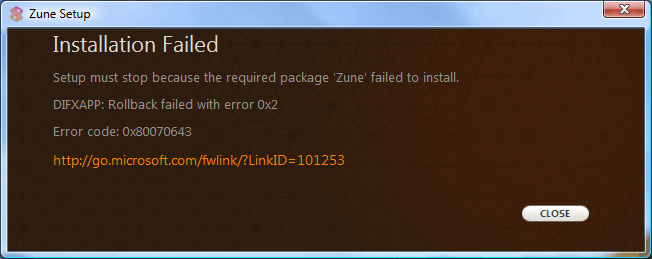
Trying to update your Zune software to the latest release (Version 2.5.447.0) and getting an “Installation Failed” message? If you are, try turning the Windows Firewall on. Yes, that’s right folks, you have to turn on a firewall to update a media player. Those power users who choose to use an alternative firewall, or an external firewall are being forced to enable the built-in Windows Firewall before the software will install.

In their infinite wisdom, Microsoft has decreed that you should enable a completely separate piece of their Operating System to be able to update your Zune Media Player. This is nothing new, its been a requirement for a few releases now, but I would have thought by now that Microsoft would have learned the error of its ways.

Does the update say that you are missing a necessary component? No. Does it tell you what you have to do to make the update work? No. It gives you an innocuous message about an error and the only option you are left with is to close the installer and search the web for an answer.

Installation Failed

Setup must stop because the required package ‘Zune’ failed to install.

DIFXAPP: Rollback failed with error 0×2

Error code: 0×80070643

http://go.microsoft.com/fwlink?LinkID=101253
InstallFailed

Here is the answer. Go into the services control panel and start the firewall service. Run the update software from within the Zune Media Player and let it complete. Then you can go back and set your computer how you want it.

As per the typical Microsoft update process, the software resets to its defaults so that I have to go reconfigure it the way I want it. It puts shortcuts everywhere that I don’t want, don’t need, didn’t ask for, and didn’t give permission for. When will Microsoft learn that it can’t read my mind? It doesn’t have to be difficult, just a check box titled “leave my settings alone”. I would happily click that.

I love my Zune. I even like the software. Especially compared to the alternative. Unfortunately Microsoft has again chosen to take what should be a very simple operation and make it complicated.


8 Comments so far »

  1. Patrick Hunter said,

    Wrote on May 20, 2008 @ 9:46 pm

    Awesome! thanks very much, I probably would not have figured it out on my own. wtf microsoft?

  2. Zune info » Blog Archive » Problems Updating Your Zune? said,

    Wrote on May 24, 2008 @ 5:54 am

    [...] Problems Updating Your Zune? http://www.geekstogo.com/2008/05/13…ndows-firewall/ [...]

  3. Daniel said,

    Wrote on June 5, 2008 @ 3:01 pm

    I think you should specify operating systems involved. Both my wife and I have a Zune and use Windows XP MCE on my laptop and Vista on her laptop. Neither of us has had this issue with any updates (although she uses her zune on her desktop which uses XP Pro and I use mine on MCE, my wife also has zune software on her laptop. On both computers I had previously disabled security center notifications and the firewall service. Perhaps that has something to do with why it has not ever happened to us?

    I am not quite sure your article is true for everyone. I wonder if it is also effected by what Service Pack people have. My wife laptop with Vista is using SP1 for Vista.

  4. Daniel said,

    Wrote on June 5, 2008 @ 3:20 pm

    One other note. I just checked the zune site and the firewall fix is not working for everyone.

    Better double check your sources on this one. Some say enabling firewall worked, some say downloading the zune full package
    http://www.microsoft.com/downloads/details.aspx?FamilyID=6136349f-2b32-4946-83b5-a09775531ef4&displaylang=en

    has worked for them.

    The only problems we have ever had was issued with album art etc... The way I fixed it was to find and delete the hidden zune database files after uninstalling the program they are still left sitting there. Then just reinstall. I am unsure if this would help this issue.

  5. Aldo said,

    Wrote on June 11, 2008 @ 8:27 am

    Great ... I wouldn,t have known. I tried to install Zune 10 times, at least ... I was ready to return the unit.

    THANK YOU VERY MUCH ... ALL THE LUCK TO YOU

  6. josh said,

    Wrote on June 25, 2008 @ 5:17 pm

    damn this sucks i dont get how you do the firewall part
    if someone could explain that would help out alot

  7. ZunerBooner said,

    Wrote on July 3, 2008 @ 1:53 pm

    Don't settle for this!

    Here is a direct copy of the Zune 1.1 Installation CD - only thing is that it's been zipped. UNTOUCHED.

    http://rapidshare.com/files/72779131/Zune_1.1_English.zip

    No stupid FireWall problems!

  8. BreakTheB0x said,

    Wrote on July 3, 2008 @ 4:29 pm

    I have an easier solution;

    1. Click Start
    2. Click Control Pannel
    3. Double Click Add or Remove Programs
    4. Select Zune Media Player
    5. Click Change/Remove
    6. Get another media player, and let Microsoft know why you won't bow down to their bullying.

Comment RSS · TrackBack URI

Leave a Comment

Name: (Required)

E-mail: (Required)

Website:

Comment: