Need a geek? Geeks to Go offers free, quality tech support -- in terms anyone can understand. Volunteers are waiting to help, friendly, technology experts who have knowledge to share, and enjoy helping others. Feel free to browse the site as a guest. However, you must log in to reply to existing topics, or to start a new topic. Other benefits of joining include richer forum features, and removal of all advertising. Learn more in our Welcome Guide Infected? Malware and Spyware Cleaning Guide. What are you waiting for? Click here to join for free today!
   
 
Reply to this topicStart new topic
How to Remove WinAntiSpyware 2007 (removal instructions)
admin
post Sep 22 2007, 04:26 AM
Post #1


Site Administrator
Group Icon
Posts: 18,684
From: 127.0.0.1
OS: Windows 7 64-bit RTM
MVP


How-to remove WinAntiSpyware 2007 (removal instructions)


WinAntiSpyware 2007 is a rogue anti-spyware application that uses scareware tactics. It gives the appearance of scanning and detecting spyware, and then attempts to deceive by presenting false, misleading scan results and/or pestering users into purchasing the program using intrusive, deceptive warnings.

WinAntiSpyWare 2007:
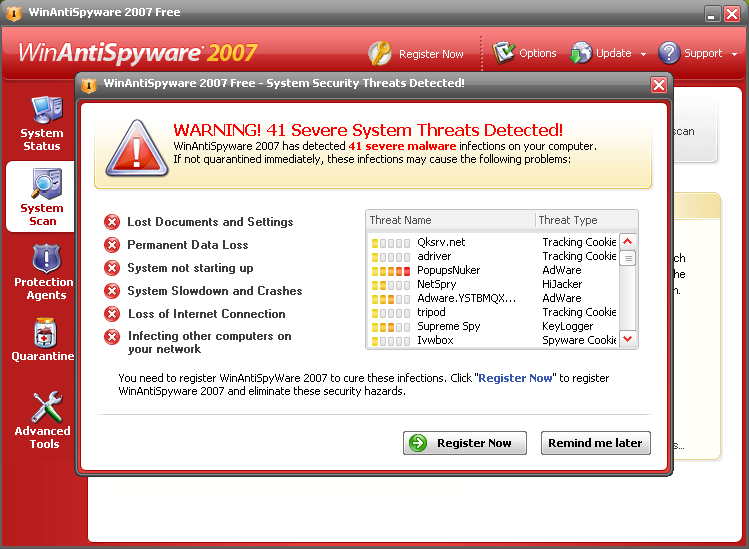

Credit: Atribune

Please download VundoFix.exe to your desktop
  • Double-click VundoFix.exe to run it.
  • Click the Scan for Vundo button.
  • Once it's done scanning, click the Remove Vundo button.
  • You will receive a prompt asking if you want to remove the files, click YES
  • Once you click yes, your desktop will go blank as it starts removing Vundo.
  • When completed, it will prompt that it will reboot your computer, click OK.
  • Please post the contents of C:\vundofix.txt and a new HiJackThis log in a reply to this thread.
Note: It is possible that VundoFix encountered a file it could not remove. In this case, VundoFix will run on reboot, simply follow the above instructions starting from "Click the Scan for Vundo button" when VundoFix appears upon rebooting.

If the WinAntiSpyware infection is still present, please post the contents of C:\vundofix.txt and a HiJackThis log in the Malware Removal Forum.

Have you've found the VundoFix removal tool useful? Please consider a donation to the author: Atribune.org.

WinAntiSpyware Alternate fix: (use only if the above fix didn't work)
1) Download VirtumundoBegone
2) Save VirtumundoBeGone.exe to your desktop.
3) Run VirtumundoBeGone.exe and follow the instructions. Do not worry if you see a BLUE SCREEN "Fatal Error" Message, this is normal and expected.
4) When it has finished, reboot.

It will create a log on your desktop called VBG.TXT, if the infection is still present, post this log and a HiJackThis log in the Malware Removal Forum.

=====================================================================
Are you still having problems with WinAntiSpyware 2007, or other malware on your system? Please start a new topic in our Malware Removal Forum, after following these instructions.

Other Sources:
WinAntiSpyware @ StopBadware.org | WinAntiSpyware @ Sunbelt Research
Go to the top of the page
 
+Quote Post
waiwai
post Mar 1 2008, 05:39 PM
Post #2


Member
**
Posts: 41
OS: windows xp


Hi

I've downloaded the VundoFix, after, i double clicked on it and wanted to run it, it didnt work
same with, HijackThis, and "some" programs that i saved on my desktop

This post has been edited by waiwai: Mar 1 2008, 06:55 PM
Go to the top of the page
 
+Quote Post
Essexboy
post Mar 2 2008, 07:58 AM
Post #3


GeekU Moderator
Group Icon
Posts: 18,760
From: Darkest Cornwall
OS: Vista Ultimate & Windows 7


Hi there

Please follow all of the steps in this section of the Malware Forum. These self-help tools will help you clean up 70% of problems on your own. If you are still having problems after doing the steps, then please post a HiJackThis Log in the Malware Forum. If you are unable to run and/or post a HJT log, then post that in your initial post in the topic you create in that forum. Should you post in that forum please do not respond to your own topic. Our Malware Staff look for topics to help out in that have no responses. The Malware Forum is very busy with many more requests for help than we have volunteer helpers, so please be patient. If you have not had a response to a topic after 3 days then please go to the Waiting Room and read the pinned topic for instructions.

Go to the top of the page
 
+Quote Post
metaphorical_bli...
post Jun 10 2008, 06:51 AM
Post #4


Member
**
Posts: 13
From: DC's Arms
OS: windows xp


hello!

this winantispyware 2007 looked almost the same with what I am infected right now-- it says its an Antivirus2008 and it scans my laptop almost every hour and then it suddenly pops out a list of trojans that it detected; and kept reminding me to purchase the program!

i have used the programs recommended below- the Vundofix.exe. After scanning, it says, NO INFECTIONS FOUND. I looked at the Antivirus2008 icon and its still there in my desktop.

im not sure if i still need to post in the HJT forum, since i didnt have any problems doing the steps.. And it says i am not infected.. I just wonder how I can be able to remove this Antivirus2008 icon lookaround.gif
Go to the top of the page
 
+Quote Post
Rorschach112
post Jun 10 2008, 06:58 AM
Post #5


GeekU Teacher
Group Icon
Posts: 34,358
From: Dublin
OS: XP


You will need to head over to the Malware Removal forum

Sounds like there are some remains left over
Go to the top of the page
 
+Quote Post
metaphorical_bli...
post Jun 10 2008, 07:04 AM
Post #6


Member
**
Posts: 13
From: DC's Arms
OS: windows xp


QUOTE (Rorschach112 @ Jun 10 2008, 08:58 PM) *
You will need to head over to the Malware Removal forum

Sounds like there are some remains left over


Thank you! smile.gif I'm headed there now
Go to the top of the page
 
+Quote Post
metaphorical_bli...
post Jun 10 2008, 07:31 AM
Post #7


Member
**
Posts: 13
From: DC's Arms
OS: windows xp


WoooooHooo! Its gone!!!

I followed the malware cleaning guide and at step one, using MALWAREBYTES' ANTI-MALWARE, it totally slaughtered the culprits!

Yay! Thanks to everyone for putting up an amazingly helpful website...

Godbless all Geeks! thumbsup.gif
Go to the top of the page
 
+Quote Post
Rorschach112
post Jun 10 2008, 05:16 PM
Post #8


GeekU Teacher
Group Icon
Posts: 34,358
From: Dublin
OS: XP


Malware Bytes is a very good spyware remover smile.gif

Glad your problem got fixed
Go to the top of the page
 
+Quote Post
extrasolid
post Jun 23 2008, 01:02 PM
Post #9


New Member
*
Posts: 1
OS: xp


i have a serious problem, i was attacked by winspyware and i can't see any of my hard drives or access the task mangager,
what can i do?
Go to the top of the page
 
+Quote Post
Thunderbird1988
post Jun 23 2008, 02:20 PM
Post #10


Trusted Helper
Group Icon
Posts: 1,844
From: The Netherlands
OS: Windows XP/Vista Dualboot


Hello,

Please follow all of the steps in this section of the Malware Forum. These self-help tools will help you clean up 70% of problems on your own. If you are still having problems after doing the steps, then please post a HiJackThis Log in the Malware Forum. If you are unable to run and/or post a HJT log, then post that in your initial post in the topic you create in that forum. Should you post in that forum please do not respond to your own topic. Our Malware Staff look for topics to help out in that have no responses. The Malware Forum is very busy with many more requests for help than we have volunteer helpers, so please be patient. If you have not had a response to a topic after 3 days then please go to the Waiting Room and read the pinned topic for instructions.

Thunderbird1988
Go to the top of the page
 
+Quote Post
nd3457
post Jul 9 2008, 03:34 AM
Post #11


New Member
*
Posts: 7
OS: XP


My PC was infected by WinAntiSpyware 2007I last weekend. But I manage to cleaned my PC from this Spyware by following the advise which I found in this forum. Therefore I would like to express my gratitude to you for your wonderful advice.

Once again, Thank You very much.
Go to the top of the page
 
+Quote Post
Rorschach112
post Jul 9 2008, 07:43 AM
Post #12


GeekU Teacher
Group Icon
Posts: 34,358
From: Dublin
OS: XP


Thank you for letting us know it worked for you

Glad we could help
Go to the top of the page
 
+Quote Post
Feifong
post Aug 10 2008, 06:17 PM
Post #13


Member
**
Posts: 21
OS: xp pro


I'm having somewhat the same problem with Anti-virus XP 2008. I went to a site that ask for me to update wmcodec, thinking of it as just a basic media update I thought nothing of it. After downloading wincodec.exe It immediately installed fAnti-virus XP 2008. I have NOD 32 and it detected the trojan immediately. However something seemed to bypass NOD and allowed for the program to download. The anti-virus xp 2008 says that I have 563 infected virus/trojans. On the flip side the trojan that has been found by NOD32 reads as follows...

"C:\\Win32/TrojanDownloader.FakeAlert.DJ trojan"

The file that brought this about is wmcodec_update.exe

I don't think this is a paralyzing virus opposed to just being a nuisance.

I would really appreciate any insight or solution that could be brought about to this problem.

-Thank you

-T

This post has been edited by Feifong: Aug 10 2008, 06:24 PM
Go to the top of the page
 
+Quote Post
Rorschach112
post Aug 10 2008, 06:30 PM
Post #14


GeekU Teacher
Group Icon
Posts: 34,358
From: Dublin
OS: XP


Head over to the malware removal forum, read the sticky threads and follow the steps there
Go to the top of the page
 
+Quote Post

Reply to this topicStart new topic
1 User(s) are reading this topic (1 Guests and 0 Anonymous Users)
0 Members:


RSS Time is now: 7th November 2009 - 04:00 PM

Advertisements do not imply our endorsement of that product or service. The forum is run by volunteers who donate their time and expertise. We make every attempt to ensure that the help and advice posted is accurate and will not cause harm to your computer. However, we do not guarantee that they are accurate and they are to be used at your own risk. All trademarks mentioned on this page are the property of their respective owners.

© Geeks to Go, Inc. | All Rights Reserved | Privacy Policy | Advertising