Need a geek? Geeks to Go offers free, quality tech support -- in terms anyone can understand. Volunteers are waiting to help, friendly, technology experts who have knowledge to share, and enjoy helping others. Feel free to browse the site as a guest. However, you must log in to reply to existing topics, or to start a new topic. Other benefits of joining include richer forum features, and removal of all advertising. Learn more in our Welcome Guide Infected? Malware and Spyware Cleaning Guide. What are you waiting for? Click here to join for free today!
   
2 Pages V   1 2 >  
Reply to this topicStart new topic
How to remove Spyware Protect 2009
admin
post Apr 10 2009, 12:56 AM
Post #1


Site Administrator
Group Icon
Posts: 18,684
From: 127.0.0.1
OS: Windows 7 64-bit RTM
MVP


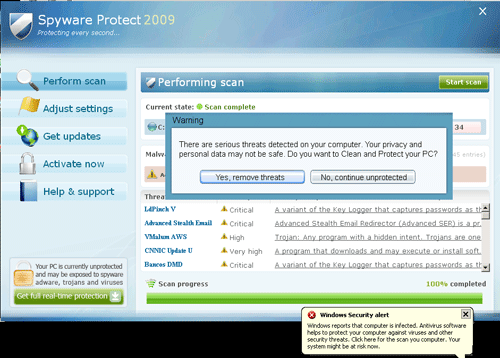
Spyware Protect 2009 is fake security software that's goal is to make you purchase the program in order to remove the "infections" it detects. These Spyware Protect 2009 fake error messages can be in the system bar, browser, popup. Don't buy Spyware Protect 2009! Remove Spyware Protect 2009! This infection is often the result of Downad.KK/Conficker.C

Attached Image


To remove Spyware Protect 2009, please download Malwarebytes' Anti-Malware from Here.

Double Click mbam-setup.exe to install the application.
  • Make sure a checkmark is placed next to Update Malwarebytes' Anti-Malware and Launch Malwarebytes' Anti-Malware, then click Finish.
  • If an update is found, it will download and install the latest version.
  • Once the program has loaded, select "Perform Quick Scan", then click Scan.
  • The scan may take some time to finish,so please be patient.
  • When the scan is complete, click OK, then Show Results to view the results.
  • Make sure that everything is checked, and click Remove Selected.
  • When Spyware Protect 2009 disinfection is completed, a log will open in Notepad and you may be prompted to Restart.(See Extra Note)

Extra Note:
If MBAM encounters a file that is difficult to remove,you will be presented with 1 of 2 prompts,click OK to either and let MBAM proceed with the disinfection process,if asked to restart the computer,please do so immediatly.

=====================================================================
This is a self-help guide. Use at your own risk.

Important Note: If you need assistance with Spyware Protect 2009 removal, please start a new topic in our Malware Removal Forum.
Go to the top of the page
 
+Quote Post
mkau
post Apr 12 2009, 07:15 PM
Post #2


Geek in Training
**
Posts: 77
OS: XP SP3/XP Media Center SP2


I actually just saw someone post about this on the general discussion section of a forum I frequent. I sent them here.
Go to the top of the page
 
+Quote Post
Ldymouse
post Apr 13 2009, 09:58 AM
Post #3


Member
**
Posts: 28
OS: xp1


Ive been using this site for 4 years at least.. THIS WORKS guys!! had this lil bugger thankfully its gone now and lordy this program found vundo and a bunch of others that i have had before that wreaked havoc......!! this was such an easy fix and wonderful!! Just wanted to thank you guys for all your hard work..... you guys deserve a REWARD!!!

Hugs,
Ldymouse
Go to the top of the page
 
+Quote Post
tbuns
post Apr 14 2009, 05:20 PM
Post #4


New Member
*
Posts: 1
OS: Windows XP, Ubuntu


Hello - My bosses system got this only today. I had the hard drive taken to be fixed. Had I been able to see this, maybe we'd be saving some frustration, time and $.

The biggest problem that I had was that this bug can and WILL hijack your browser, as it did ours. Unfortunately, my boss(s) only like to use IE - they have only very basic computer literacy, so they don't always know not to click on deceptive pop-ups. As soon as it comes back in the morning, FF is going on and I am deletely IE shortcuts (they wont know where to look.)

Good to know for the future, thanks for posting!!!

*sigh
Go to the top of the page
 
+Quote Post
Suzzie
post Apr 15 2009, 06:38 PM
Post #5


New Member
*
Posts: 1
OS: XP


This does not work. The Spyware Protect 2009 disabled my Adaware and Malwarebytes' Anti-Malware. I can not even remove and re-install these software. They just DO NOT run. at the same time, I have this www.windowsclick.com problem.

I have tried A-Squired and Vipre. They did not work! Found the virus and Malware, but can not effectively remove them. My McAfee did not work either! The computer is having the same problem after re-boot.

I'm running on XP.

Please help!!!!!!
Go to the top of the page
 
+Quote Post
mkau
post Apr 15 2009, 08:30 PM
Post #6


Geek in Training
**
Posts: 77
OS: XP SP3/XP Media Center SP2


QUOTE (Suzzie @ Apr 15 2009, 08:38 PM) *
This does not work. The Spyware Protect 2009 disabled my Adaware and Malwarebytes' Anti-Malware. I can not even remove and re-install these software. They just DO NOT run. at the same time, I have this www.windowsclick.com problem.

I have tried A-Squired and Vipre. They did not work! Found the virus and Malware, but can not effectively remove them. My McAfee did not work either! The computer is having the same problem after re-boot.

I'm running on XP.

Please help!!!!!!

Please read the Malware and Spyware Cleaning guide and follow the steps there. If it doesn't work, post your logs in the malware removal and spyware removal forum. One of the trained staff members will be along to help you. I won't be, I'm still training.
EDIT: Is this allowed if I'm in GeekU? or would this be considered helping someone?

This post has been edited by mkau: Apr 15 2009, 08:30 PM
Go to the top of the page
 
+Quote Post
gmanpopinjay
post Apr 18 2009, 05:54 PM
Post #7


Member
**
Posts: 17
OS: XP


i got this yesterday while watching a youtube vid randomly sad.gif luckily i had Mbam removed it but now i noticed it blocked me from accessing Microsoft.com and updates like msn messanger and net framework can someone help me sad.gif even did a system restore which takes off all installed programs on the comp it came back but i managed to update Mbam and delete it i think... my bitdefender if blocking it also

Picture of my problem


This post has been edited by gmanpopinjay: Apr 18 2009, 06:16 PM
Go to the top of the page
 
+Quote Post
Rorschach112
post Apr 19 2009, 05:03 AM
Post #8


GeekU Teacher
Group Icon
Posts: 34,327
From: Dublin
OS: XP


Please go to the malware forum and follow the instructions at the top....Especially the CLICK HERE.

That will give you several steps that will help you clean up 70 percent of all problems by yourself. If at the end of the process you are still having difficulty--and you may not be-- then post a hijackthis log in THAT forum.
Go to the top of the page
 
+Quote Post
pingu789
post May 6 2009, 11:10 PM
Post #9


New Member
*
Posts: 1
OS: Windows XP


You can remove spywares and malwares by using different tools but no tool can remove 100% spywares .
Go to the top of the page
 
+Quote Post
roxannethescince...
post May 22 2009, 06:02 AM
Post #10


New Member
*
Posts: 2
OS: windows xp/ ubuntu


I already had antivir and Malwarebytes installed but it is blocked from starting everytime start the computer. I constantly get a pop sound every time I try to open either of these and also ATF CLeaner, the task manager and many other functions. I just purchased this computer a few weeks ago and I hardly get to use it. please help!!!
Go to the top of the page
 
+Quote Post
roxannethescince...
post May 22 2009, 06:14 AM
Post #11


New Member
*
Posts: 2
OS: windows xp/ ubuntu


YEAH NEW DISCOVERY!!!!!!
It seems that I can rightclick on files AND SCAN THEM WITH AVIRA ANTIVIR!!! I'm going to try it wish me luck
Go to the top of the page
 
+Quote Post
KUNAGUERO66
post Jun 16 2009, 10:39 AM
Post #12


Geek in Training
*
Posts: 8
OS: Windows XP


Hello, I just got this Spyware thing, and it doesnt let me open up my Malware software. Right now im in safe mode to use the internet, and i dont know what to do. I can open up MBAM in safe mode, but i cant update it in safe mode. And I cant open anything in Regular Mode. What do I need to do?
Go to the top of the page
 
+Quote Post
Essexboy
post Jun 16 2009, 11:19 AM
Post #13


GeekU Moderator
Group Icon
Posts: 18,727
From: Darkest Cornwall
OS: Vista Ultimate & Windows 7


Please post an OTL log in the Malware Forum
Go to the top of the page
 
+Quote Post
Roman Pope
post Jun 22 2009, 11:25 PM
Post #14


Geek in Training
***
Posts: 103
From: Canada
OS: Windows XP, SP2


Hm... Safe Mode? It got me thinking:
I was wondering if it would be a good or a really bad idea to open Safe Mode with Network Support and update MBAM there. Perhaps download/update some other software removing tools as well. Is SUPERAntiSpyware any good? What about Spyware Terminator and Ad-Aware? Will it make an "initial" scan to get things moving a little bit...
A lot of sites and people don't recommend to do scans in Safe Mode; I was just wondering why.

PS I also heard that sometimes we should rename the setup files in order to fool the viruses? Is it a ridiculous advice?

This post has been edited by Roman Pope: Jun 22 2009, 11:28 PM
Go to the top of the page
 
+Quote Post
Rorschach112
post Jun 23 2009, 04:52 AM
Post #15


GeekU Teacher
Group Icon
Posts: 34,327
From: Dublin
OS: XP


Yes that would be a bad idea because you are running online completely unprotected. We do not recommend that at all

SAS is good, Spyware Terminator I am not a fan as it was once a rogue, and Ad-Aware is getting out-dated.


MBAM doesn't need to be run in safe mode as its better in normal mode. Some scans though are better in safe mode.


QUOTE
PS I also heard that sometimes we should rename the setup files in order to fool the viruses? Is it a ridiculous advice?

Nope we do this in the Malware Removal forum. You need to against some rootkits to get programs to run
Go to the top of the page
 
+Quote Post

2 Pages V   1 2 >
Reply to this topicStart new topic
1 User(s) are reading this topic (1 Guests and 0 Anonymous Users)
0 Members:


Collapse

> Similar Topics

    Topic Title Replies / Views Topic Information
No New Posts   3 / 1,008 3rd January 2005 - 03:12 AM
dhnish started - last by dhnish
No New Posts   0 / 1,242 16th July 2006 - 12:53 AM
robgee76 started - last by robgee76
No New Posts   0 / 2,930 27th July 2008 - 06:19 PM
charlieminxs started - last by charlieminxs
No New Posts   10 / 18,013 15th January 2009 - 09:36 AM
eddielok started - last by Rorschach112

RSS Time is now: 7th November 2009 - 01:08 PM

Advertisements do not imply our endorsement of that product or service. The forum is run by volunteers who donate their time and expertise. We make every attempt to ensure that the help and advice posted is accurate and will not cause harm to your computer. However, we do not guarantee that they are accurate and they are to be used at your own risk. All trademarks mentioned on this page are the property of their respective owners.

© Geeks to Go, Inc. | All Rights Reserved | Privacy Policy | Advertising