I don't know what this is? [RESOLVED], Google doesn't work, results are redirected. |
![]() ![]() |
I don't know what this is? [RESOLVED], Google doesn't work, results are redirected. |
Nov 13 2008, 07:00 PM
Post
#1
|
|
|
Member ![]() ![]() Posts: 36 OS: XP |
So i somehow contracted this virus thing, where basically i can still use the internet, but everything is funky.
First, my google doesn't function properly, everytime i search something, all my results are redirected to some ad site, so i end up having to copy paste the address into the address bar. Also, many computer help sites, like this one, are completely blocked, so i can't go to them. Second, all of my programs somehow got blocked to my internet access. Programs such as 2Wire Monitor [for my DSL], desktop weather [from weather.com], age of mythology [a game] just do not connect, and there's a network connection error in the system tray, but i can still go on the internet. Also, i don't know why, but for some reason, my AIM [aol instant messanger] can function fine. I have done scan after scan with -spybot s & d -superantispyware -a-squared -ad-aware -advanced window care v2 but they all come up as clean. i use a-squared anti-hijacker to view all the processes, and they all seem to be fine ...ok so it won't let me save a copy of the processes, but i think trend micro's hijackthis does it anyways, so here's the hijackthis log Logfile of Trend Micro HijackThis v2.0.2 Scan saved at 7:55:04 PM, on 11/13/2008 Platform: Windows XP SP2 (WinNT 5.01.2600) MSIE: Internet Explorer v6.00 SP2 (6.00.2900.2180) Boot mode: Normal Running processes: C:\WINDOWS\System32\smss.exe C:\WINDOWS\system32\winlogon.exe C:\WINDOWS\system32\services.exe C:\WINDOWS\system32\lsass.exe C:\WINDOWS\system32\Ati2evxx.exe C:\WINDOWS\system32\svchost.exe C:\WINDOWS\System32\svchost.exe C:\Program Files\Lavasoft\Ad-Aware\aawservice.exe C:\WINDOWS\system32\Ati2evxx.exe C:\WINDOWS\Explorer.EXE C:\WINDOWS\system32\spoolsv.exe C:\Program Files\a-squared Free\a2service.exe C:\Program Files\Common Files\Apple\Mobile Device Support\bin\AppleMobileDeviceService.exe C:\Program Files\Bonjour\mDNSResponder.exe C:\Program Files\COMODO\COMODO Internet Security\cmdagent.exe C:\Program Files\Common Files\Microsoft Shared\VS7DEBUG\MDM.EXE C:\WINDOWS\system32\HPZipm12.exe C:\WINDOWS\system32\svchost.exe C:\Program Files\Viewpoint\Common\ViewpointService.exe C:\Program Files\2Wire\2PortalMon.exe C:\Program Files\COMODO\COMODO Internet Security\cfp.exe C:\Program Files\The Weather Channel FW\Desktop\DesktopWeather.exe C:\Program Files\Spybot - Search & Destroy\TeaTimer.exe C:\WINDOWS\system32\wuauclt.exe C:\Program Files\Trend Micro\HijackThis\HijackThis.exe R1 - HKCU\Software\Microsoft\Internet Explorer\Main,Default_Page_URL = http://ie.redirect.hp.com/svs/rdr?TYPE=3&a...arm1=seconduser R1 - HKCU\Software\Microsoft\Internet Explorer\Main,Default_Search_URL = http://ie.redirect.hp.com/svs/rdr?TYPE=3&a...arm1=seconduser R1 - HKLM\Software\Microsoft\Internet Explorer\Main,Default_Page_URL = http://ie.redirect.hp.com/svs/rdr?TYPE=3&a...arm1=seconduser R1 - HKLM\Software\Microsoft\Internet Explorer\Main,Default_Search_URL = http://ie.redirect.hp.com/svs/rdr?TYPE=3&a...arm1=seconduser R1 - HKLM\Software\Microsoft\Internet Explorer\Main,Search Bar = http://ie.redirect.hp.com/svs/rdr?TYPE=3&a...arm1=seconduser R1 - HKLM\Software\Microsoft\Internet Explorer\Main,Search Page = http://ie.redirect.hp.com/svs/rdr?TYPE=3&a...arm1=seconduser R0 - HKLM\Software\Microsoft\Internet Explorer\Main,Start Page = http://ie.redirect.hp.com/svs/rdr?TYPE=3&a...arm1=seconduser R0 - HKLM\Software\Microsoft\Internet Explorer\Search,SearchAssistant = http://ie.redirect.hp.com/svs/rdr?TYPE=3&a...arm1=seconduser R1 - HKCU\Software\Microsoft\Windows\CurrentVersion\Internet Settings,ProxyOverride = *.local O2 - BHO: AcroIEHlprObj Class - {06849E9F-C8D7-4D59-B87D-784B7D6BE0B3} - C:\Program Files\Adobe\Acrobat 7.0\ActiveX\AcroIEHelper.dll O2 - BHO: Spybot-S&D IE Protection - {53707962-6F74-2D53-2644-206D7942484F} - C:\PROGRA~1\SPYBOT~1\SDHelper.dll O2 - BHO: (no name) - {67AE599E-FAAA-4567-AD41-5B3038582737} - C:\WINDOWS\system32\comre.dll O2 - BHO: SSVHelper Class - {761497BB-D6F0-462C-B6EB-D4DAF1D92D43} - C:\Program Files\Java\jre1.6.0_07\bin\ssv.dll O2 - BHO: (no name) - {AA58ED58-01DD-4d91-8333-CF10577473F7} - (no file) O2 - BHO: (no name) - {AF69DE43-7D58-4638-B6FA-CE66B5AD205D} - (no file) O4 - HKLM\..\Run: [2wSysTray] C:\Program Files\2Wire\2PortalMon.exe O4 - HKLM\..\Run: [COMODO Internet Security] "C:\Program Files\COMODO\COMODO Internet Security\cfp.exe" -h O4 - HKCU\..\Run: [DW6] "C:\Program Files\The Weather Channel FW\Desktop\DesktopWeather.exe" O4 - HKCU\..\Run: [SpybotSD TeaTimer] C:\Program Files\Spybot - Search & Destroy\TeaTimer.exe O8 - Extra context menu item: E&xport to Microsoft Excel - res://C:\PROGRA~1\MI1933~1\OFFICE11\EXCEL.EXE/3000 O9 - Extra button: (no name) - {08B0E5C0-4FCB-11CF-AAA5-00401C608501} - C:\Program Files\Java\jre1.6.0_07\bin\ssv.dll O9 - Extra 'Tools' menuitem: Sun Java Console - {08B0E5C0-4FCB-11CF-AAA5-00401C608501} - C:\Program Files\Java\jre1.6.0_07\bin\ssv.dll O9 - Extra button: Research - {92780B25-18CC-41C8-B9BE-3C9C571A8263} - C:\PROGRA~1\MI1933~1\OFFICE11\REFIEBAR.DLL O9 - Extra button: (no name) - {DFB852A3-47F8-48C4-A200-58CAB36FD2A2} - C:\PROGRA~1\SPYBOT~1\SDHelper.dll O9 - Extra 'Tools' menuitem: Spybot - Search & Destroy Configuration - {DFB852A3-47F8-48C4-A200-58CAB36FD2A2} - C:\PROGRA~1\SPYBOT~1\SDHelper.dll O9 - Extra button: Connection Help - {E2D4D26B-0180-43a4-B05F-462D6D54C789} - C:\WINDOWS\PCHEALTH\HELPCTR\Vendors\CN=Hewlett-Packard,L=Cupertino,S=Ca,C=US\IEButton\support.htm O9 - Extra 'Tools' menuitem: Connection Help - {E2D4D26B-0180-43a4-B05F-462D6D54C789} - C:\WINDOWS\PCHEALTH\HELPCTR\Vendors\CN=Hewlett-Packard,L=Cupertino,S=Ca,C=US\IEButton\support.htm O9 - Extra button: Messenger - {FB5F1910-F110-11d2-BB9E-00C04F795683} - C:\Program Files\Messenger\msmsgs.exe O9 - Extra 'Tools' menuitem: Windows Messenger - {FB5F1910-F110-11d2-BB9E-00C04F795683} - C:\Program Files\Messenger\msmsgs.exe O16 - DPF: {30528230-99f7-4bb4-88d8-fa1d4f56a2ab} (Installation Support) - C:\Program Files\Yahoo!\Common\Yinsthelper.dll O20 - AppInit_DLLs: C:\WINDOWS\system32\guard32.dll O23 - Service: a-squared Free Service (a2free) - Emsi Software GmbH - C:\Program Files\a-squared Free\a2service.exe O23 - Service: Lavasoft Ad-Aware Service (aawservice) - Lavasoft - C:\Program Files\Lavasoft\Ad-Aware\aawservice.exe O23 - Service: Apple Mobile Device - Apple Inc. - C:\Program Files\Common Files\Apple\Mobile Device Support\bin\AppleMobileDeviceService.exe O23 - Service: Ati HotKey Poller - ATI Technologies Inc. - C:\WINDOWS\system32\Ati2evxx.exe O23 - Service: Bonjour Service - Apple Inc. - C:\Program Files\Bonjour\mDNSResponder.exe O23 - Service: COMODO Internet Security Helper Service (cmdAgent) - Unknown owner - C:\Program Files\COMODO\COMODO Internet Security\cmdagent.exe O23 - Service: getPlus® Helper - NOS Microsystems Ltd. - C:\Program Files\NOS\bin\getPlus_HelperSvc.exe O23 - Service: InstallDriver Table Manager (IDriverT) - Macrovision Corporation - C:\Program Files\Common Files\InstallShield\Driver\1050\Intel 32\IDriverT.exe O23 - Service: iPod Service - Apple Inc. - C:\Program Files\iPod\bin\iPodService.exe O23 - Service: Pml Driver HPZ12 - HP - C:\WINDOWS\system32\HPZipm12.exe O23 - Service: Viewpoint Manager Service - Viewpoint Corporation - C:\Program Files\Viewpoint\Common\ViewpointService.exe -- End of file - 6671 bytes I honestly can barely interperet this.. so yeah, can anyone please tell me what's wrong? besides that, i have a few more questions [sorry -Can viruses go into flash drives? If i plugged my flash drive into my computer with the virus, would it contract the virus? -What is "Viewpoint?" I've seen this program floating around every so often, and i have no clue what it is -Same with Python 2.2 -Same with Bonjour Anyways, i know i've got quite a few problems, but thanks for reading -Matt |
|
|
Nov 13 2008, 07:23 PM
Post
#2
|
|
![]() GeekU Teacher Posts: 41,926 From: Dublin OS: XP |
Hello
Download ComboFix from one of these locations: Link 1 Link 2 Link 3 * IMPORTANT !!! Save ComboFix.exe to your Desktop
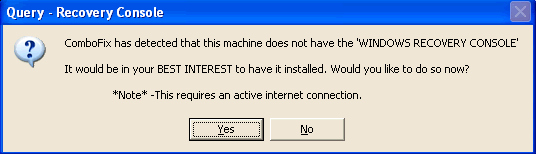
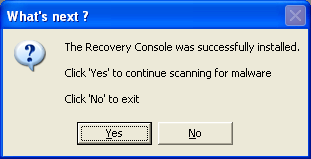
**Please note: If the Microsoft Windows Recovery Console is already installed, ComboFix will continue it's malware removal procedures. ![]() Once the Microsoft Windows Recovery Console is installed using ComboFix, you should see the following message: ![]() Click on Yes, to continue scanning for malware. When finished, it shall produce a log for you. Please include the C:\ComboFix.txt in your next reply. |
|
|
Nov 13 2008, 07:51 PM
Post
#3
|
|
|
Member ![]() ![]() Posts: 36 OS: XP |
ok finally
ComboFix 08-11-12.01 - Compaq_Owner 2008-11-13 20:36:49.1 - NTFSx86 Microsoft Windows XP Home Edition 5.1.2600.2.1252.1.1033.18.167 [GMT -5:00] . ((((((((((((((((((((((((((((((((((((((( Other Deletions ))))))))))))))))))))))))))))))))))))))))))))))))) . c:\program files\yahoo!\assist~1 c:\program files\yahoo!\assist~1\Assist\yuninst.dll.1.log c:\windows\BM2300617d.txt c:\windows\BM2300617d.xml c:\windows\cdmxtras c:\windows\cookies.ini c:\windows\Downloaded Program Files\setup.inf c:\windows\system32\comre.dll c:\windows\system32\drivers\TDSSpqxt.sys c:\windows\system32\Drivers\TDSSpxoe.sys c:\windows\system32\TDSScfgb.dll c:\windows\system32\TDSSfpmp.dll c:\windows\system32\TDSSirxy.dll c:\windows\system32\TDSSliqp.dll c:\windows\system32\TDSSmupe.dat c:\windows\system32\TDSSncun.dll c:\windows\system32\TDSSnmxh.log c:\windows\system32\TDSSnrse.dll c:\windows\system32\TDSSoeqh.dll c:\windows\system32\TDSSosvn.dat c:\windows\system32\TDSSotpa.dll c:\windows\system32\TDSSqqyk.dll c:\windows\system32\TDSSsbhc.dll c:\windows\system32\TDSSthym.log c:\windows\system32\TDSStkdv.log c:\windows\system32\TDSSwghd.log c:\windows\system32\TDSSyavu.dll D:\Autorun.inf . ((((((((((((((((((((((((((((((((((((((( Drivers/Services ))))))))))))))))))))))))))))))))))))))))))))))))) . -------\Service_TDSSSERV.SYS -------\Legacy_TDSSSERV.SYS ((((((((((((((((((((((((( Files Created from 2008-10-14 to 2008-11-14 ))))))))))))))))))))))))))))))) . 2008-11-12 22:39 . 2008-11-12 22:39 <DIR> d-------- c:\program files\SpywareBlaster 2008-11-12 22:37 . 2008-11-12 22:37 <DIR> d-------- c:\program files\VS Revo Group 2008-11-12 22:19 . 2008-11-12 22:19 <DIR> d-------- c:\documents and settings\Compaq_Owner\Application Data\Comodo 2008-11-12 19:15 . 2008-11-12 19:15 <DIR> d-------- c:\program files\COMODO 2008-11-12 19:15 . 2008-11-12 22:12 <DIR> d-------- c:\documents and settings\All Users\Application Data\comodo 2008-11-12 19:15 . 2008-11-12 19:15 143,096 --a------ c:\windows\system32\guard32.dll 2008-11-12 19:15 . 2008-11-12 19:15 99,856 --a------ c:\windows\system32\drivers\cmdguard.sys 2008-11-12 19:15 . 2008-11-12 19:15 31,504 --a------ c:\windows\system32\drivers\cmdhlp.sys 2008-11-12 19:10 . 2008-11-12 19:10 <DIR> d-------- c:\program files\IObit 2008-11-12 18:00 . 2008-11-12 18:00 <DIR> d-------- c:\program files\Lavasoft 2008-11-12 18:00 . 2008-11-12 18:01 <DIR> d-------- c:\documents and settings\All Users\Application Data\Lavasoft 2008-11-12 17:45 . 2008-11-12 17:45 <DIR> d-------- C:\!KillBox 2008-11-12 17:27 . 2008-11-12 17:27 <DIR> d-------- c:\program files\Trend Micro 2008-11-11 22:20 . 2008-11-11 22:20 <DIR> d-------- c:\program files\a-squared HiJackFree 2008-11-09 18:14 . 2008-11-09 19:57 <DIR> d-------- c:\program files\a-squared Free 2008-11-09 12:09 . 2005-08-30 19:18 <DIR> d-------- c:\documents and settings\Administrator.MAO\WINDOWS 2008-11-09 12:09 . 2005-08-30 19:36 <DIR> d-------- c:\documents and settings\Administrator.MAO\Application Data\Symantec 2008-11-09 12:09 . 2005-08-30 19:22 <DIR> d-------- c:\documents and settings\Administrator.MAO\Application Data\SampleView 2008-11-09 12:09 . 2005-08-30 19:20 <DIR> d-------- c:\documents and settings\Administrator.MAO\Application Data\Intuit 2008-11-09 12:09 . 2005-08-30 19:17 <DIR> d-------- c:\documents and settings\Administrator.MAO\Application Data\Apple Computer 2008-11-09 12:09 . 2008-11-09 12:09 <DIR> d-------- c:\documents and settings\Administrator.MAO 2008-10-25 21:23 . 2008-11-01 10:01 <DIR> d-------- c:\documents and settings\Compaq_Owner\.fontconfig 2008-10-25 21:21 . 2008-10-25 21:22 <DIR> d-------- c:\program files\LilyPond 2008-10-25 21:04 . 2008-10-25 21:14 <DIR> d-------- c:\documents and settings\Compaq_Owner\.gimp-2.4 2008-10-21 21:06 . 2008-10-21 21:06 <DIR> d-------- c:\program files\NOS 2008-10-14 19:23 . 2008-10-14 19:23 <DIR> d-------- c:\program files\Viewpoint 2008-10-14 19:23 . 2008-10-14 19:23 <DIR> d-------- c:\documents and settings\All Users\Application Data\acccore . (((((((((((((((((((((((((((((((((((((((( Find3M Report )))))))))))))))))))))))))))))))))))))))))))))))))))) . 2008-11-14 01:37 --------- d-----w c:\program files\Yahoo! 2008-11-12 22:59 --------- d-----w c:\program files\Common Files\Wise Installation Wizard 2008-11-09 17:33 --------- d-----w c:\documents and settings\Compaq_Owner\Application Data\LimeWire 2008-11-09 17:33 --------- d-----w c:\documents and settings\Compaq_Owner\Application Data\GameHouse 2008-10-26 02:06 --------- d-----w c:\documents and settings\Compaq_Owner\Application Data\gtk-2.0 2008-10-22 02:28 --------- d-----w c:\documents and settings\All Users\Application Data\NOS 2008-10-15 00:24 --------- d-----w c:\program files\AIM6 2008-10-15 00:23 --------- d-----w c:\documents and settings\All Users\Application Data\Viewpoint 2008-10-15 00:22 --------- d-----w c:\program files\Common Files\AOL 2008-10-10 20:11 --------- d-----w c:\program files\Microsoft Games 2008-10-09 18:22 --------- d-----w c:\program files\iTunes 2008-10-09 18:22 --------- d-----w c:\program files\iPod 2008-10-01 17:01 32,000 ----a-w c:\windows\system32\drivers\usbaapl.sys 2008-09-26 14:04 --------- d-----w c:\program files\Power Tab Software 2008-09-21 19:53 --------- d-----w c:\program files\2Wire 2008-09-19 21:23 --------- d-----w c:\program files\MSXML 4.0 2008-09-19 21:21 11,376 ----a-w c:\windows\system32\drivers\secdrv.sys 2008-09-19 21:14 --------- d-----w c:\program files\ShortKeys2 2008-09-19 21:06 --------- d-----w c:\program files\ffdshow 2008-09-19 21:02 --------- d-----w c:\program files\Bonjour 2008-09-18 21:09 --------- d-----w c:\program files\Microsoft Works 2008-09-18 20:59 --------- d-----w c:\program files\Common Files\Real 2008-09-18 20:50 --------- d-----w c:\program files\QuickTime 2008-09-18 20:44 --------- d--h--w c:\program files\InstallShield Installation Information 2008-09-18 20:44 --------- d-----w c:\program files\Hewlett-Packard 2008-09-18 19:44 --------- d-----w c:\program files\Common Files\Symantec Shared 2008-09-18 19:21 --------- d-----w c:\program files\Java 2008-09-18 18:50 --------- d-----w c:\documents and settings\Compaq_Owner\Application Data\Intuit 2008-09-18 18:50 --------- d-----w c:\documents and settings\Compaq_Owner\Application Data\Apple Computer 2008-09-18 18:49 1,726 --sha-r c:\windows\system32\drivers\103C_HP_CPC_ED850AA-ABA SR1616NX NA540_YC_0Pres_QCNH539_E54NAheRED2_48_IAmberine M_SASUSTek Computer INC._V1.03_B3.07_T050729_WXH2_L409_M447_J100_7AMD_8Sempron_91.8_#051112_N10EC813 9_Z14F12F20_G10025954.MRK 2008-09-18 10:13 --------- d-----w c:\program files\CCleaner 2008-09-18 10:11 --------- d-----w c:\program files\The Weather Channel FW 2008-09-16 00:49 --------- d-----w c:\documents and settings\Compaq_Owner.MAO\Application Data\SUPERAntiSpyware.com 2008-09-15 00:42 --------- d-----w c:\program files\Spybot - Search & Destroy 2008-09-15 00:37 --------- d-----w c:\documents and settings\All Users\Application Data\Spybot - Search & Destroy 2008-09-15 00:33 --------- d-----w c:\documents and settings\Compaq_Owner.MAO\Application Data\LimeWire 2008-09-14 22:17 --------- d-----w c:\documents and settings\Compaq_Owner.MAO\Application Data\Apple Computer 2008-09-14 21:24 --------- d-----w c:\documents and settings\Compaq_Owner.MAO\Application Data\Imagomat 2008-09-14 21:00 --------- d-----w c:\documents and settings\All Users\Application Data\{3276BE95_AF08_429F_A64F_CA64CB79BCF6} 2008-09-14 20:58 --------- d-----w c:\program files\Common Files\Apple 2008-09-14 20:57 --------- d-----w c:\program files\Apple Software Update 2008-09-14 17:49 --------- d-----w c:\documents and settings\Compaq_Owner.MAO\Application Data\acccore 2008-09-14 16:48 --------- d-----w c:\documents and settings\Compaq_Owner.MAO\Application Data\HPQ 2008-09-14 15:02 --------- d-----w c:\documents and settings\All Users\Application Data\AOL 2008-09-14 15:01 --------- d-----w c:\documents and settings\Compaq_Owner.MAO\Application Data\AOL 2008-09-14 13:26 --------- d-----w c:\documents and settings\Compaq_Owner.MAO\Application Data\You've Got Pictures Screensaver 2008-09-01 01:32 73,216 ----a-w c:\windows\ST6UNST.EXE 2008-09-01 01:32 249,856 ------w c:\windows\Setup1.exe 2005-12-14 23:56 0 -c--a-w c:\documents and settings\Compaq_Owner\Application Data\wklnhst.dat . ((((((((((((((((((((((((((((((((((((( Reg Loading Points )))))))))))))))))))))))))))))))))))))))))))))))))) . . *Note* empty entries & legit default entries are not shown REGEDIT4 [HKEY_CURRENT_USER\SOFTWARE\Microsoft\Windows\CurrentVersion\Run] "DW6"="c:\program files\The Weather Channel FW\Desktop\DesktopWeather.exe" [2008-06-10 785520] "SpybotSD TeaTimer"="c:\program files\Spybot - Search & Destroy\TeaTimer.exe" [2008-08-18 1832272] [HKEY_LOCAL_MACHINE\SOFTWARE\Microsoft\Windows\CurrentVersion\Run] "2wSysTray"="c:\program files\2Wire\2PortalMon.exe" [2004-05-25 393216] "COMODO Internet Security"="c:\program files\COMODO\COMODO Internet Security\cfp.exe" [2008-11-12 1797880] [HKEY_LOCAL_MACHINE\software\microsoft\windows\currentversion\policies\explorer] "NoResolveSearch"= 1 (0x1) [HKEY_LOCAL_MACHINE\software\microsoft\windows nt\currentversion\windows] "AppInit_DLLs"= c:\windows\system32\guard32.dll [HKEY_LOCAL_MACHINE\SYSTEM\CurrentControlSet\Control\SafeBoot\Minimal\Winiq64.sys] @="Driver" [HKEY_LOCAL_MACHINE\software\microsoft\shared tools\msconfig\startupreg\HP Software Update] --a------ 2005-02-17 08:11 49152 c:\program files\HP\HP Software Update\hpwuSchd2.exe [HKEY_LOCAL_MACHINE\software\microsoft\shared tools\msconfig\startupreg\iTunesHelper] --a------ 2008-10-01 17:57 289576 c:\program files\iTunes\iTunesHelper.exe [HKEY_LOCAL_MACHINE\software\microsoft\security center] "AntiVirusOverride"=dword:00000001 [HKEY_LOCAL_MACHINE\software\microsoft\security center\Monitoring\SymantecAntiVirus] "DisableMonitoring"=dword:00000001 [HKEY_LOCAL_MACHINE\software\microsoft\security center\Monitoring\SymantecFirewall] "DisableMonitoring"=dword:00000001 [HKLM\~\services\sharedaccess\parameters\firewallpolicy\standardprofile\AuthorizedApplications\List] "%windir%\\system32\\sessmgr.exe"= "c:\\TEMP\\Counter-Strike\\hl.exe"= "c:\\Program Files\\Bonjour\\mDNSResponder.exe"= "c:\\Program Files\\LimeWire\\LimeWire.exe"= "c:\\Program Files\\Microsoft Games\\Age of Mythology\\aomx.exe"= "c:\\Program Files\\AIM6\\aim6.exe"= "c:\\Documents and Settings\\Compaq_Owner\\My Documents\\Heroes III\\Heroes3.exe"= "c:\\WINDOWS\\system32\\dplaysvr.exe"= "c:\\Program Files\\iTunes\\iTunes.exe"= "c:\\Program Files\\Common Files\\AOL\\Loader\\aolload.exe"= R1 cmdGuard;COMODO Internet Security Sandbox Driver;c:\windows\system32\DRIVERS\cmdguard.sys [2008-11-12 99856] R1 cmdHlp;COMODO Internet Security Helper Driver;c:\windows\system32\DRIVERS\cmdhlp.sys [2008-11-12 31504] R2 Viewpoint Manager Service;Viewpoint Manager Service;c:\program files\Viewpoint\Common\ViewpointService.exe [2007-01-04 24652] S0 Winiq64;Winiq64;c:\windows\system32\Drivers\Winiq64.sys [ ] S3 getPlus® Helper;getPlus® Helper;c:\program files\NOS\bin\getPlus_HelperSvc.exe [2008-08-29 33752] [HKEY_CURRENT_USER\software\microsoft\windows\currentversion\explorer\mountpoints2\{2d435b36-e506-11d9-9b78-e6b009352ae7}] \Shell\AutoRun\command - c:\windows\system32\RunDLL32.EXE Shell32.DLL,ShellExec_RunDLL Info.exe protect.ed 480 480 [HKEY_CURRENT_USER\software\microsoft\windows\currentversion\explorer\mountpoints2\{674de7e4-85c9-11dd-8c98-806d6172696f}] \Shell\AutoRun\command - c:\windows\system32\RunDLL32.EXE Shell32.DLL,ShellExec_RunDLL Info.exe protect.ed 480 480 *Newly Created Service* - CATCHME *Newly Created Service* - PROCEXP90 . - - - - ORPHANS REMOVED - - - - BHO-{67AE599E-FAAA-4567-AD41-5B3038582737} - c:\windows\system32\comre.dll . ------- Supplementary Scan ------- . FireFox -: Profile - c:\documents and settings\Compaq_Owner\Application Data\Mozilla\Firefox\Profiles\h1nhslnn.default\ FireFox -: prefs.js - SEARCH.DEFAULTURL - hxxp://www.google.com/search?lr=&ie=UTF-8&oe=UTF-8&q= FireFox -: prefs.js - STARTUP.HOMEPAGE - hxxp://www.google.com/ FF -: plugin - c:\documents and settings\Compaq_Owner\Application Data\Mozilla\Firefox\Profiles\h1nhslnn.default\extensions\{CF40ACC5-E1BB-4aff-AC72-04C2F616BCA7}\plugins\np_gp.dll FF -: plugin - c:\program files\Adobe\Acrobat 7.0\Reader\browser\nppdf32.dll FF -: plugin - c:\program files\iTunes\Mozilla Plugins\npitunes.dll FF -: plugin - c:\program files\Mozilla Firefox\plugins\np_gp.dll FF -: plugin - c:\program files\Mozilla Firefox\plugins\npViewpoint.dll FF -: plugin - c:\program files\Mozilla Firefox\plugins\npyaxmpb.dll FF -: plugin - c:\program files\Viewpoint\Viewpoint Media Player\npViewpoint.dll . ************************************************************************** catchme 0.3.1367 W2K/XP/Vista - rootkit/stealth malware detector by Gmer, http://www.gmer.net Rootkit scan 2008-11-13 20:42:31 Windows 5.1.2600 Service Pack 2 NTFS scanning hidden processes ... scanning hidden autostart entries ... scanning hidden files ... scan completed successfully hidden files: 0 ************************************************************************** [HKEY_LOCAL_MACHINE\system\ControlSet001\Services\TDSSserv.sys] "imagepath"="\systemroot\system32\drivers\TDSSpqxt.sys" . Completion time: 2008-11-13 20:45:50 ComboFix-quarantined-files.txt 2008-11-14 01:45:46 Pre-Run: 16,519,315,456 bytes free Post-Run: 16,736,899,072 bytes free 203 sorry it took so long, i have to burn it onto a CD-RW and bring it back and forth and such and such [i disconnected the internet to my computer that is infected] |
|
|
Nov 13 2008, 07:57 PM
Post
#4
|
|
![]() GeekU Teacher Posts: 41,926 From: Dublin OS: XP |
Hello
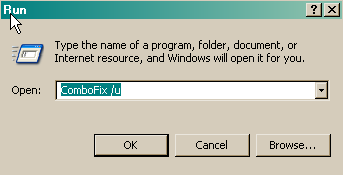
1. Close any open browsers. 2. Close/disable all anti virus and anti malware programs so they do not interfere with the running of ComboFix. 3. Open notepad and copy/paste the text in the quotebox below into it: QUOTE File:: Folder:: Registry:: [-HKEY_CURRENT_USER\software\microsoft\windows\currentversion\explorer\mountpoints2\{2d435b36-e506-11d9-9b78-e6b009352ae7}] [-HKEY_CURRENT_USER\software\microsoft\windows\currentversion\explorer\mountpoints2\{674de7e4-85c9-11dd-8c98-806d6172696f}] [-HKEY_LOCAL_MACHINE\system\ControlSet001\Services\TDSSserv.sys] [-HKEY_LOCAL_MACHINE\SYSTEM\CurrentControlSet\Control\SafeBoot\Minimal\Winiq64.sys] Driver:: Winiq64 Save this as CFScript.txt, in the same location as ComboFix.exe ![]() Refering to the picture above, drag CFScript into ComboFix.exe When finished, it shall produce a log for you at C:\ComboFix.txt which I will require in your next reply. |
|
|
Nov 13 2008, 08:31 PM
Post
#5
|
|
|
Member ![]() ![]() Posts: 36 OS: XP |
Here you go
ComboFix 08-11-12.01 - Compaq_Owner 2008-11-13 21:17:08.2 - NTFSx86 Microsoft Windows XP Home Edition 5.1.2600.2.1252.1.1033.18.123 [GMT -5:00] Running from: c:\documents and settings\Compaq_Owner\Desktop\ComboFix.exe Command switches used :: c:\documents and settings\Compaq_Owner\Desktop\CFScript.txt * Created a new restore point . ((((((((((((((((((((((((((((((((((((((( Other Deletions ))))))))))))))))))))))))))))))))))))))))))))))))) . . ((((((((((((((((((((((((((((((((((((((( Drivers/Services ))))))))))))))))))))))))))))))))))))))))))))))))) . -------\Service_Winiq64 ((((((((((((((((((((((((( Files Created from 2008-10-14 to 2008-11-14 ))))))))))))))))))))))))))))))) . 2008-11-12 22:39 . 2008-11-12 22:39 <DIR> d-------- c:\program files\SpywareBlaster 2008-11-12 22:37 . 2008-11-12 22:37 <DIR> d-------- c:\program files\VS Revo Group 2008-11-12 22:19 . 2008-11-12 22:19 <DIR> d-------- c:\documents and settings\Compaq_Owner\Application Data\Comodo 2008-11-12 19:15 . 2008-11-12 19:15 <DIR> d-------- c:\program files\COMODO 2008-11-12 19:15 . 2008-11-12 22:12 <DIR> d-------- c:\documents and settings\All Users\Application Data\comodo 2008-11-12 19:15 . 2008-11-12 19:15 143,096 --a------ c:\windows\system32\guard32.dll 2008-11-12 19:15 . 2008-11-12 19:15 99,856 --a------ c:\windows\system32\drivers\cmdguard.sys 2008-11-12 19:15 . 2008-11-12 19:15 31,504 --a------ c:\windows\system32\drivers\cmdhlp.sys 2008-11-12 19:10 . 2008-11-12 19:10 <DIR> d-------- c:\program files\IObit 2008-11-12 18:00 . 2008-11-12 18:00 <DIR> d-------- c:\program files\Lavasoft 2008-11-12 18:00 . 2008-11-12 18:01 <DIR> d-------- c:\documents and settings\All Users\Application Data\Lavasoft 2008-11-12 17:45 . 2008-11-12 17:45 <DIR> d-------- C:\!KillBox 2008-11-12 17:27 . 2008-11-12 17:27 <DIR> d-------- c:\program files\Trend Micro 2008-11-11 22:20 . 2008-11-11 22:20 <DIR> d-------- c:\program files\a-squared HiJackFree 2008-11-09 18:14 . 2008-11-09 19:57 <DIR> d-------- c:\program files\a-squared Free 2008-11-09 12:09 . 2005-08-30 19:18 <DIR> d-------- c:\documents and settings\Administrator.MAO\WINDOWS 2008-11-09 12:09 . 2005-08-30 19:36 <DIR> d-------- c:\documents and settings\Administrator.MAO\Application Data\Symantec 2008-11-09 12:09 . 2005-08-30 19:22 <DIR> d-------- c:\documents and settings\Administrator.MAO\Application Data\SampleView 2008-11-09 12:09 . 2005-08-30 19:20 <DIR> d-------- c:\documents and settings\Administrator.MAO\Application Data\Intuit 2008-11-09 12:09 . 2005-08-30 19:17 <DIR> d-------- c:\documents and settings\Administrator.MAO\Application Data\Apple Computer 2008-11-09 12:09 . 2008-11-09 12:09 <DIR> d-------- c:\documents and settings\Administrator.MAO 2008-10-25 21:23 . 2008-11-01 10:01 <DIR> d-------- c:\documents and settings\Compaq_Owner\.fontconfig 2008-10-25 21:21 . 2008-10-25 21:22 <DIR> d-------- c:\program files\LilyPond 2008-10-25 21:04 . 2008-10-25 21:14 <DIR> d-------- c:\documents and settings\Compaq_Owner\.gimp-2.4 2008-10-21 21:06 . 2008-10-21 21:06 <DIR> d-------- c:\program files\NOS 2008-10-14 19:23 . 2008-10-14 19:23 <DIR> d-------- c:\program files\Viewpoint 2008-10-14 19:23 . 2008-10-14 19:23 <DIR> d-------- c:\documents and settings\All Users\Application Data\acccore . (((((((((((((((((((((((((((((((((((((((( Find3M Report )))))))))))))))))))))))))))))))))))))))))))))))))))) . 2008-11-14 01:37 --------- d-----w c:\program files\Yahoo! 2008-11-12 22:59 --------- d-----w c:\program files\Common Files\Wise Installation Wizard 2008-11-09 17:33 --------- d-----w c:\documents and settings\Compaq_Owner\Application Data\LimeWire 2008-11-09 17:33 --------- d-----w c:\documents and settings\Compaq_Owner\Application Data\GameHouse 2008-10-26 02:06 --------- d-----w c:\documents and settings\Compaq_Owner\Application Data\gtk-2.0 2008-10-22 02:28 --------- d-----w c:\documents and settings\All Users\Application Data\NOS 2008-10-15 00:24 --------- d-----w c:\program files\AIM6 2008-10-15 00:23 --------- d-----w c:\documents and settings\All Users\Application Data\Viewpoint 2008-10-15 00:22 --------- d-----w c:\program files\Common Files\AOL 2008-10-10 20:11 --------- d-----w c:\program files\Microsoft Games 2008-10-09 18:22 --------- d-----w c:\program files\iTunes 2008-10-09 18:22 --------- d-----w c:\program files\iPod 2008-10-01 17:01 32,000 ----a-w c:\windows\system32\drivers\usbaapl.sys 2008-09-26 14:04 --------- d-----w c:\program files\Power Tab Software 2008-09-21 19:53 --------- d-----w c:\program files\2Wire 2008-09-19 21:23 --------- d-----w c:\program files\MSXML 4.0 2008-09-19 21:21 11,376 ----a-w c:\windows\system32\drivers\secdrv.sys 2008-09-19 21:14 --------- d-----w c:\program files\ShortKeys2 2008-09-19 21:06 --------- d-----w c:\program files\ffdshow 2008-09-19 21:02 --------- d-----w c:\program files\Bonjour 2008-09-18 21:09 --------- d-----w c:\program files\Microsoft Works 2008-09-18 20:59 --------- d-----w c:\program files\Common Files\Real 2008-09-18 20:50 --------- d-----w c:\program files\QuickTime 2008-09-18 20:44 --------- d--h--w c:\program files\InstallShield Installation Information 2008-09-18 20:44 --------- d-----w c:\program files\Hewlett-Packard 2008-09-18 19:44 --------- d-----w c:\program files\Common Files\Symantec Shared 2008-09-18 19:21 --------- d-----w c:\program files\Java 2008-09-18 18:50 --------- d-----w c:\documents and settings\Compaq_Owner\Application Data\Intuit 2008-09-18 18:50 --------- d-----w c:\documents and settings\Compaq_Owner\Application Data\Apple Computer 2008-09-18 18:49 1,726 --sha-r c:\windows\system32\drivers\103C_HP_CPC_ED850AA-ABA SR1616NX NA540_YC_0Pres_QCNH539_E54NAheRED2_48_IAmberine M_SASUSTek Computer INC._V1.03_B3.07_T050729_WXH2_L409_M447_J100_7AMD_8Sempron_91.8_#051112_N10EC813 9_Z14F12F20_G10025954.MRK 2008-09-18 10:13 --------- d-----w c:\program files\CCleaner 2008-09-18 10:11 --------- d-----w c:\program files\The Weather Channel FW 2008-09-16 00:49 --------- d-----w c:\documents and settings\Compaq_Owner.MAO\Application Data\SUPERAntiSpyware.com 2008-09-15 00:42 --------- d-----w c:\program files\Spybot - Search & Destroy 2008-09-15 00:37 --------- d-----w c:\documents and settings\All Users\Application Data\Spybot - Search & Destroy 2008-09-15 00:33 --------- d-----w c:\documents and settings\Compaq_Owner.MAO\Application Data\LimeWire 2008-09-14 22:17 --------- d-----w c:\documents and settings\Compaq_Owner.MAO\Application Data\Apple Computer 2008-09-14 21:24 --------- d-----w c:\documents and settings\Compaq_Owner.MAO\Application Data\Imagomat 2008-09-14 21:00 --------- d-----w c:\documents and settings\All Users\Application Data\{3276BE95_AF08_429F_A64F_CA64CB79BCF6} 2008-09-14 20:58 --------- d-----w c:\program files\Common Files\Apple 2008-09-14 20:57 --------- d-----w c:\program files\Apple Software Update 2008-09-14 17:49 --------- d-----w c:\documents and settings\Compaq_Owner.MAO\Application Data\acccore 2008-09-14 16:48 --------- d-----w c:\documents and settings\Compaq_Owner.MAO\Application Data\HPQ 2008-09-14 15:02 --------- d-----w c:\documents and settings\All Users\Application Data\AOL 2008-09-14 15:01 --------- d-----w c:\documents and settings\Compaq_Owner.MAO\Application Data\AOL 2008-09-14 13:26 --------- d-----w c:\documents and settings\Compaq_Owner.MAO\Application Data\You've Got Pictures Screensaver 2008-09-01 01:32 73,216 ----a-w c:\windows\ST6UNST.EXE 2008-09-01 01:32 249,856 ------w c:\windows\Setup1.exe 2005-12-14 23:56 0 -c--a-w c:\documents and settings\Compaq_Owner\Application Data\wklnhst.dat . ((((((((((((((((((((((((((((( snapshot@2008-11-13_20.45.19.00 ))))))))))))))))))))))))))))))))))))))))) . + 2005-10-21 01:02:28 163,328 ----a-w c:\windows\ERDNT\subs\ERDNT.EXE . ((((((((((((((((((((((((((((((((((((( Reg Loading Points )))))))))))))))))))))))))))))))))))))))))))))))))) . . *Note* empty entries & legit default entries are not shown REGEDIT4 [HKEY_CURRENT_USER\SOFTWARE\Microsoft\Windows\CurrentVersion\Run] "DW6"="c:\program files\The Weather Channel FW\Desktop\DesktopWeather.exe" [2008-06-10 785520] "SpybotSD TeaTimer"="c:\program files\Spybot - Search & Destroy\TeaTimer.exe" [2008-08-18 1832272] [HKEY_LOCAL_MACHINE\SOFTWARE\Microsoft\Windows\CurrentVersion\Run] "2wSysTray"="c:\program files\2Wire\2PortalMon.exe" [2004-05-25 393216] "COMODO Internet Security"="c:\program files\COMODO\COMODO Internet Security\cfp.exe" [2008-11-12 1797880] [HKEY_LOCAL_MACHINE\software\microsoft\windows\currentversion\policies\explorer] "NoResolveSearch"= 1 (0x1) [HKEY_LOCAL_MACHINE\software\microsoft\windows nt\currentversion\windows] "AppInit_DLLs"= c:\windows\system32\guard32.dll [HKEY_LOCAL_MACHINE\SYSTEM\CurrentControlSet\Control\SafeBoot\Minimal\Winiq64.sys] @="" [HKEY_LOCAL_MACHINE\software\microsoft\shared tools\msconfig\startupreg\HP Software Update] --a------ 2005-02-17 08:11 49152 c:\program files\HP\HP Software Update\hpwuSchd2.exe [HKEY_LOCAL_MACHINE\software\microsoft\shared tools\msconfig\startupreg\iTunesHelper] --a------ 2008-10-01 17:57 289576 c:\program files\iTunes\iTunesHelper.exe [HKEY_LOCAL_MACHINE\software\microsoft\security center] "AntiVirusOverride"=dword:00000001 [HKEY_LOCAL_MACHINE\software\microsoft\security center\Monitoring\SymantecAntiVirus] "DisableMonitoring"=dword:00000001 [HKEY_LOCAL_MACHINE\software\microsoft\security center\Monitoring\SymantecFirewall] "DisableMonitoring"=dword:00000001 [HKLM\~\services\sharedaccess\parameters\firewallpolicy\standardprofile\AuthorizedApplications\List] "%windir%\\system32\\sessmgr.exe"= "c:\\TEMP\\Counter-Strike\\hl.exe"= "c:\\Program Files\\Bonjour\\mDNSResponder.exe"= "c:\\Program Files\\LimeWire\\LimeWire.exe"= "c:\\Program Files\\Microsoft Games\\Age of Mythology\\aomx.exe"= "c:\\Program Files\\AIM6\\aim6.exe"= "c:\\Documents and Settings\\Compaq_Owner\\My Documents\\Heroes III\\Heroes3.exe"= "c:\\WINDOWS\\system32\\dplaysvr.exe"= "c:\\Program Files\\iTunes\\iTunes.exe"= "c:\\Program Files\\Common Files\\AOL\\Loader\\aolload.exe"= R1 cmdGuard;COMODO Internet Security Sandbox Driver;c:\windows\system32\DRIVERS\cmdguard.sys [2008-11-12 99856] R1 cmdHlp;COMODO Internet Security Helper Driver;c:\windows\system32\DRIVERS\cmdhlp.sys [2008-11-12 31504] R2 Viewpoint Manager Service;Viewpoint Manager Service;c:\program files\Viewpoint\Common\ViewpointService.exe [2007-01-04 24652] S3 getPlus® Helper;getPlus® Helper;c:\program files\NOS\bin\getPlus_HelperSvc.exe [2008-08-29 33752] . - - - - ORPHANS REMOVED - - - - BHO-{67AE599E-FAAA-4567-AD41-5B3038582737} - (no file) ************************************************************************** catchme 0.3.1367 W2K/XP/Vista - rootkit/stealth malware detector by Gmer, http://www.gmer.net Rootkit scan 2008-11-13 21:22:26 Windows 5.1.2600 Service Pack 2 NTFS scanning hidden processes ... scanning hidden autostart entries ... scanning hidden files ... ************************************************************************** . ------------------------ Other Running Processes ------------------------ . c:\windows\system32\ati2evxx.exe c:\windows\system32\ati2evxx.exe c:\program files\Lavasoft\Ad-Aware\aawservice.exe c:\program files\a-squared Free\a2service.exe c:\program files\Common Files\Apple\Mobile Device Support\bin\AppleMobileDeviceService.exe c:\program files\Bonjour\mDNSResponder.exe c:\program files\COMODO\COMODO Internet Security\cmdagent.exe c:\program files\Common Files\Microsoft Shared\VS7DEBUG\MDM.EXE c:\windows\system32\HPZipm12.exe c:\windows\system32\wdfmgr.exe . ************************************************************************** . Completion time: 2008-11-13 21:28:24 - machine was rebooted ComboFix-quarantined-files.txt 2008-11-14 02:27:18 ComboFix2.txt 2008-11-14 01:45:52 Pre-Run: 16,725,512,192 bytes free Post-Run: 16,633,610,240 bytes free 172 |
|
|
Nov 14 2008, 09:20 AM
Post
#6
|
|
![]() GeekU Teacher Posts: 41,926 From: Dublin OS: XP |
Hello
Please download the OTMoveIt3 by OldTimer or from here.
Note: If a file or folder cannot be moved immediately you may be asked to reboot the machine to finish the move process. If you are asked to reboot the machine choose Yes. In this case, after the reboot, open Notepad (Start->All Programs->Accessories->Notepad), click File->Open, in the File Name box enter *.log and press the Enter key, navigate to the C:\_OTMoveIt\MovedFiles folder, and open the newest .log file present, and copy/paste the contents of that document back here in your next post. Please download Malwarebytes' Anti-Malware from Here or Here Double Click mbam-setup.exe to install the application.
Extra Note: If MBAM encounters a file that is difficult to remove,you will be presented with 1 of 2 prompts,click OK to either and let MBAM proceed with the disinfection process,if asked to restart the computer,please do so immediatly. Go to Kaspersky website and perform an online antivirus scan.
|
|
|
Nov 14 2008, 02:01 PM
Post
#7
|
|
|
Member ![]() ![]() Posts: 36 OS: XP |
uhh problem:
i turned my computer on today, and my internet doesn't work anymore... i use SBC Yahoo! DSL, with a 2Wire Portal. I don't know why it doesn't work, 2Wire can't connect to the internet, but it didn't before when the virus came, and the internet didn't work. But today my internet just doesn't work... so i can't update MBAM, and i can't do the online scan. i'll post the OT log and the MBAM log in my next reply |
|
|
Nov 14 2008, 02:09 PM
Post
#8
|
|
|
Member ![]() ![]() Posts: 36 OS: XP |
OTMoveit Log
========== PROCESSES ========== Process explorer.exe killed successfully. ========== SERVICES/DRIVERS ========== ========== REGISTRY ========== Registry key HKEY_LOCAL_MACHINE\SYSTEM\CurrentControlSet\Control\Safeboot\Minimal\Winiq64.sys\\ deleted successfully. ========== FILES ========== ========== COMMANDS ========== User's Temp folder emptied. User's Temporary Internet Files folder emptied. User's Internet Explorer cache folder emptied. File delete failed. C:\Documents and Settings\LocalService\Local Settings\Temp\Temporary Internet Files\Content.IE5\index.dat scheduled to be deleted on reboot. File delete failed. C:\Documents and Settings\LocalService\Local Settings\Temp\History\History.IE5\index.dat scheduled to be deleted on reboot. File delete failed. C:\Documents and Settings\LocalService\Local Settings\Temp\Cookies\index.dat scheduled to be deleted on reboot. Local Service Temp folder emptied. File delete failed. C:\Documents and Settings\LocalService\Local Settings\Temporary Internet Files\Content.IE5\index.dat scheduled to be deleted on reboot. Local Service Temporary Internet Files folder emptied. File delete failed. C:\WINDOWS\temp\2wswlog\2PortalMon_Debug.txt scheduled to be deleted on reboot. Windows Temp folder emptied. Java cache emptied. FireFox cache emptied. Temp folders emptied. Explorer started successfully OTMoveIt3 by OldTimer - Version 1.0.7.1 log created on 11142008_144327 Files moved on Reboot... C:\Documents and Settings\LocalService\Local Settings\Temp\Temporary Internet Files\Content.IE5\index.dat moved successfully. C:\Documents and Settings\LocalService\Local Settings\Temp\History\History.IE5\index.dat moved successfully. C:\Documents and Settings\LocalService\Local Settings\Temp\Cookies\index.dat moved successfully. C:\Documents and Settings\LocalService\Local Settings\Temporary Internet Files\Content.IE5\index.dat moved successfully. C:\WINDOWS\temp\2wswlog\2PortalMon_Debug.txt moved successfully. MBAM log Malwarebytes' Anti-Malware 1.30 Database version: 1306 Windows 5.1.2600 Service Pack 2 11/14/2008 3:03:55 PM mbam-log-2008-11-14 (15-03-55).txt Scan type: Quick Scan Objects scanned: 55407 Time elapsed: 5 minute(s), 10 second(s) Memory Processes Infected: 0 Memory Modules Infected: 0 Registry Keys Infected: 0 Registry Values Infected: 0 Registry Data Items Infected: 0 Folders Infected: 0 Files Infected: 0 Memory Processes Infected: (No malicious items detected) Memory Modules Infected: (No malicious items detected) Registry Keys Infected: (No malicious items detected) Registry Values Infected: (No malicious items detected) Registry Data Items Infected: (No malicious items detected) Folders Infected: (No malicious items detected) Files Infected: (No malicious items detected) |
|
|
Nov 14 2008, 02:17 PM
Post
#9
|
|
![]() GeekU Teacher Posts: 41,926 From: Dublin OS: XP |
Post a new HJT log
|
|
|
Nov 14 2008, 02:30 PM
Post
#10
|
|
|
Member ![]() ![]() Posts: 36 OS: XP |
Logfile of Trend Micro HijackThis v2.0.2
Scan saved at 3:26:17 PM, on 11/14/2008 Platform: Windows XP SP2 (WinNT 5.01.2600) MSIE: Internet Explorer v6.00 SP2 (6.00.2900.2180) Boot mode: Normal Running processes: C:\WINDOWS\System32\smss.exe C:\WINDOWS\system32\winlogon.exe C:\WINDOWS\system32\services.exe C:\WINDOWS\system32\lsass.exe C:\WINDOWS\system32\Ati2evxx.exe C:\WINDOWS\system32\svchost.exe C:\WINDOWS\System32\svchost.exe C:\WINDOWS\system32\Ati2evxx.exe C:\Program Files\Lavasoft\Ad-Aware\aawservice.exe C:\WINDOWS\Explorer.EXE C:\WINDOWS\system32\spoolsv.exe C:\Program Files\a-squared Free\a2service.exe C:\Program Files\Common Files\Apple\Mobile Device Support\bin\AppleMobileDeviceService.exe C:\Program Files\Bonjour\mDNSResponder.exe C:\Program Files\COMODO\COMODO Internet Security\cmdagent.exe C:\Program Files\Common Files\Microsoft Shared\VS7DEBUG\MDM.EXE C:\WINDOWS\system32\HPZipm12.exe C:\WINDOWS\system32\svchost.exe C:\Program Files\Viewpoint\Common\ViewpointService.exe C:\Program Files\2Wire\2PortalMon.exe C:\Program Files\COMODO\COMODO Internet Security\cfp.exe C:\Program Files\The Weather Channel FW\Desktop\DesktopWeather.exe C:\Program Files\Spybot - Search & Destroy\TeaTimer.exe C:\Program Files\Trend Micro\HijackThis\HijackThis.exe R1 - HKCU\Software\Microsoft\Internet Explorer\Main,Default_Search_URL = http://ie.redirect.hp.com/svs/rdr?TYPE=3&a...arm1=seconduser R1 - HKLM\Software\Microsoft\Internet Explorer\Main,Default_Page_URL = http://go.microsoft.com/fwlink/?LinkId=69157 R1 - HKLM\Software\Microsoft\Internet Explorer\Main,Default_Search_URL = http://go.microsoft.com/fwlink/?LinkId=54896 R1 - HKLM\Software\Microsoft\Internet Explorer\Main,Search Bar = http://ie.redirect.hp.com/svs/rdr?TYPE=3&a...arm1=seconduser R1 - HKLM\Software\Microsoft\Internet Explorer\Main,Search Page = http://go.microsoft.com/fwlink/?LinkId=54896 R0 - HKLM\Software\Microsoft\Internet Explorer\Main,Start Page = http://ie.redirect.hp.com/svs/rdr?TYPE=3&a...arm1=seconduser R1 - HKCU\Software\Microsoft\Windows\CurrentVersion\Internet Settings,ProxyOverride = *.local O2 - BHO: AcroIEHlprObj Class - {06849E9F-C8D7-4D59-B87D-784B7D6BE0B3} - C:\Program Files\Adobe\Acrobat 7.0\ActiveX\AcroIEHelper.dll O2 - BHO: Spybot-S&D IE Protection - {53707962-6F74-2D53-2644-206D7942484F} - C:\PROGRA~1\SPYBOT~1\SDHelper.dll O2 - BHO: (no name) - {67AE599E-FAAA-4567-AD41-5B3038582737} - (no file) O2 - BHO: SSVHelper Class - {761497BB-D6F0-462C-B6EB-D4DAF1D92D43} - C:\Program Files\Java\jre1.6.0_07\bin\ssv.dll O2 - BHO: (no name) - {AA58ED58-01DD-4d91-8333-CF10577473F7} - (no file) O2 - BHO: (no name) - {AF69DE43-7D58-4638-B6FA-CE66B5AD205D} - (no file) O4 - HKLM\..\Run: [2wSysTray] C:\Program Files\2Wire\2PortalMon.exe O4 - HKLM\..\Run: [COMODO Internet Security] "C:\Program Files\COMODO\COMODO Internet Security\cfp.exe" -h O4 - HKLM\..\RunOnce: [Malwarebytes' Anti-Malware] C:\Program Files\Malwarebytes' Anti-Malware\mbamgui.exe /install /silent O4 - HKCU\..\Run: [DW6] "C:\Program Files\The Weather Channel FW\Desktop\DesktopWeather.exe" O4 - HKCU\..\Run: [SpybotSD TeaTimer] C:\Program Files\Spybot - Search & Destroy\TeaTimer.exe O8 - Extra context menu item: E&xport to Microsoft Excel - res://C:\PROGRA~1\MI1933~1\OFFICE11\EXCEL.EXE/3000 O9 - Extra button: (no name) - {08B0E5C0-4FCB-11CF-AAA5-00401C608501} - C:\Program Files\Java\jre1.6.0_07\bin\ssv.dll O9 - Extra 'Tools' menuitem: Sun Java Console - {08B0E5C0-4FCB-11CF-AAA5-00401C608501} - C:\Program Files\Java\jre1.6.0_07\bin\ssv.dll O9 - Extra button: Research - {92780B25-18CC-41C8-B9BE-3C9C571A8263} - C:\PROGRA~1\MI1933~1\OFFICE11\REFIEBAR.DLL O9 - Extra button: (no name) - {DFB852A3-47F8-48C4-A200-58CAB36FD2A2} - C:\PROGRA~1\SPYBOT~1\SDHelper.dll O9 - Extra 'Tools' menuitem: Spybot - Search & Destroy Configuration - {DFB852A3-47F8-48C4-A200-58CAB36FD2A2} - C:\PROGRA~1\SPYBOT~1\SDHelper.dll O9 - Extra button: Connection Help - {E2D4D26B-0180-43a4-B05F-462D6D54C789} - C:\WINDOWS\PCHEALTH\HELPCTR\Vendors\CN=Hewlett-Packard,L=Cupertino,S=Ca,C=US\IEButton\support.htm O9 - Extra 'Tools' menuitem: Connection Help - {E2D4D26B-0180-43a4-B05F-462D6D54C789} - C:\WINDOWS\PCHEALTH\HELPCTR\Vendors\CN=Hewlett-Packard,L=Cupertino,S=Ca,C=US\IEButton\support.htm O9 - Extra button: Messenger - {FB5F1910-F110-11d2-BB9E-00C04F795683} - C:\Program Files\Messenger\msmsgs.exe O9 - Extra 'Tools' menuitem: Windows Messenger - {FB5F1910-F110-11d2-BB9E-00C04F795683} - C:\Program Files\Messenger\msmsgs.exe O16 - DPF: {30528230-99f7-4bb4-88d8-fa1d4f56a2ab} (Installation Support) - C:\Program Files\Yahoo!\Common\Yinsthelper.dll O20 - AppInit_DLLs: C:\WINDOWS\system32\guard32.dll O23 - Service: a-squared Free Service (a2free) - Emsi Software GmbH - C:\Program Files\a-squared Free\a2service.exe O23 - Service: Lavasoft Ad-Aware Service (aawservice) - Lavasoft - C:\Program Files\Lavasoft\Ad-Aware\aawservice.exe O23 - Service: Apple Mobile Device - Apple Inc. - C:\Program Files\Common Files\Apple\Mobile Device Support\bin\AppleMobileDeviceService.exe O23 - Service: Ati HotKey Poller - ATI Technologies Inc. - C:\WINDOWS\system32\Ati2evxx.exe O23 - Service: Bonjour Service - Apple Inc. - C:\Program Files\Bonjour\mDNSResponder.exe O23 - Service: COMODO Internet Security Helper Service (cmdAgent) - Unknown owner - C:\Program Files\COMODO\COMODO Internet Security\cmdagent.exe O23 - Service: getPlus® Helper - NOS Microsystems Ltd. - C:\Program Files\NOS\bin\getPlus_HelperSvc.exe O23 - Service: InstallDriver Table Manager (IDriverT) - Macrovision Corporation - C:\Program Files\Common Files\InstallShield\Driver\1050\Intel 32\IDriverT.exe O23 - Service: iPod Service - Apple Inc. - C:\Program Files\iPod\bin\iPodService.exe O23 - Service: Pml Driver HPZ12 - HP - C:\WINDOWS\system32\HPZipm12.exe O23 - Service: Viewpoint Manager Service - Viewpoint Corporation - C:\Program Files\Viewpoint\Common\ViewpointService.exe -- End of file - 6172 bytes |
|
|
Nov 14 2008, 02:35 PM
Post
#11
|
|
![]() GeekU Teacher Posts: 41,926 From: Dublin OS: XP |
Hello
1. Please re-open HiJackThis and choose do a system scan only. Check the boxes next to ONLY the entries listed below(if present): O2 - BHO: (no name) - {67AE599E-FAAA-4567-AD41-5B3038582737} - (no file) O2 - BHO: (no name) - {AA58ED58-01DD-4d91-8333-CF10577473F7} - (no file) O2 - BHO: (no name) - {AF69DE43-7D58-4638-B6FA-CE66B5AD205D} - (no file) 2. Now close all windows other than HiJackThis, including browsers, so that nothing other than HijackThis is open, then click Fix Checked. A box will pop up asking you if you wish to fix the selected items. Please choose YES. Once it has fixed them, please exit/close HijackThis. Follow these steps to uninstall Combofix and tools used in the removal of malware
Below I have included a number of recommendations for how to protect your computer against malware infections. * Keep Windows updated by regularly checking their website at : http://windowsupdate.microsoft.com/ This will ensure your computer has always the latest security updates available installed on your computer. * To reduce re-infection for malware in the future, I strongly recommend installing these free programs: SpywareBlaster protects against bad ActiveX IE-SPYAD puts over 5000 sites in your restricted zone so you'll be protected when you visit innocent-looking sites that aren't actually innocent at all Have a look at this tutorial for IE-Spyad here * SpywareGuard offers realtime protection from spyware installation attempts. Make sure you are only running one real-time anti-spyware protection program or there will be a conflict. Make Internet Explorer more secure
*ATF Cleaner - Cleans temporary files from IE and Windows, empties the recycle bin and more. Great tool to help speed up your computer and knock out those nasties that like to reside in the temp folders. *NoScript - Addon for Firefox that stops all scripts from running on websites. Stops malicious software from invading via flash, java, javascript, and many other entry points. *Keep a backup of your important files - Now, more than ever, it's especially important to protect your digital files and memories. This article is full of good information on alternatives for home backup solutions. * MVPS Hosts file replaces your current HOSTS file with one containing well known ad sites and other bad sites. Basically, this prevents your computer from connecting to those sites by redirecting them to 127.0.0.1 which is your local computer, meaning it will be difficult to infect yourself in the future. * Please consider using an alternate browser. Mozilla's Firefox browser is fantastic; it is much more secure than Internet Explorer, immune to almost all known browser hijackers, and also has the best built-in pop up blocker (as an added benefit!) that I have ever seen. If you are interested, Firefox may be downloaded from Here * Take a good look at the following suggestions for malware prevention by reading Tony Klein’s article 'How Did I Get Infected In The First Place' Here Thank you for your patience, and performing all of the procedures requested. |
|
|
Nov 14 2008, 02:56 PM
Post
#12
|
|
|
Member ![]() ![]() Posts: 36 OS: XP |
ok so i did everything you did, but i cannot connect to the internet. It says i have limited or no connectivity, and when i try to repair, it just gets stuck at renewing the IP address. Did one of the programs i use mess that up?
|
|
|
Nov 14 2008, 03:02 PM
Post
#13
|
|
![]() GeekU Teacher Posts: 41,926 From: Dublin OS: XP |
Chances are the rootkit did it
Try this ComboFix will disconnect the machine from the internet, this prevents fresh malware from coming in. The connection shall be restored once ComboFix gets to the Find3M stage. In the event that ComboFix terminates prematurely you can manually restore the connection by ... * Going to Control Panel > Network Connections. * Right click on their Network icons & select "Repair" ![]() Alternately, if the Network icon appears in the notification area in the lower right corner of Desktop, right-click it, and then click Repair from the shortcut menu. ![]() If that fails you will need to post on the Windows XP forum |
|
|
Nov 14 2008, 04:28 PM
Post
#14
|
|
|
Member ![]() ![]() Posts: 36 OS: XP |
it failed.
i'll post there, thanks for all your help the thing is, without internet, i can't tell if the malware is gone, so i might need your help later, so could you not close this topic? thanks -matt |
|
|
Nov 14 2008, 04:44 PM
Post
#15
|
|
![]() GeekU Teacher Posts: 41,926 From: Dublin OS: XP |
The malware is gone, you don't need to worry about that
Go and post in the Windows XP forum to fix your net problem And do this Follow these steps to uninstall Combofix and tools used in the removal of malware
Below I have included a number of recommendations for how to protect your computer against malware infections. * Keep Windows updated by regularly checking their website at : http://windowsupdate.microsoft.com/ This will ensure your computer has always the latest security updates available installed on your computer. * To reduce re-infection for malware in the future, I strongly recommend installing these free programs: SpywareBlaster protects against bad ActiveX IE-SPYAD puts over 5000 sites in your restricted zone so you'll be protected when you visit innocent-looking sites that aren't actually innocent at all Have a look at this tutorial for IE-Spyad here * SpywareGuard offers realtime protection from spyware installation attempts. Make sure you are only running one real-time anti-spyware protection program or there will be a conflict. Make Internet Explorer more secure
*ATF Cleaner - Cleans temporary files from IE and Windows, empties the recycle bin and more. Great tool to help speed up your computer and knock out those nasties that like to reside in the temp folders. *NoScript - Addon for Firefox that stops all scripts from running on websites. Stops malicious software from invading via flash, java, javascript, and many other entry points. *Keep a backup of your important files - Now, more than ever, it's especially important to protect your digital files and memories. This article is full of good information on alternatives for home backup solutions. * MVPS Hosts file replaces your current HOSTS file with one containing well known ad sites and other bad sites. Basically, this prevents your computer from connecting to those sites by redirecting them to 127.0.0.1 which is your local computer, meaning it will be difficult to infect yourself in the future. * Please consider using an alternate browser. Mozilla's Firefox browser is fantastic; it is much more secure than Internet Explorer, immune to almost all known browser hijackers, and also has the best built-in pop up blocker (as an added benefit!) that I have ever seen. If you are interested, Firefox may be downloaded from Here * Take a good look at the following suggestions for malware prevention by reading Tony Klein’s article 'How Did I Get Infected In The First Place' Here Thank you for your patience, and performing all of the procedures requested. |
|
|
![]() ![]() |
Similar Topics
| Topic Title | Replies / Views | Topic Information | |||||
|---|---|---|---|---|---|---|---|
![]() |
3 / 825 | 24th April 2007 - 02:15 AM srksrk started - last by Retired Tech |
|||||
![]() |
24 / 1,269 | 25th December 2008 - 12:10 PM lilac_sim started - last by lilac_sim |
|||||
![]() |
0 / 68 | 27th May 2009 - 05:28 PM Kolorus started - last by Kolorus |
|||||
![]() |
0 / 64 | 6th January 2010 - 01:07 PM simard started - last by simard |
|||||
|
Time is now: 9th February 2010 - 08:22 AM |
Advertisements do not imply our endorsement of that product or service. The forum is run by volunteers who donate their time and expertise. We make every attempt to ensure that the help and advice posted is accurate and will not cause harm. However, we do not guarantee that they are accurate and they are to be used at your own risk. All trademarks mentioned on this page are the property of their respective owners.
© Geeks to Go, Inc. | All Rights Reserved | Privacy Policy | Advertising