Need a geek? Geeks to Go offers free, quality tech support -- in terms anyone can understand. Volunteers are waiting to help, friendly, technology experts who have knowledge to share, and enjoy helping others. Feel free to browse the site as a guest. However, you must log in to reply to existing topics, or to start a new topic. Other benefits of joining include richer forum features, and removal of all advertising. Learn more in our Welcome Guide Infected? Malware and Spyware Cleaning Guide. What are you waiting for? Click here to join for free today!
   
4 Pages V   1 2 3 > »   
Reply to this topicStart new topic
Remove Antivirus 2009
admin
post Dec 2 2008, 12:33 PM
Post #1


Site Administrator
Group Icon
Posts: 18,684
From: 127.0.0.1
OS: Windows 7 64-bit RTM
MVP


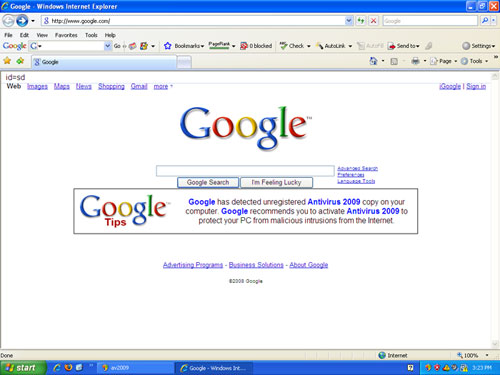
Antivirus 2009 is fake security software that's goal is to make you purchase the program in order to remove the "infections" it detects. These Antivirus 2009 fake error messages can be in the system bar, browser, popup. Don't buy Antivirus 2009! Remove Antivirus 2009!

Attached Image


To remove Antivirus 2009, please download Malwarebytes' Anti-Malware from Here.

Double Click mbam-setup.exe to install the application.
  • Make sure a checkmark is placed next to Update Malwarebytes' Anti-Malware and Launch Malwarebytes' Anti-Malware, then click Finish.
  • If an update is found, it will download and install the latest version.
  • Once the program has loaded, select "Perform Quick Scan", then click Scan.
  • The scan may take some time to finish,so please be patient.
  • When the scan is complete, click OK, then Show Results to view the results.
  • Make sure that everything is checked, and click Remove Selected.
  • When Antivirus 2009 disinfection is completed, a log will open in Notepad and you may be prompted to Restart.(See Extra Note)

Extra Note:
If MBAM encounters a file that is difficult to remove,you will be presented with 1 of 2 prompts,click OK to either and let MBAM proceed with the disinfection process,if asked to restart the computer,please do so immediatly.

=====================================================================
This is a self-help guide. Use at your own risk.

Important Note: If you need assistance with Antivirus 2009 removal, please start a new topic in our Malware Removal Forum.
Go to the top of the page
 
+Quote Post
jt1990
post Dec 2 2008, 03:28 PM
Post #2


Member 1K
****
Posts: 1,519
From: The middle of Nowhere (Maine, USA
OS: Windows XP Home, Pro SP3, Windows Vista Business SP1, Windows 7 Beta


Can Antivirus 2009 be removed with only MBAM? I usually have more difficulty...
Go to the top of the page
 
+Quote Post
admin
post Dec 2 2008, 03:49 PM
Post #3


Site Administrator
Group Icon
Posts: 18,684
From: 127.0.0.1
OS: Windows 7 64-bit RTM
MVP


MBAM usually does a pretty good job of removing Antivirus 2009. Unfortunately, there are often other infections along with it.
Go to the top of the page
 
+Quote Post
jt1990
post Dec 2 2008, 07:50 PM
Post #4


Member 1K
****
Posts: 1,519
From: The middle of Nowhere (Maine, USA
OS: Windows XP Home, Pro SP3, Windows Vista Business SP1, Windows 7 Beta


Gotcha. That's probably what I usually end up running into. Thanks for the advice smile.gif
Go to the top of the page
 
+Quote Post
Epsilon
post Dec 4 2008, 03:05 PM
Post #5


Member
**
Posts: 23
From: Canada
OS: XP


I removed this from my friends computer not to long ago perhaps a month. I also took it out of the msconfig startup tab, and deleted everything initiated with it then deleted the .exe with taskmanager would this fully remove it or would there be traces of it else were I should be looking I did a HJK scan on his computer as well and removed it.
Go to the top of the page
 
+Quote Post
Rorschach112
post Dec 4 2008, 05:07 PM
Post #6


GeekU Teacher
Group Icon
Posts: 34,353
From: Dublin
OS: XP


There would be more there
Go to the top of the page
 
+Quote Post
**Brian**
post Dec 5 2008, 06:36 AM
Post #7


GeekU Junior: Semper Paratus: Always Ready
Group Icon
Posts: 1,138
From: Barre, VT USA
OS: Windows: 2000 Pro/XP Pro/Home/MCE/2003 Linux: Redhat and Debian (Lenny) Linux


I had a friend with this and used MBAM - it WILL remove this (as has been stated above) smile.gif

Brian

This post has been edited by **Brian**: Dec 5 2008, 06:45 AM
Go to the top of the page
 
+Quote Post
Rawley
post Dec 5 2008, 08:21 PM
Post #8


New Member
*
Posts: 1
OS: win xp sp3


I got this virus on my computer last week. Couldn't find any info on it as to what it was called. It would redirect IE and Firefox to random sites, one was the Antivirus2009 and a myriad of other sites.

It kept repicating dlls in my windows\system32 directory with random consonant-vowel 8 character filenames. It would also create .INI files of 1 Megabyte size and small extensionless files. Some of the replicated dlls I could delete and some I couldn't. I used process explorer to look at the stuff running. The dlls would piggyback off of each process that was running.

The files names were things like jopetefu.dll, uletihor.ini, and zunapoma.

I booted up a version of puppy linux I keep around from CD-ROM, mounted my windows partition and deleted the dlls and INI files associated with this, then booted up windows in safe mode and used regdll view to remove the registry entries. System seems to be fine ever since.
Go to the top of the page
 
+Quote Post
**Brian**
post Dec 5 2008, 08:22 PM
Post #9


GeekU Junior: Semper Paratus: Always Ready
Group Icon
Posts: 1,138
From: Barre, VT USA
OS: Windows: 2000 Pro/XP Pro/Home/MCE/2003 Linux: Redhat and Debian (Lenny) Linux


Just FYI:

I clicked on the Antivirus 2009 JPG pic in Admin's first Post, and I got an error message stating that I didn't have permission to view the information - asked me to login to view it, and I was already logged in wink.gif

Brian
Go to the top of the page
 
+Quote Post
admin
post Dec 5 2008, 09:35 PM
Post #10


Site Administrator
Group Icon
Posts: 18,684
From: 127.0.0.1
OS: Windows 7 64-bit RTM
MVP


@ Brian, it was a permission problem exclusive to the GeekU member groups, fixed now.
Go to the top of the page
 
+Quote Post
admin
post Dec 5 2008, 09:39 PM
Post #11


Site Administrator
Group Icon
Posts: 18,684
From: 127.0.0.1
OS: Windows 7 64-bit RTM
MVP


QUOTE (Rawley @ Dec 5 2008, 08:21 PM) *
It kept repicating dlls in my windows\system32 directory with random consonant-vowel 8 character filenames. It would also create .INI files of 1 Megabyte size and small extensionless files. Some of the replicated dlls I could delete and some I couldn't. I used process explorer to look at the stuff running. The dlls would piggyback off of each process that was running.

The files names were things like jopetefu.dll, uletihor.ini, and zunapoma.

It sounds like your Antivirus 2009 infection had a rootkit component. Since it appears that you know at least enough to be dangerous, you may want to run GMER to see if it's been removed. A better idea would be to start with our Malware Removal Guide. Then start a new topic in the malware removal forum, and let us take a look for you.
Go to the top of the page
 
+Quote Post
zelinfenrir
post Dec 5 2008, 09:58 PM
Post #12


Member
**
Posts: 13
OS: XP


I have installed Malware bytes, but my computer is not allowing me to run the exe to perform the scan.

It doesn't run in safe mode either. What should I do?
Go to the top of the page
 
+Quote Post
admin
post Dec 5 2008, 10:04 PM
Post #13


Site Administrator
Group Icon
Posts: 18,684
From: 127.0.0.1
OS: Windows 7 64-bit RTM
MVP


QUOTE (zelinfenrir @ Dec 5 2008, 09:58 PM) *
I have installed Malware bytes, but my computer is not allowing me to run the exe to perform the scan.

It doesn't run in safe mode either. What should I do?


QUOTE (admin @ Dec 2 2008, 12:33 PM) *
Important Note: If you need assistance with Antivirus 2009 removal, please start a new topic in our Malware Removal Forum.

Go to the top of the page
 
+Quote Post
**Brian**
post Dec 6 2008, 06:34 AM
Post #14


GeekU Junior: Semper Paratus: Always Ready
Group Icon
Posts: 1,138
From: Barre, VT USA
OS: Windows: 2000 Pro/XP Pro/Home/MCE/2003 Linux: Redhat and Debian (Lenny) Linux


QUOTE (admin @ Dec 5 2008, 10:35 PM) *
@ Brian, it was a permission problem exclusive to the GeekU member groups, fixed now.

Thanks Admin - I figured it may be a permission problem, thanks for fixing it smile.gif

Brian
Go to the top of the page
 
+Quote Post
Bonzai82
post Dec 18 2008, 10:19 PM
Post #15


Member
**
Posts: 12
From: Croatia
OS: Windows XP 32 & Vista Ultimate 64


I've use SuperAntispyware to remove Anitvirus 2009 on few computers and it did a good job.It also removes Spyware 2009.
Go to the top of the page
 
+Quote Post

4 Pages V   1 2 3 > » 
Reply to this topicStart new topic
1 User(s) are reading this topic (1 Guests and 0 Anonymous Users)
0 Members:


RSS Time is now: 7th November 2009 - 03:28 PM

Advertisements do not imply our endorsement of that product or service. The forum is run by volunteers who donate their time and expertise. We make every attempt to ensure that the help and advice posted is accurate and will not cause harm to your computer. However, we do not guarantee that they are accurate and they are to be used at your own risk. All trademarks mentioned on this page are the property of their respective owners.

© Geeks to Go, Inc. | All Rights Reserved | Privacy Policy | Advertising