Welcome Guest ( Log In | Register )

Discover the best free computer help!
Learn more about Geeks to Go by taking the tour. Spyware, virus, trojan, fake security or privacy alerts? Read the malware cleaning guide.
      
25 Pages V   1 2 3 > »   
Reply to this topicStart new topic
Running a Call of Duty/uo server @home, Ill explain..
jrm20
post May 15 2005, 11:04 PM
Post #1


System building expert
Group Icon
Posts: 2,094
From: USA
OS: XP


Hey all im new to this site but im here to help people out and im experienced at running lagless servers @ home with 128 kb upload and up.

A new guide is being developed to replace this thread. Please be patient. If you need help please start a new topic. We would be glad to assist. Until then this thread is closed.

This post has been edited by starjax: Mar 10 2007, 10:43 AM
Go to the top of the page
 
+Quote Post
jrm20
post May 15 2005, 11:16 PM
Post #2


System building expert
Group Icon
Posts: 2,094
From: USA
OS: XP


*Edit* Redid the bandwidth calculations for a server at home**

**For Lagfree gameplay use these settings** These settings are for when noone else is using your connection at all. Make shure noone else is using your connection or downloading/uploading or playing a multiplayer game. If so you will have to lower the amount of players depending on what they are doing. On cable or dsl your upload speed will take a major impact if someone is downloading or uploading on your internet line while you have a multiplayer server up and it will lag.

This upload speed is measured it Kbps (kilobits per second)

To find out your internet speed or upload speed goto a test site and run a test. Upload is the part that matters for a server.

bandwidth test sites:

http://www.pcpitstop.com

http://testmy.net

http://www.speakeasy.net/speedtest/

128Kbps upload: 4 players
256Kbps upload: 6 players
384Kbps upload: 8 players
512Kbps upload 10 players
768Kbps upload: 12-14 players (14 would be absolute max)

the above will work with the sv_maxrate at 5000. If you have 512Kbps upload you could up the maxrate to 6000 if you like but if you do that the clients use more bandwidth.
Over an 8 person server it is a good idea to have a dedicated pc just for the game server.

If you host and play on the same pc as the server that is fine but if you get over 8 players on it the server will get jittery for you and the clients at times because the game server uses alot of your cpus Usage.

This post has been edited by jrm20: Mar 5 2006, 03:07 PM
Go to the top of the page
 
+Quote Post
jrm20
post May 15 2005, 11:35 PM
Post #3


System building expert
Group Icon
Posts: 2,094
From: USA
OS: XP


here is a server config file named dedicated.cfg So, if you want to use it fill it in then save it. After that place it in cod/main. Then you need to have a shortcut for call of duty on your desktop. Right click on that shortcut and goto properties. Look in the target line and add this. +exec dedicated.cfg after the ". Make shure you have one space between the " and +exec. Then your set to open up your own server.


if anyone has any questions just post away....

This post has been edited by jrm20: May 15 2005, 11:36 PM
Attached File(s)
Attached File  dedicated.zip ( 810bytes ) Number of downloads: 6502
 
Go to the top of the page
 
+Quote Post
jrm20
post May 22 2005, 03:54 PM
Post #4


System building expert
Group Icon
Posts: 2,094
From: USA
OS: XP


lol any questions??
Go to the top of the page
 
+Quote Post
CmMulla
post May 31 2005, 03:15 PM
Post #5


New Member
*
Posts: 2
OS: XP Pro MCE 2004


Yea it doesn't work. I've done all the things you've said, opened router ports, firewall ports, all that good stuff and it still doesn't appear in the browser even though the console comes up... any help?
Go to the top of the page
 
+Quote Post
jrm20
post May 31 2005, 03:27 PM
Post #6


System building expert
Group Icon
Posts: 2,094
From: USA
OS: XP


on some routers, like mine its called dmz host. Try and see if your router has a function called dmz host and enable it. All it does is makes your local ip or (lan ip) appear on the net. After you do this make shure the server is set to pure server. After you open the server in console it should say

Hitch warning: 2754 msec frame time
Resolving coduomaster.activision.com
coduomaster.activision.com resolved to 63.146.124.59:20610
Sending heartbeat to coduomaster.activision.com
Resolving coduoauthorize.activision.com
coduoauthorize.activision.com resolved to 63.146.124.59:20600

after that minimize the console and go back into call of duty and go find your server. It should be listed on the internet and local both.
Another thing make shure Dedicated is Internet.

If you do all of this it will work. If not still, hook modem directly to your pc and open server from that pc.

Always refresh your list!!

This post has been edited by jrm20: May 31 2005, 03:28 PM
Go to the top of the page
 
+Quote Post
CmMulla
post Jun 1 2005, 01:43 PM
Post #7


New Member
*
Posts: 2
OS: XP Pro MCE 2004


Yea I do remember seeing something about dmz.. I will try that and thank you very much in advance. if it doesn't work then oh well, my router comes first wink.gif
Go to the top of the page
 
+Quote Post
riley05
post Jun 1 2005, 06:30 PM
Post #8


New Member
*
Posts: 8
OS: windows xp professional


can some one tell me what ports need 2 be forwarded to create ur own server on call of duty united offensive on a netgear dg834 router. pplzzzzzzzz

This post has been edited by riley05: Jun 2 2005, 06:37 PM
Go to the top of the page
 
+Quote Post
jrm20
post Jun 3 2005, 08:05 PM
Post #9


System building expert
Group Icon
Posts: 2,094
From: USA
OS: XP


i dont use port forwarding, try dmz host.
Go to the top of the page
 
+Quote Post
jrm20
post Jun 3 2005, 10:42 PM
Post #10


System building expert
Group Icon
Posts: 2,094
From: USA
OS: XP


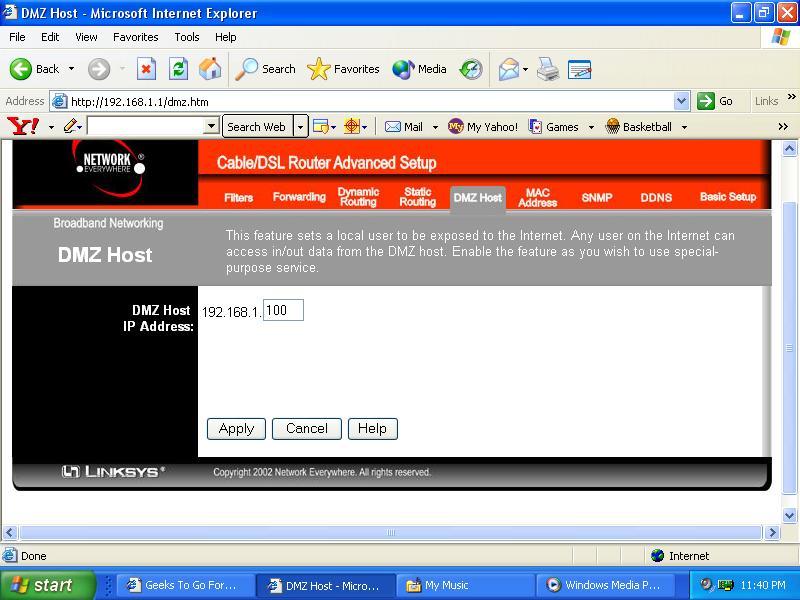
Enter your router ip in the web address and get into the router settings.


find a setting like this.....
Attached thumbnail(s)
Attached Image
 
Go to the top of the page
 
+Quote Post
jrm20
post Jun 3 2005, 10:50 PM
Post #11


System building expert
Group Icon
Posts: 2,094
From: USA
OS: XP


My dmz setting was found under the advanced settings button, i have a linksys router. Whatever your router ip is (192.168.1.1) is default on most routers. Try typing that in the web address to get into your router settings. Then when you find dmz host, it will probably be (192.168.1.0) default if you have not ever enabled dmz host. Or the last space will be blank. So if your router ip is 192.168.1.1 try putting the last ip number as .100 in the dmz host button. So it would be this 192.168.1.100 in the dmz host setting. save that and try opening the server again.
Go to the top of the page
 
+Quote Post
slayer1
post Jun 6 2005, 01:47 PM
Post #12


New Member
*
Posts: 2
OS: windows xp


hiya guys im also new to this forum i have been checking it out quite a bit for a few days and that seeing what it is like it looks quite gud so i finally decided to join lol, anyone got any tips on how to finish the last bit of cakll of duty off?mines on xbox tho so if anyone got any tips for me guys it would be well appreciated lols thanks very much. thumbsup.gif keeyo
Go to the top of the page
 
+Quote Post
dajoker_610
post Jun 7 2005, 02:57 PM
Post #13


Member
**
Posts: 14
OS: XP


Hello, I'm trying to do the same thing as far as setting up a server to host Call of Duty United Offensive. I have another computer a 2.6ghz system that I plan on using to make as my server. Currently it has OS system Windows XP on it, do I need to install Server Software like Server 2003 or something on it, to host as a gaming server online?

Thanks,
Joker
Go to the top of the page
 
+Quote Post
jrm20
post Jun 8 2005, 12:14 AM
Post #14


System building expert
Group Icon
Posts: 2,094
From: USA
OS: XP


NO, you do not need to install server 2003. You can run a server on win xp just fine. You can run the server on win 98/2000/xp or linux if you wanted. thumbsup.gif
Go to the top of the page
 
+Quote Post
dajoker_610
post Jun 8 2005, 09:53 AM
Post #15


Member
**
Posts: 14
OS: XP


Thank Ya
Go to the top of the page
 
+Quote Post

25 Pages V   1 2 3 > » 
Reply to this topicStart new topic
1 User(s) are reading this topic (1 Guests and 0 Anonymous Users)
0 Members:


Collapse

> Similar Topics

    Topic Title Replies / Views Topic Information
No New Posts  
2 / 697 7th January 2008 - 07:55 AM
3lement started - last by ==SpuD==
No New Posts  
2 / 520 3rd January 2006 - 07:44 PM
Sonic Panzy started - last by Sonic Panzy
No New Posts  
1 / 376 20th July 2007 - 06:36 AM
starjax started - last by Salku69
No New Posts  
1 / 612 7th January 2008 - 08:02 AM
Major Blah started - last by ==SpuD==
No New Posts  
1 / 156 20th June 2008 - 08:06 PM
jimboss started - last by Makaveli213

RSS Time is now: 29th August 2008 - 04:52 PM
Advertisements do not imply our endorsement of that product or service. The forum is run by volunteers who donate their time and expertise. We make every attempt to ensure that the help and advice posted is accurate and will not cause harm to your computer. However, we do not guarantee that they are accurate and they are to be used at your own risk.