

How do you disable touchpad tap to click
Started by
Jules52
, Jan 01 2008 12:12 PM
#1

 Posted 01 January 2008 - 12:12 PM
Jules52
-
- Member
-

- 44 posts
Member

#2
Posted 01 January 2008 - 04:17 PM
PsychPosse
-

- Member
-
- 322 posts
Member
Try going into the Control panel and double click the Mouse icon to open it.
In there should be a tab for your synaptics mouse pad. It may have a little red synaptics icon on the tab.
You should be able to change all the tap functions there.
My HP laptop has a very small button located just above the touch pad so that I can simply disable it there, which I do when I am typing since my hands always brush over the pad and move the mouse around, messing things up.
I am unfamiliar with Toshiba but I would think they have a small button to turn off the mouse pad.
In there should be a tab for your synaptics mouse pad. It may have a little red synaptics icon on the tab.
You should be able to change all the tap functions there.
My HP laptop has a very small button located just above the touch pad so that I can simply disable it there, which I do when I am typing since my hands always brush over the pad and move the mouse around, messing things up.
I am unfamiliar with Toshiba but I would think they have a small button to turn off the mouse pad.
#3
Posted 02 January 2008 - 03:37 PM
Jules52
- Topic Starter
-
- Member
-
- 44 posts
Member
I have opened Mouse Properties from the control panel and checked out every single tab and option. There is no way to disable the 'tap to click' function from here. My Toshiba has no button near the touchpad. Incidentally it is only the 'tap to click' function that I wish to disable, not the entire touchpad.
#4
Posted 02 January 2008 - 08:37 PM
PsychPosse
-
- Member
-
- 322 posts
Member
Confusing it is.
I did a Google search for Toshiba and synaptics and there seems to be a lot of issues for others as well. I don't have the answer for you, but I am going to check around with others who I know are running Vista Home Premium and see if I can figure it out that way.
Meanwhile, maybe do some Google searching yourself. Another idea is to open the Start menu and do a Search on your computer for Synaptics and see if you can locate anything.
I did a Google search for Toshiba and synaptics and there seems to be a lot of issues for others as well. I don't have the answer for you, but I am going to check around with others who I know are running Vista Home Premium and see if I can figure it out that way.
Meanwhile, maybe do some Google searching yourself. Another idea is to open the Start menu and do a Search on your computer for Synaptics and see if you can locate anything.
#5
Posted 03 January 2008 - 03:15 PM
Jules52
- Topic Starter
-
- Member
-
- 44 posts
Member
Thanks. I'll do as you suggest. Hear from you later.
#6
Posted 03 January 2008 - 08:24 PM
PsychPosse
-
- Member
-
- 322 posts
Member
Check your System Tray too. (the little row of icons in the lower right corner of your screen)
Synaptics Logo looks like this:
(the red one)
Synaptics Logo looks like this:
(the red one)
Edited by PsychPosse, 03 January 2008 - 08:24 PM.
#7
Posted 04 January 2008 - 05:32 PM
Jules52
- Topic Starter
-
- Member
-
- 44 posts
Member
I know about the system tray icon. A double left click brings up the usual mouse properties box, which as I said before is of no help. Right-clicking the icon brings up a menu for the same mouse properties box, a couple of accessory programs and the 'tap to click' option which is greyed out and so I cannot change it.
#8
Posted 04 January 2008 - 06:47 PM
PsychPosse
-
- Member
-
- 322 posts
Member
Ok. Not sure why it is grayed out on the right click. I can check or uncheck mine that way.
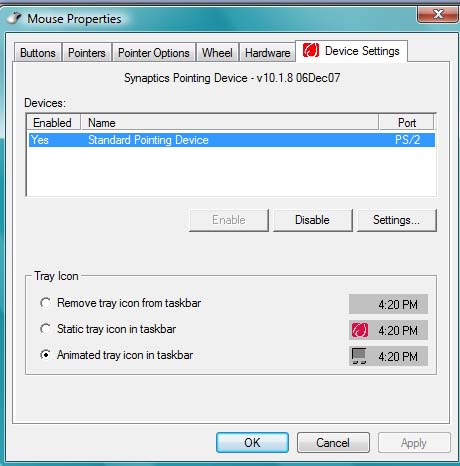
So you don't have the synaptics "Device Settings" tab under the mouse properties.
Here is what it looks like on my system.
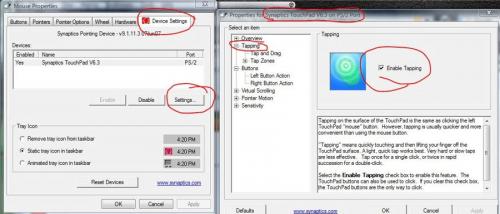
I am wondering what version you have and if you can even find out.
So you don't have the synaptics "Device Settings" tab under the mouse properties.
Here is what it looks like on my system.
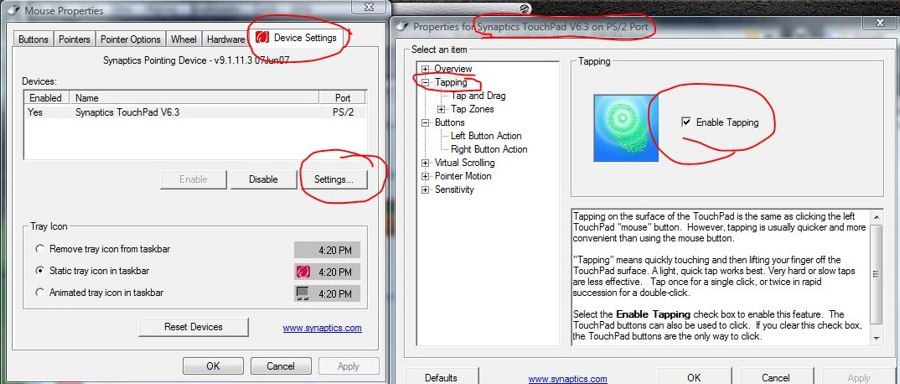
I am wondering what version you have and if you can even find out.
#9
Posted 04 January 2008 - 07:29 PM
PsychPosse
-
- Member
-
- 322 posts
Member
Try uninstalling it and reinstalling with a new download. (I know you already updated but it may have corrupted somehow)
1. Download a new driver version. Save it to your desktop but don't install it.
Click to download from Synaptics: Vista 32bit Driver Download (latest version)
2. Go to: >ControlPanel/ProgramsAndFeatures/SynapticsPointingDeviceDriver and uninstall it.
You will have to do a restart and it make take a bit as it finishes uninstalling before completely shutting down and rebooting.
Make sure your mouse pad works after the reboot; if it doesn't, do a reboot again and it should work.
Double click the new download and let it install. You might have to do another reboot after installation.
3. Share the good news.
1. Download a new driver version. Save it to your desktop but don't install it.
Click to download from Synaptics: Vista 32bit Driver Download (latest version)
2. Go to: >ControlPanel/ProgramsAndFeatures/SynapticsPointingDeviceDriver and uninstall it.
You will have to do a restart and it make take a bit as it finishes uninstalling before completely shutting down and rebooting.
Make sure your mouse pad works after the reboot; if it doesn't, do a reboot again and it should work.
Double click the new download and let it install. You might have to do another reboot after installation.
3. Share the good news.
Edited by PsychPosse, 04 January 2008 - 07:31 PM.
#10
Posted 05 January 2008 - 04:40 PM
Jules52
- Topic Starter
-
- Member
-
- 44 posts
Member
I do have the Synaptics "Device Settings" under Mouse Properties. Here is what it looks like on my system:
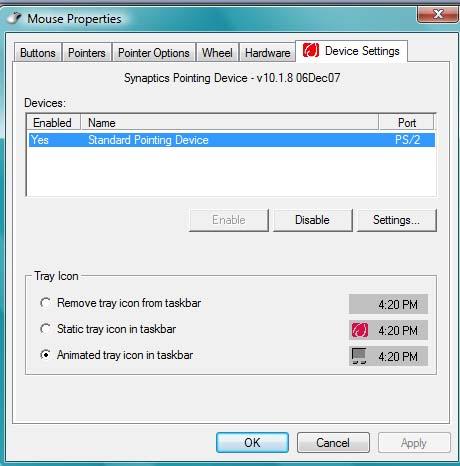
As you can see, on clicking the Settings button there is no Tapping Item or Virtual Scrolling, Pointer Motion or Sensitivity Items.
I have uninstalled and reinstalled the Synaptics Pointing Device driver version 10.1.8 Vista32 as you suggested. It has not soved the problem.
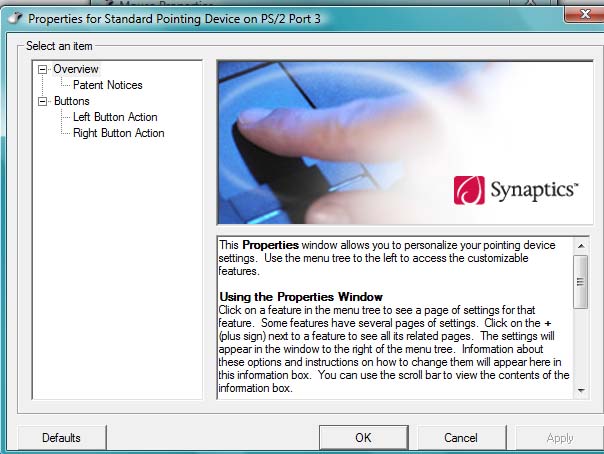
As you can see, on clicking the Settings button there is no Tapping Item or Virtual Scrolling, Pointer Motion or Sensitivity Items.
I have uninstalled and reinstalled the Synaptics Pointing Device driver version 10.1.8 Vista32 as you suggested. It has not soved the problem.
#11
Posted 05 January 2008 - 08:36 PM
PsychPosse
-
- Member
-
- 322 posts
Member
Ok.. I see your Synaptics Device is not listed in the Hardware list. I will look into that some more.
What "family" of Toshiba do you have?
(satellite, tecra, etc..) and what is the model number.
What "family" of Toshiba do you have?
(satellite, tecra, etc..) and what is the model number.
Edited by PsychPosse, 05 January 2008 - 09:26 PM.
#12
Posted 06 January 2008 - 11:35 AM
Jules52
- Topic Starter
-
- Member
-
- 44 posts
Member
Model Name: Toshiba Equium A200-15L
Model No: PSAE2E-00J00CAV
Model No: PSAE2E-00J00CAV
#13
Posted 06 January 2008 - 12:03 PM
PsychPosse
-
- Member
-
- 322 posts
Member
Not sure what to tell you at the moment.
I found a request for help from a different user with a similar problem. He has the same laptop as you and also had a problem with the touchpad after a recent update, only differance is he lost the scrolling function.
It might be beneficial to keep an eye on this topic to see if he gets any help from Toshiba techs.
Here is the link: Toshiba Tech Forum
I'm a little confused at to why I can't find anything about this laptop at the Toshiba site here.
I found a request for help from a different user with a similar problem. He has the same laptop as you and also had a problem with the touchpad after a recent update, only differance is he lost the scrolling function.
It might be beneficial to keep an eye on this topic to see if he gets any help from Toshiba techs.
Here is the link: Toshiba Tech Forum
I'm a little confused at to why I can't find anything about this laptop at the Toshiba site here.
Edited by PsychPosse, 06 January 2008 - 12:10 PM.
#14
Posted 06 January 2008 - 02:54 PM
Jules52
- Topic Starter
-
- Member
-
- 44 posts
Member
Thanks. I'll monitor the Toshiba forum you suggested - there have been no replies yet. My Toshiba laptop is UK. The equivalent Toshiba Downloads page is http://uk.computers...._DOWNLOAD_FILES (I don't know how to put this into the post as a link as you have done). On the Toshiba UK Download Files page enter the following in the drop down menus: Product Type: Notebook; Family: Equium; Product Series: Equium A Series; Model: Equium A200 (PSAE2).
It doesn't look as if there is a straightforward solution to this problem. It is so frustrating. On many occasions when moving the cusor using the touchpad I inadvertantly open up some program or control feature, even deleting or changing things by mistake. I do not understand why I cannot turn off this 'tap to click' when a few weeks ago I had no problem ie I had it switched off. I don't know if it is relevant, but I noticed that when I uninstalled the Synaptics driver and just used the remaining Microsoft driver for the touchpad I also had the 'tap to click' function on and no way to disable it. I am suprised to find that 'tap to click' is the normal default whatever the source of the touchpad program.
It doesn't look as if there is a straightforward solution to this problem. It is so frustrating. On many occasions when moving the cusor using the touchpad I inadvertantly open up some program or control feature, even deleting or changing things by mistake. I do not understand why I cannot turn off this 'tap to click' when a few weeks ago I had no problem ie I had it switched off. I don't know if it is relevant, but I noticed that when I uninstalled the Synaptics driver and just used the remaining Microsoft driver for the touchpad I also had the 'tap to click' function on and no way to disable it. I am suprised to find that 'tap to click' is the normal default whatever the source of the touchpad program.
#15
Posted 06 January 2008 - 04:33 PM
PsychPosse
-
- Member
-
- 322 posts
Member
Well I rarely use the touchpad so I have it turned off completely most of the time.
I use a wireless mouse.
I can't figure out on my system, how to disable the touchpad without Synaptics. I cannot reproduce the problem you have either.
And as I mentioned earlier on, I have a small button that is practically invisible on the touchpad that I simply use to disable it. Apparently your laptop doesn't have such a thing.
So you could just go get a wireless mouse with the small USB receiver, they work great. Then you won't have the problem you have while using the touchpad. (at least not as much)
Hopefully we can get your problem figured out though. I am not giving up yet.
I use a wireless mouse.
I can't figure out on my system, how to disable the touchpad without Synaptics. I cannot reproduce the problem you have either.
And as I mentioned earlier on, I have a small button that is practically invisible on the touchpad that I simply use to disable it. Apparently your laptop doesn't have such a thing.
So you could just go get a wireless mouse with the small USB receiver, they work great. Then you won't have the problem you have while using the touchpad. (at least not as much)
Hopefully we can get your problem figured out though. I am not giving up yet.


Similar Topics
0 user(s) are reading this topic
0 members, 0 guests, 0 anonymous users
As Featured On:






 Sign In
 Create Account


