Mouse, Audio, Video Stutters - Geeks to Go Forums

Jump to content

Log in Register Register Malware removal guide How it works

Mouse, Audio, Video Stutters

#1 troubleduser

  • Group: Member
  • Posts: 16
  • Joined: 23-April 12

Posted 23 April 2012 - 11:20 AM

I've windows XP Home Edition on Dell Vostro 1500 (with Intel Core 2 Duo CPU).
My laptop was working fine from last 2.5 yrs but suddenly from last 3 days, I'm experiencing this stuttering problems.
My mouse lags intermittently, any audio (from iTunes, You tube) stutters and videos also have the same issue. Even the windows startup and shutdown audio stutters.
I've gone through various forums online and have tried Updating Audio Driver, DMA Settings on IDE Controller, Removed recently installed windows updates, Ran chkdsk and defragmentation, Ran SuperAntiSpyware, Malwarebytes, CCleaner, Norton-AntiVirus check. Still no solution.
Would appreciate if you can provide any more pointers.

#2 Macboatmaster

  • Group: Member
  • Posts: 7,233
  • Joined: 13-March 10

Posted 23 April 2012 - 03:57 PM

Welcome to Geeks to Go

Do the same faults occur in a Safe Mode with Networking boot on F8 please

#3 troubleduser

  • Group: Member
  • Posts: 16
  • Joined: 23-April 12

Posted 23 April 2012 - 04:33 PM

Same problem in safe mode. Mouse lagged and video stutter. Voice did not work in safe mode though.

#4 Macboatmaster

  • Group: Member
  • Posts: 7,233
  • Joined: 13-March 10

Posted 23 April 2012 - 04:41 PM

1.

Quote

Voice did not work in safe mode though.


Please clarify the above.

2. Try Safe Mode on its own please.

3. In normal boot mode check device manager please for any warnings

4. Sound fault only on video or on graphics as well please.

#5 troubleduser

  • Group: Member
  • Posts: 16
  • Joined: 23-April 12

Posted 23 April 2012 - 06:06 PM

1. Well, in Safe Mode (with or without network), the audio did not work. No Sound. When I check on "Sound Control" it says "There are no active mixer devices available. To install mmixer devices, go to Control Panel, click Printers and Other Hardware, and then click Add Hardware".
2. Same issue in Safe mode without network. Mouse and video stutters and no audio
3. In Device Manager, I see 2 warnings (Yellow question mark with exclamation) under Other devices.
a)BCM2045 b) Modem Device on High Definition Audio Bus
I guess these 2 warnings have been around for while.
4. Sorry I didn't understand what do you mean graphics vs video.

Thanks for looking into it

#6 Macboatmaster

  • Group: Member
  • Posts: 7,233
  • Joined: 13-March 10

Posted 23 April 2012 - 07:20 PM

1) Click on Start and Run
2) Type the following command and press Enter

services.msc

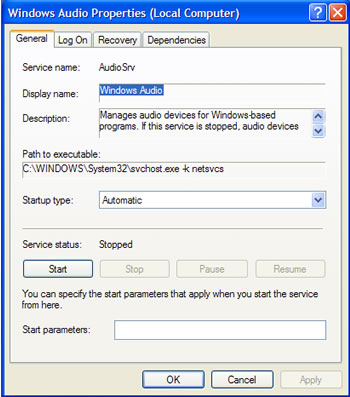
3) Scroll down to Windows Audio in the right-hand column and double-click on it, you should see a screen similar to this one.

Posted Image


Check the start type is shown automatic and if the service is topped , please start it.

#7 troubleduser

  • Group: Member
  • Posts: 16
  • Joined: 23-April 12

Posted 23 April 2012 - 07:27 PM

Windows Audio Service had startup mode of "Automatic" and the service is already Started.

#8 Macboatmaster

  • Group: Member
  • Posts: 7,233
  • Joined: 13-March 10

Posted 23 April 2012 - 07:36 PM

I am signing off now.


If that does not work, I suggest you connect an external mouse, if you are referring to the touchpad and pointer, not as a solution of course, but simply to try.

I also suggest that you uninstall the sound driver and install this one from Dell

http://www.dell.com/...ivers/us/en/555


I appreciate that you already have updated but uninstall it in Control Panel add remove programs please - SigmaTel
and then install.

Download it please before you uninstall, then reboot and see if windows will find a driver, test the sound with that driver, if Windows does find one and then if still no good install the driver you downloaded from Dell

#9 troubleduser

  • Group: Member
  • Posts: 16
  • Joined: 23-April 12

Posted 23 April 2012 - 07:45 PM

I've a wireless mouse and I tried it but same issue.
I can still live with mouse lags but audio/video is more of a problem since we use it heavily for multimedia (Netflix/Movies, etc)..

I'll uninstall and install the sound drivers as you said. Will update results in a while.

Thanks.

#10 troubleduser

  • Group: Member
  • Posts: 16
  • Joined: 23-April 12

Posted 23 April 2012 - 08:17 PM

Uninstalled through Control Panel --> Add/Remove Programs. On re-starting Windows search found "IDT High Definition Audio CODEC" driver but could not install it due to Error Code "10". Looked up this code may be due to incompatible driver. So, installed SigmaTel Audio CODEC and the audio now works but with same problem of stuttering. :(

#11 Macboatmaster

  • Group: Member
  • Posts: 7,233
  • Joined: 13-March 10

Posted 23 April 2012 - 08:37 PM

Thought you may be interested

Not that it will cure the problem I regret, but IDT bought Sigma Tel in about 2008 I think and window offers the IDT driver, rather than the original Sigma Tel driver.

That is why the IDT one would not work.

Would you also send me this please.

PLEASE NOTE - may I ask that you do not make any changes, recommended.


It is of course your computer, but if you make changes after sending me the results, it makes my job harder.
2. Run this please and send me the results

Please Run the PCPitstop.com OverDrive Full Tests

Here's how:

You must use your Internet Explorer for this procedure. (doesn't work so well in Firefox or others).

Go to: http://www.pCPitstop.com

Click on "Free Computer Check-up" listed below PC Pitstop OverDrive

In the User Login - Click on "Sign up FREE!" OR YOU CAN RUN THE TEST ANON. without signing up. - you will see that at the end of that screen. The results will still be saved long enough for me to look at them.

If you do wish to sign up - for some reason

Now enter your email address and password to Log in, Select - Scan this system Now!(button)

You will then be asked to download an ActiveX component and allow it to install.
It is safe and does not compromise your privacy.

Follow the on-screen prompts to install the ActiveX and to allow the Full Tests to be run on your machine.

The Full Tests take about 2 1/2 - 3 minutes on most machines.
When complete, a Results - Summary - Recommended Fixes will be displayed. - Please do not follow any procedures, until I have seen it for the reason outlined above

Please post the URL internet address, from your Results, back here into this Topic Thread so that we can review the configuration.

Note: During the graphics 2D and graphics 3D testing, your screen will display some rapidly moving objects.
If you are sensitive to visual flashing, it may cause dizziness. Therefore, look away from the screen during that portion of the testing.


While PCPitstop does offer a variety of Paid Products, the PCPitstop OverDrive testing is FREE. Please ignore the references to Paid Products. We prefer to provide manual solution instructions that you can apply directly to your machine.

PLEASE DO NOT RUN ANY other tests on offer

#12 troubleduser

  • Group: Member
  • Posts: 16
  • Joined: 23-April 12

Posted 24 April 2012 - 04:52 PM

hey, back from work.
Below is the URL from pitstop

http://www.pcpitstop...?conid=24888314

#13 Macboatmaster

  • Group: Member
  • Posts: 7,233
  • Joined: 13-March 10

Posted 24 April 2012 - 05:19 PM

To save you waiting, for a reply that is not arriving, tonight, will post before 1800 - just about to sign off.

0019 in UK


I have had a quick look - I do not know if you have but there is something slowing down the whole system, your hard drive read wite speed is down, your processor is slower than I have ever seen and your memory capabilities are down, not on installed Mb`s but on speed.

For instance

Quote

The processor performance of this system, 3477 MIPS (millions of integer operations per second), is significantly lower than similar systems with the same type of processor running at the same clock rate, which perform at 11852 MIPS, on average.


Download this, you will have to make another CD and run the memtest please

OPTION A If you have more than one RAM module installed, try starting computer with one RAM stick at a time.

NOTE Keep in mind, the manual check listed above is always superior to the software check, listed below. DO NOT proceed with memtest, if you can go with option A

B. If you have only one RAM stick installed...or cannot easily, or would rather not, remove sticks to test physically
...run memtest...


1. Download - Pre-Compiled Bootable ISO (.zip). If you prefer to use the USB version then use this link USB KEY
2. Unzip downloaded /memtest86+-4.20.iso.zip file.
3. Inside, you'll find /memtest86+-4.20.iso file.
4. Download, and install ImgBurn: http://www.imgburn.com/
5. Insert blank CD into your CD drive.
6. Open ImgBurn, and click on Write image file to disc
7. Click on Browse for a file... icon:

Posted Image

8. Locate memtest86+-4.20.iso file, and click Open button.
9. Click on ImgBurn green arrow to start burning bootable memtest86 CD:

Posted Image

10. Once the CD is created, boot from it, and memtest will automatically start to run. You may have to change the boot sequence in your BIOS to make it work right.

To change Boot Sequence in your BIOS
    Reboot the system and at the first post screen (where it is counting up memory) start tapping the DEL button
    This will enter you into the Bios\Cmos area.
    Find the Advanced area and click Enter
    Look for Boot Sequence or Boot Options and highlight that click Enter
    Now highlight the first drive and follow the directions on the bottom of the screen on how to modify it and change it to CDrom.
    Change the second drive to the C or Main Drive
    Once that is done then click F10 to Save and Exit
    You will prompted to enter Y to verify Save and Exit. Click Y and the system will now reboot with the new settings.


The running program will look something like this depending on the size and number of ram modules installed:


Posted Image

It's recommended to run 5-6 passes. Each pass contains very same 8 tests.

This will show the progress of the test. It can take a while. Be patient, or leave it running overnight.

Posted Image

The following image is the test results area:

Posted Image

The most important item here is the “errors” line. If you see ANY errors, even one, most likely, you have bad RAM.

#14 Macboatmaster

  • Group: Member
  • Posts: 7,233
  • Joined: 13-March 10

Posted 24 April 2012 - 05:48 PM

I have posted separately so you do not miss it, please do check the memory first.

If that is OK and you must let it run for the complete 5 or 6 passes with 8 tests in each pass, then please
UNINSTALL NORTON - it will not be the first time that I have seen Norton completely slow down a system.

Here is the Norton removal tool, follow the instructions applicable to your product.
https://www-secure.s...n=1&pvid=f-home
You must disable Norton before you can uninstall it.


NOW of course you need an AV
May I suggest this for the time being if you do not find it suitable to your requiremnst you can of course change.
It is free, unobtrusive, uses few resources, regularly updated and I use it on all my computers and it has never let me down.

http://windows.micro...rity-essentials

Goodnight, if you get a move on you can have all this done for when I come back online about 1800 :lol:

#15 troubleduser

  • Group: Member
  • Posts: 16
  • Joined: 23-April 12

Posted 24 April 2012 - 05:49 PM

What is the Option A ? The manual checklist.. Sorry I don't see it.. I just see instructions for memtest.


As explained - sorry missed part of the paragraph on my paste from my database.
Macboatmaster.

Share this topic:


  • 3 Pages +
  • 1
  • 2
  • 3