

Document created in Microsoft Word won't open in Open Office
Started by
debodun
, Jul 16 2012 02:02 PM
#1

 Posted 16 July 2012 - 02:02 PM
debodun
-
- Member
-

- 567 posts
Member
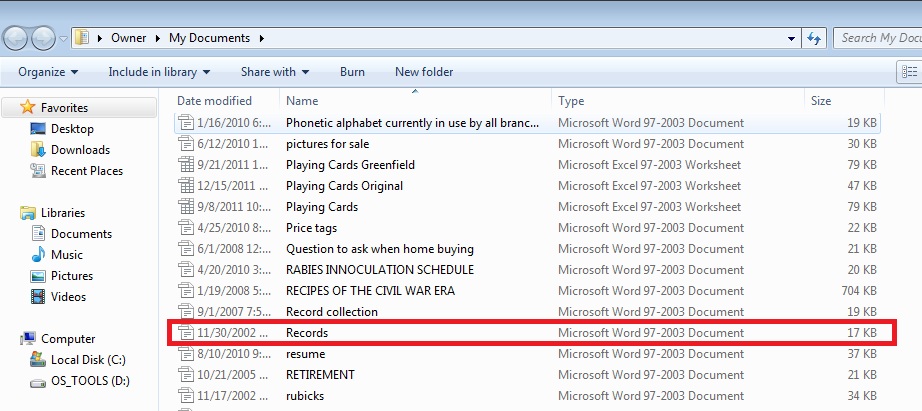

#2
Posted 16 July 2012 - 07:01 PM
AstraNut
-

- Member
-
- 465 posts
Member
#3
Posted 17 July 2012 - 04:18 AM
debodun
- Topic Starter
-
- Member
-
- 567 posts
Member
That only works if you have Word. I only have Open Office.
#4
Posted 18 July 2012 - 10:51 AM
AstraNut
-
- Member
-
- 465 posts
Member
From the image, it looks like there is no extension. I assume you have "show common extensions" turned off. You could try renaming the extension. If the file was an original Word file, OpenOffice would have opened it unless corrupted. That's why I figured you could try to repair it. Maybe even try a .rtf extension or try opening in a plain text editor. You'll lose any formatting/images, but you'll recover the main content.
Might help...
File Converters:
Three Free Tools That Convert PDF Files To Word Documents: http://www.makeuseof...word-documents/
Free online file converter: http://www.cometdocs.com/
http://www.freefileconvert.com/
http://www.coolutils...L-Converter.php
http://www.zamzar.com/
Might help...
File Converters:
Three Free Tools That Convert PDF Files To Word Documents: http://www.makeuseof...word-documents/
Free online file converter: http://www.cometdocs.com/
http://www.freefileconvert.com/
http://www.coolutils...L-Converter.php
http://www.zamzar.com/


Similar Topics
0 user(s) are reading this topic
0 members, 0 guests, 0 anonymous users
As Featured On:






 Sign In
 Create Account


