
BSOD again tt - Geeks to Go Forums

Jump to content

Log in Register Register Malware removal guide How it works

BSOD again tt

#1 Joshua.Locke

  • Group: Member
  • Posts: 95
  • Joined: 06-July 12

Posted 31 July 2012 - 12:18 AM

first it was my ram now im getting another bsod or idk i getting tired of this, i need help pretty plz


System Information (local)
--------------------------------------------------------------------------------

computer name: JOSHUA-PC
windows version: Windows 7 Service Pack 1, 6.1, build: 7601
windows dir: C:\Windows
CPU: GenuineIntel Intel® Core™ i7-3770 CPU @ 3.40GHz Intel586, level: 6
8 logical processors, active mask: 255
RAM: 4258476032 total
VM: 2147352576, free: 1952006144


--------------------------------------------------------------------------------
Crash Dump Analysis
--------------------------------------------------------------------------------

Crash dump directory: C:\Windows\Minidump

Crash dumps are enabled on your computer.


On Tue 7/31/2012 6:14:30 AM GMT your computer crashed
crash dump file: C:\Windows\Minidump\073112-12578-01.dmp
This was probably caused by the following module: ntoskrnl.exe (nt+0x7F1C0)
Bugcheck code: 0xF4 (0x3, 0xFFFFFA8005F43B30, 0xFFFFFA8005F43E10, 0xFFFFF8000377F510)
Error: CRITICAL_OBJECT_TERMINATION
file path: C:\Windows\system32\ntoskrnl.exe
product: Microsoft® Windows® Operating System
company: Microsoft Corporation
description: NT Kernel & System
Bug check description: This indicates that a process or thread crucial to system operation has unexpectedly exited or been terminated.
This appears to be a typical software driver bug and is not likely to be caused by a hardware problem.
The crash took place in the Windows kernel. Possibly this problem is caused by another driver which cannot be identified at this time.



On Tue 7/31/2012 6:14:30 AM GMT your computer crashed
crash dump file: C:\Windows\memory.dmp
This was probably caused by the following module: ntkrnlmp.exe (nt!KeBugCheckEx+0x0)
Bugcheck code: 0xF4 (0x3, 0xFFFFFA8005F43B30, 0xFFFFFA8005F43E10, 0xFFFFF8000377F510)
Error: CRITICAL_OBJECT_TERMINATION
Bug check description: This indicates that a process or thread crucial to system operation has unexpectedly exited or been terminated.
This appears to be a typical software driver bug and is not likely to be caused by a hardware problem.
The crash took place in the Windows kernel. Possibly this problem is caused by another driver which cannot be identified at this time.


On Tue 7/31/2012 6:07:55 AM GMT your computer crashed
crash dump file: C:\Windows\Minidump\073112-18156-01.dmp
This was probably caused by the following module: ntoskrnl.exe (nt+0x7F1C0)
Bugcheck code: 0x7A (0x20, 0xFFFFFFFFC000009D, 0xFFFFFA8005A8C7C8, 0x0)
Error: KERNEL_DATA_INPAGE_ERROR
file path: C:\Windows\system32\ntoskrnl.exe
product: Microsoft® Windows® Operating System
company: Microsoft Corporation
description: NT Kernel & System
Bug check description: This bug check indicates that the requested page of kernel data from the paging file could not be read into memory.
The crash took place in the Windows kernel. Possibly this problem is caused by another driver which cannot be identified at this time.

On Tue 7/31/2012 4:15:33 AM GMT your computer crashed
crash dump file: C:\Windows\Minidump\073012-16250-01.dmp
This was probably caused by the following module: ntfs.sys (Ntfs+0xEF648)
Bugcheck code: 0x7A (0xFFFFF6FC40009990, 0xFFFFFFFFC000000E, 0x52697860, 0xFFFFF88001332648)
Error: KERNEL_DATA_INPAGE_ERROR
file path: C:\Windows\system32\drivers\ntfs.sys
product: Microsoft® Windows® Operating System
company: Microsoft Corporation
description: NT File System Driver
Bug check description: This bug check indicates that the requested page of kernel data from the paging file could not be read into memory.
The crash took place in a standard Microsoft module. Your system configuration may be incorrect. Possibly this problem is caused by another driver on your system which cannot be identified at this time.


On Tue 7/31/2012 3:32:04 AM GMT your computer crashed
crash dump file: C:\Windows\Minidump\073012-11546-01.dmp
This was probably caused by the following module: ntoskrnl.exe (nt+0x7F1C0)
Bugcheck code: 0x7A (0xFFFFF6FB800083F8, 0xFFFFFFFFC000000E, 0x9847D880, 0xFFFFF7000107FFF8)
Error: KERNEL_DATA_INPAGE_ERROR
file path: C:\Windows\system32\ntoskrnl.exe
product: Microsoft® Windows® Operating System
company: Microsoft Corporation
description: NT Kernel & System
Bug check description: This bug check indicates that the requested page of kernel data from the paging file could not be read into memory.
The crash took place in the Windows kernel. Possibly this problem is caused by another driver which cannot be identified at this time.
#2 rshaffer61

  • Group: Moderator
  • Posts: 32,402
  • Joined: 28-February 09

Posted 31 July 2012 - 08:48 AM

Tutorial for running chkdsk in Vista\Win 7 located HERE.

#3 Joshua.Locke

  • Group: Member
  • Posts: 95
  • Joined: 06-July 12

Posted 31 July 2012 - 12:07 PM

Done now wat should i do?

#4 rshaffer61

  • Group: Moderator
  • Posts: 32,402
  • Joined: 28-February 09

Posted 31 July 2012 - 12:44 PM

Did it report any errors during the steps?

#5 Joshua.Locke

  • Group: Member
  • Posts: 95
  • Joined: 06-July 12

Posted 31 July 2012 - 03:09 PM

no it says no errors found in all steps, i just dont get it why i get so many errors and different ones.
this is so frustrating...

#6 rshaffer61

  • Group: Moderator
  • Posts: 32,402
  • Joined: 28-February 09

Posted 31 July 2012 - 03:10 PM

OK no problem then it is not a file system issue.


Go HERE and read the tutorial that shows how to do SFC or System File Checker and running in a Elevated Command Prompt in Vista and Win7.

#7 Joshua.Locke

  • Group: Member
  • Posts: 95
  • Joined: 06-July 12

Posted 31 July 2012 - 03:37 PM

ok it says Windows Resource Protection did not find any integrity violations.

T_T

#8 rshaffer61

  • Group: Moderator
  • Posts: 32,402
  • Joined: 28-February 09

Posted 31 July 2012 - 03:39 PM

OK so it is not the system files causing the issue. Have you had any other BSOD's since we started?
BTW is there any particular program the BSOD's happen with?

#9 Joshua.Locke

  • Group: Member
  • Posts: 95
  • Joined: 06-July 12

Posted 31 July 2012 - 04:02 PM

onyl happens when i play games, like kingdoms of amadaleur, path of exile, DoTa 2 and diablo 3
and no i havent, i havent played tho

#10 rshaffer61

  • Group: Moderator
  • Posts: 32,402
  • Joined: 28-February 09

Posted 31 July 2012 - 04:04 PM

OK that would indicate a possible video driver issue. Try one of them and let me know what happens.

#11 Joshua.Locke

  • Group: Member
  • Posts: 95
  • Joined: 06-July 12

Posted 31 July 2012 - 04:51 PM

no crash so far, yesterday night i got 3 in a row then stop playing

#12 rshaffer61

  • Group: Moderator
  • Posts: 32,402
  • Joined: 28-February 09

Posted 31 July 2012 - 05:00 PM

One of the steps we did today may have helped hopefully.

#13 ranchhand3

  • Group: Member
  • Posts: 66
  • Joined: 31-July 12

Posted 31 July 2012 - 05:17 PM

Hey Joshua.... this is your key:

Quote

onyl happens when i play games
Your problem may be overheating; gaming creates the greatest stress out of any app on a computer. I assume you are running a desktop, not a laptop, correct me if I am wrong. If you have had your computer 2 years or more, and especially if it sits on the floor, pop the side off and blow out the dust. I use a small canister vacuum cleaner with the airflow reversed from suction to "blow" with a crevice tool (I suggest you do this outside, there will be a considerable amount of dust). Do not use these compressed air cans, they are expensive and weak. Also, they can actually create "frost" condensation on metal parts which you do not want. Especially pay attention to all fans, and double-especially the CPU heatsink and fan which will clog with dust and start overheating the unit due to poor airflow. If you recently installed a high-performance video card it may be overheating also. Also, check your memory sticks after a BSOD; if they are really hot that may be a problem also. Try this and post back with results.
[EDIT]: Ok, I just re-read your post, and I guess you are saying that you are not having any more BSODs so far. I thought at first you meant you had none, and suddenly you had 3 in a row so you still had a problem. Sorry... I should have read the post more carefully!

#14 rshaffer61

  • Group: Moderator
  • Posts: 32,402
  • Joined: 28-February 09

Posted 31 July 2012 - 05:25 PM

It would also help if you were to get the temps after playing the game for a bit.

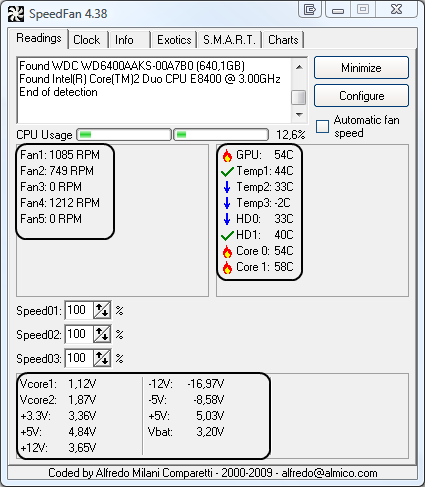
Download Speedfan (The download link is to the right), and install it. Once it's installed, run the program and post here the information it shows.
The information I want you to post is the stuff that is circled in the example picture I have attached.
To make sure we are getting all the correct information it would help us if you were to attach a screenshot like the one below of your Speedfan results.

To do a screenshot please have click on your Print Screen on your keyboard.
  • It is normally the key above your number pad between the F12 key and the Scroll Lock key
  • Now go to Start and then to All Programs
  • Scroll to Accessories and then click on Paint
  • In the Empty White Area click and hold the CTRL key and then click the V
  • Go to the File option at the top and click on Save as
  • Save as file type JPEG and save it to your Desktop
  • Attach it to your next reply


Posted Image

#15 Joshua.Locke

  • Group: Member
  • Posts: 95
  • Joined: 06-July 12

Posted 31 July 2012 - 05:35 PM

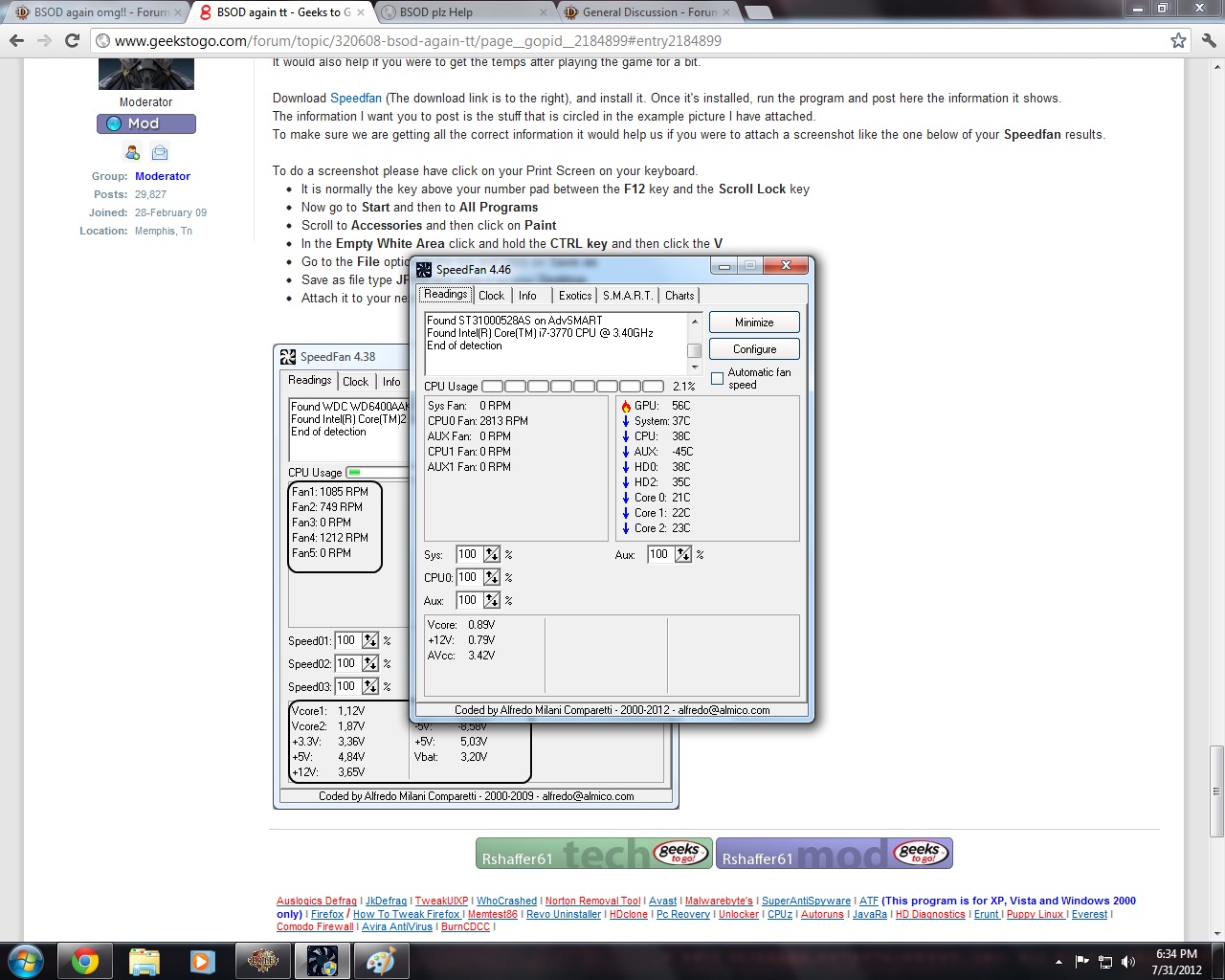
ok there it is it seems when im playing the game it gets really hot the gpu but idk

Attached Image: fan.jpg

when am on the desk it low to 43c

Share this topic:


  • 12 Pages +
  • 1
  • 2
  • 3
  • Last »




