Welcome Guest ( Log In | Register )

      
Discover the best free computer help!
Learn more about Geeks to Go by taking the tour. Spyware, virus, trojan, fake security or privacy alerts? Read the malware cleaning guide.
4 Pages V   1 2 3 > »   
Reply to this topicStart new topic
Free Antivirus and Antispyware Software, Includes screenshots and recommendations
admin
post Sep 12 2003, 06:43 AM
Post #1


Site Administrator
Group Icon
Posts: 17,472
From: 127.0.0.1
OS: Windows Vista Ultimate


Use the links below to find free resources to scan and remove viruses, and to scan and remove spyware from your computer. Includes: Free Antivirus Software, Free Online Virus Scanners, Free Virus Removal Tools for Specific Infections, Free Spyware Detection and Removal, Free Online Spyware Detection and Removal, Free Spyware Prevention, Free Firewalls, Free Rootkit Detection and Removal, Other Free Tools.

Free Antivirus Software

Important note: Geeks to Go highly recommends uninstalling any other antivirus software BEFORE installing another antivirus application. Antivirus programs often conflict and can cause system slowdowns, crashes, or even leave you unprotected. Here are some uninstall programs that you can download directly from the publisher's website: Symantec (Norton) | McAfee | Trend Micro
  1. Avast! Antivirus:
    Click Here for Avast! - Recommended
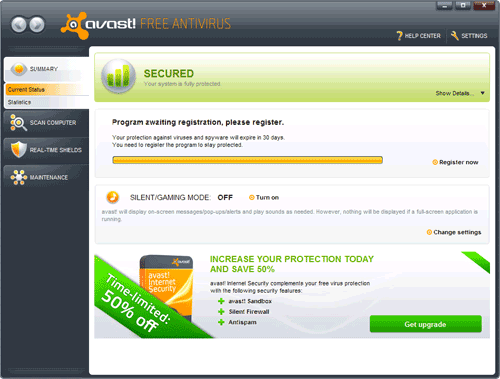
    Avast is light on system resources, and it's unobtrusive. For the most part it runs silently in the background. It's the only free antivirus with boot scan options. While it's our favorite free antivirus, the alarm that the detection engine sounds can be annoying, and we wish they'd remove the requirement for email registration.

    Avast could be used only by home users which do NOT use their computer for profit. If you do not meet this condition, you will need to buy a commercial license of avast!. Use it for up to 60 days before being required to register (for free) and you'll be sent a license key via email. Resident Protection: Instant Messaging, P2P shield, Internet Mail, Outlook/Exchange, Network Shield, Web Shield, Standard Shield. Compatible with Windows 95/98/ME/NT/2K/XP/Vista, 64-bit and Linux.
    1. Splashscreen

    2. Program Interface

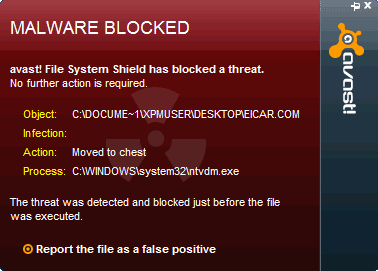
    3. Virus detected
  2. Anti-Vir:
    Click Here for Anti-Vir
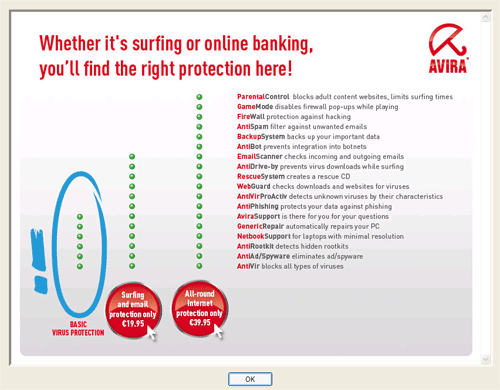
    Anti-Vir has a clean and pleasant interface. It has a small footprint and is easy on system resources. It also consistently ranks near the top of all antiviruses in detection rates. So why isn't it our top recommendation? It's a free product, but aggressively promotes the paid version. For example, a pop-up is displayed after running updates (shown below). Compatible with Windows NT/2K/XP/Vista, 64-bit and Linux.

    This free AntiVirŪ Personal Edition is intended exclusively for private use on a single workstation. You may copy the complete program package and pass it on to others for private use only. The free AntiVirŪ Personal Edition may not be used for commercial or professional purposes.
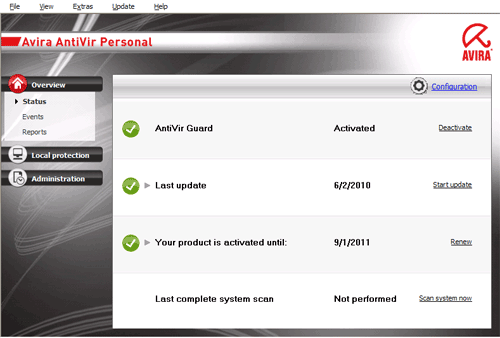
    1. Control Center

    2. Nag screen pop-up

    3. Virus detected
  3. AVG:
    Click Here for AVG
    AVG was among the first of the free antivirus products offered, and has long been a favorite of this site and others. However, their detection rates are consistently testing at the bottom of these free antivirus applications. They've also had a number of problems with their update servers recently. While AVG is still a good choice, it's at the bottom of our recommendations. Compatible with Windows 98/ME/NT/2K/XP/Vista, 64-bit and Linux.

    Antivirus Protection Freeware for HOME use on personal computer only.
    1. AVG Free Edition is a FREE product. There is no warranty and no technical support available unless you purchase a technical support agreement.
    2. You may install and use only one copy of the Software for single home or office computer protection only, irrespective of the number of times you download the Software or the number of licenses you purport to accept.
    3. You may not use the Software on a network or more than one PC.
    1. Test Center

    2. Virus detected
========================================================

Free Online Virus Scanners
  1. Panda Active scan Very easy to use. High detection rate. Detects rootkits. No removal.

  2. Panda NanoScan (beta) Promises quick one minute scans. Only detects active infections. Beware, still in beta.

  3. Panda TotalScan (beta) Vista compatible. Future replacement for Active scan. Removal with registration. Beware, still beta.

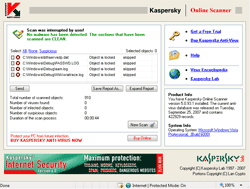
  4. Kaspersky Online Scanner Easy to use. Excellent detection rate. Cannot disinfect. Slow scanning. Slow updating.

  5. Trend Micro Housecall Easy to use. High detection rate. Does NOT require ActiveX.

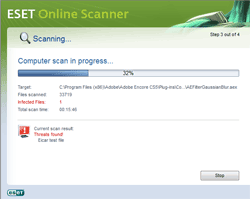
  6. Eset Online Scanner Recently out of beta, uses the very fine ESET detection engine.
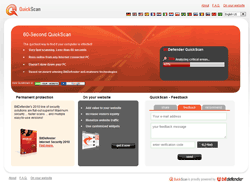
  7. BitDefender Online Scanner Easy to use. High detection rate.
  8. Symantec Security Check Easy to use. High detection rate.

  9. McAfee freescan Easy to use. High detection rate. Cannot disinfect.

  10. eTrust Antivirus Web Scanner Easy to use. High detection rate.

  11. F-Secure Online Virus Scanner Easy to use. High detection rate. Detects & removes rootkits.

  12. ArcaOnline Scanner High detection rate. Buggy interface. Must be added to trusted zone in IE.

  13. Authentium Command On Demand Easy to use. High detection rate. Very light resources. Cannot disinfect.
========================================================

Free Virus Removal Tools for Specific Infections
  1. From Symantec
  2. From BitDefender
  3. From Panda
  4. From ESET
========================================================

Free Spyware Detection and Removal
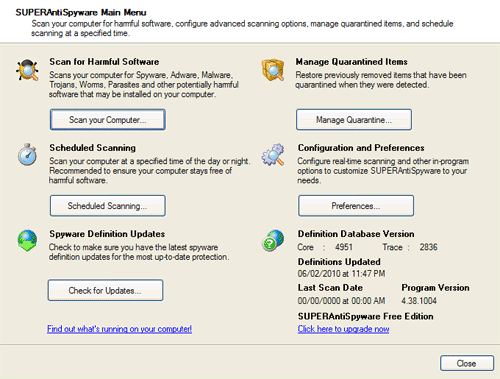
  1. SUPERAntiSpyware Despite the rogue sounding name, this boasts one of the best detection and removal engines available. - Recommended

  2. AVG Anti-Spyware Free Edition Formerly Ewido Antispyware, now renamed by AVG. Still a very competent free scanner, and a worth your consideration.

  3. Spyware Doctor (Google Pack Free Edition) Excellent detection rates, well reviewed antispyware software, but only available for free when installed using Google Pack.

  4. Windows Defender Microsoft's free antivirus application. Now included with Windows Vista. Unlike most free products, it also includes free support (2 incidents).

  5. AdAware 2007 A shiny new interface, and updated to work with Vista, but the same old detection results. The marketing of the paid version is also too visible in the 2007 edition. Okay for basic threats, but it should not be your only spyware protection.

  6. Spybot S&D 1.5 Updated to work with Vista, but little else can be said about this application that's showing its age. Out dated interface, and detection engine. Often buggy. Loyalists may be the only users of this once fine program.
========================================================

Free Online Spyware Detection and Removal
  1. Ewido Online Malware Scan Easy to use. Detects & removes trojans, spyware, adware etc.

  2. a-squared Web Malware Scanner Easy to use. Detects & removes trojans, spyware, adware etc.

  3. Windows Live OneCare Safety Scan Easy to use. Detects & removes trojans, spyware, adware etc. Slow scanning.

  4. Full Service Scan for Windows Vista Easy to use. Vista comaptible. Very slow.

  5. Prevx CSI NEW - Requires a download, but no install. Good detection rate, some false positives (flagged suspicious).
========================================================

Free Spyware Prevention
  1. Spyware Blaster Does NOT scan or detect spyware, it does prevents it from being installed. Uses a blocklist and no computer resources to run. Paid version adds automatic updating. - Recommended

  2. Spyware Guard Real-time protections against spyware. Designed to use along side Spyware Blaster. Offers signature-based scanning for known spyware and heuristic/generic detection capabilities to catch new/mutated spyware.

  3. WinPatrol 2007 WinPatrol is like a watch dog for your computer. It watches programs running on your PC (including the hidden ones) and alerts you if a program tries to install something unexpected, sets itself to run on startup, change your home page or install something it shouldn't.

  4. All-Seeing Eye The program consists of a collection of tools that monitor important areas of your computer, areas in which spyware and other malicious programs practically always leave some kind of trace when they sneak into your computer.

  5. ThreatFire NEW - Fast standard scanning, good behavior based detection (not signature), easy to use.
========================================================

Free Firewalls
    Note: Do NOT run more than ONE firewall.

  1. Comodo Free Firewall Easy to use. Nice looking interface. Impressive performance. - Recommended

  2. Sunbelt-Kerio A terrific free firewall, but aggressive marketing, and confusing license terms, "Sunbelt Personal Firewall 4 can run in a free mode vs. a full (paid) mode. Install it now, and for the first 30 days it will run in 'full' mode. After that, it shuts down selected features, but will continue to run in 'free' mode'."

  3. Zone Alarm A powerful firewall, but bloated and often buggy software. Many features of the pro version are removed from the free version.
========================================================

Free Rootkit Detection and Removal
Sophos Anti-Rootkit
AVG Anti-Rootkit Free
IceSword
GMER

========================================================

Other Free Tools
VirusTotal Single file upload virus scanning and submission
Jotti's Scanner Another site to submit sample files for detection and submission to security publishers
Norman Sandbox Live Upload a suspicious file to this sandbox and get a detail analysis
Sunbelt CWSandbox Sunbelt Research's sandbox
System Safety Monitor Help you to protect your computer from harmful programs. Very comprehensive.

Digg it?
Go to the top of the page
 
+Quote Post
hao hao
post Mar 23 2008, 01:05 AM
Post #2


Spammer
**
Posts: 14
From: beijing
OS: xp


there so many , which one is the best , thank you for giving it to us
Go to the top of the page
 
+Quote Post
ample2008
post Mar 28 2008, 08:11 AM
Post #3


New Member
*
Posts: 5
OS: xp


wow! it is useful for me, it is wonderful!
it is graet!
Go to the top of the page
 
+Quote Post
wizzy2k5
post Mar 29 2008, 06:28 PM
Post #4


GeekU Junior
Group Icon
Posts: 622
OS: XP


Cheers for the list this has alot of information i could refer to at a later date

most appreciated and thanks
Go to the top of the page
 
+Quote Post
kbz1960
post Apr 4 2008, 08:03 PM
Post #5


Member
**
Posts: 67
From: IL
OS: windows xp home


Hi is AVG really that bad and avast that much better? I downloaded Avast 4.8 today because it is the recommended program, uninstalled AVG and installed avast.

Things I like about AVG that evidently Avast can't do unless you buy it for some of the things.

1. Ability to schedule scans when I'm not using the computer.
2. I use Mozilla Thunderbird to access gmail and it scans the email with no extra programs to install and difficult setup.
3. The user interface. Maybe Avast will take some getting use to but I really don't like the interface, I think I'm using a media player.

I do like that Avast includes spyware and rootkit protection.
Go to the top of the page
 
+Quote Post
crawdoogie
post Apr 8 2008, 02:50 AM
Post #6


New Member
*
Posts: 1
OS: Windows XP Pro SP2


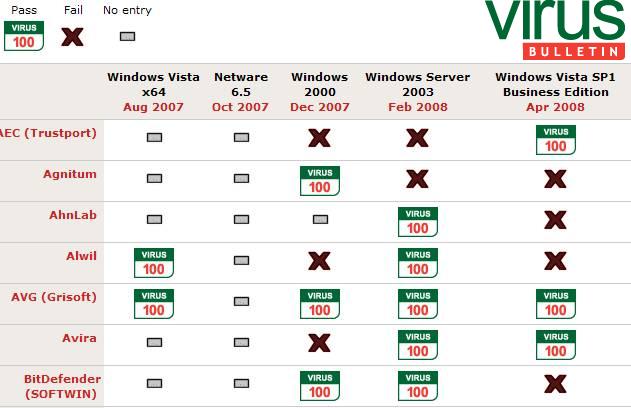
The original post is slightly outdated. AVG 7.5 is vastly improved over earlier versions. Take a look at current test results on the VirusBulletin website.

http://www.virusbtn.com/vb100/archive/resu...display=summary

(note: To view the link above free registration is required.)

Here is a screenshot from the link above showing how AVG, Alwil (Avast), and Avira (Antivir) fared on recent VB100 tests.

Attached Image


This post has been edited by crawdoogie: Apr 8 2008, 03:15 AM
Go to the top of the page
 
+Quote Post
kbz1960
post Apr 8 2008, 03:23 AM
Post #7


Member
**
Posts: 67
From: IL
OS: windows xp home


That's interesting but it's not that far out of date. The post is very old but if you look at the screen shot it does show AVG 7.5 in 9-07. Dang and I all ready switched to avast which failed.
Go to the top of the page
 
+Quote Post
sari
post Apr 8 2008, 06:32 AM
Post #8


Grammar Department Administrator
Group Icon
Posts: 8,960
From: Maryland USA
OS: Windows XP Pro SP2/Windows Vista Business/Windows SBS 2003


kbz1960,

AVG is a perfectly good AV. I myself have is installed on a couple of computers in my house, and I have no complants with it. If you prefer the interface and features of AVG over Avast!, then that's a good reason to use it. An AV's effectiveness can be based in part on how well it's used - if you like and use features of AVG, such as the scheduled scans and the Gmail interface, that's a good reason to use it. People who don't keep their programs updated or take advantage of the features they offer are still vulnerable, regardless of which program they're using. I think you can switch back and feel confident about your decision.
Go to the top of the page
 
+Quote Post
Anonymous1337
post Apr 18 2008, 05:54 PM
Post #9


New Member
*
Posts: 7
OS: Windows XP


I downloaded avast last week after seeing a video of it on youtube.

I did both a boot-time scan and a regular scan, and managed to remove 7 of 13 trojans.

The problem, though, is that every minute or so, a message appears saying,

QUOTE
"Avast!: INI file modification"

"A program is attempting to modify an avast! INI file, possibly changing some of its system-wide settings. Some of the settings can even disable avast! realtime protection."

"Do you want to continue?"

"(Select No unless you are preforming the action intentionally)"


And I have no idea what I'm preforming, so I'm not doing anything intentionally.
I think it's McAffe; instead of Avast's "BEEP BEEP! A trojan has been detected" message, I get mcaffe's crappy message.
It could also be a virus trying to shut avast down, but I'm not too sure.

I was thinking of removing Mcaffe from my computer, but it seems like Avast! isn't picking those active trojans up; only when I scan.

What should I do?

Thanks~

This post has been edited by Anonymous1337: Apr 18 2008, 06:11 PM
Go to the top of the page
 
+Quote Post
CamTheMan
post Apr 18 2008, 06:14 PM
Post #10


Member
***
Posts: 196
From: Alabama
OS: Win XP


QUOTE (Anonymous1337 @ Apr 18 2008, 06:54 PM) *
I downloaded avast last week after seeing a video of it on youtube.

I did both a boot-time scan and a regular scan, and managed to remove 7 of 13 trojans.

The problem, though, is that every minute or so, a message appears saying,

QUOTE
"Avast!: INI file modification"

"A program is attempting to modify an avast! INI file, possibly changing some of its system-wide settings. Some of the settings can even disable avast! realtime protection."

"Do you want to continue?"

"(Select No unless you are preforming the action intentionally)"


And I have no idea what I'm preforming, so I'm not doing anything intentionally.
I think it's McAffe; instead of Avast's "BEEP BEEP! A trojan has been detected" message, I get mcaffe's crappy message.
It could also be a virus trying to shut avast down, but I'm not too sure.

I was thinking of removing Mcaffe from my computer, but it seems like Avast! isn't picking those active trojans up; only when I scan.

What should I do?

Thanks~


Hi Anonymous1337,

If you suspect your infected Follow the instructions here:
http://www.geekstogo.com/forum/Must-Read-B...-Log-t2852.html

Then at the end it will explain how to make a HiJackThis Log you'll post that log here:
http://www.geekstogo.com/forum/Malware-Rem...o-Here-f37.html

Where trained and experience personnel will assist you to remove and clean the infections and recommend you to programs that will help prevent future infections.

If you do not want Mcafee, or Avast and you're not subscribe to them try something thing else in the above post and see which one you like.

Hope this helps you,
Cam

This post has been edited by CamTheMan: Apr 18 2008, 06:15 PM
Go to the top of the page
 
+Quote Post
sari
post Apr 18 2008, 07:16 PM
Post #11


Grammar Department Administrator
Group Icon
Posts: 8,960
From: Maryland USA
OS: Windows XP Pro SP2/Windows Vista Business/Windows SBS 2003


Anonymous1337,

You should never have 2 antivirus programs installed at once, as they can conflicts and slowness on your computer, and even leave you more vulnerable. I would feel confident with Avast, if I were you. It's possible that Avast is trying to update itself and McAfee is flagging it, in which case you're not getting current updates. I would uninstall McAfee, if I were you, and then check for updates for Avast and scan again. If it can't remove everything, then post in the malware forum and get additional help. You say McAfee is catching things that Avast isn't, but remember those viruses got on there while McAfee was installed.
Go to the top of the page
 
+Quote Post
Adamsappleone
post May 6 2008, 09:01 AM
Post #12


Member
**
Posts: 14
From: Tucson, Arizona
OS: WindowsXP Home SP3


Hello all,

You seem to have a very nice compilation of Security Programs listed here, but I noticed that Spysweeper by Webroot is not among them.
Just curious, but is there a particular reason why it's not on your list?
Go to the top of the page
 
+Quote Post
admin
post May 15 2008, 10:26 AM
Post #13


Site Administrator
Group Icon
Posts: 17,472
From: 127.0.0.1
OS: Windows Vista Ultimate


Great question!

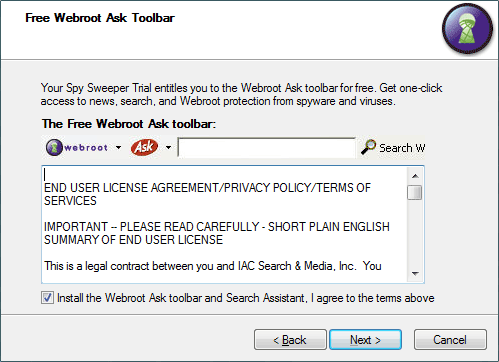
Spysweeper is not free. They offer a 30-day free trial. The trial also installs the Ask toolbar by default. It was a one time favorite of sites like this. However, it has not kept pace with current infections. It will not be recommended as long as behavior like installing toolbars exist by default.

Attached Image
Go to the top of the page
 
+Quote Post
Adamsappleone
post May 15 2008, 11:52 AM
Post #14


Member
**
Posts: 14
From: Tucson, Arizona
OS: WindowsXP Home SP3


Thanks for the info, although, if you have a MSN subscription it is free and the Ask Toolbar is not included.

One more ? please.
What's your feedback on running Avast and Threatfire together?
Go to the top of the page
 
+Quote Post
admin
post May 15 2008, 12:12 PM
Post #15


Site Administrator
Group Icon
Posts: 17,472
From: 127.0.0.1
OS: Windows Vista Ultimate


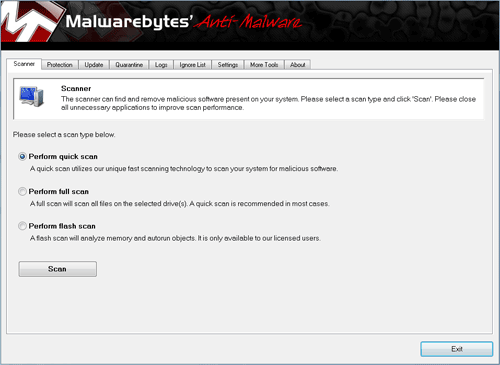
If you have an MSN subscription, and can get it free it's better than nothing. But there are better alternatives. One that's not in this list yet: http://www.malwarebytes.org/mbam.php

Avast and Threatfire should work well together. However, I personally prefer SpywareBlaster.
Go to the top of the page
 
+Quote Post

4 Pages V   1 2 3 > » 
Reply to this topicStart new topic
8 User(s) are reading this topic (8 Guests and 0 Anonymous Users)
0 Members: