Welcome Guest ( Log In | Register )

Discover the best free computer help!
Learn more about Geeks to Go by taking the tour. Spyware, virus, trojan, fake security or privacy alerts? Read the malware cleaning guide.
      
4 Pages V   1 2 3 > »   
Reply to this topicStart new topic
How to Remove Trojan.Win32.Obfuscated.gx, Your browser was infected by
admin
post Dec 9 2007, 11:20 PM
Post #1


Site Administrator
Group Icon
Posts: 16,620
From: 127.0.0.1
OS: Windows Vista Ultimate


How to remove Trojan.Win32.Obfuscated.gx

Fake Alert (Critical System Error):
"Your browser was infected by Trojan.Win32.Obfuscated.gx You need to clean your system immediately, in other case it can be crashed soon!
Click OK to download the high-tech antispyware protection software! (Recommended)"


This infection is usually installed by installing a fake codec:
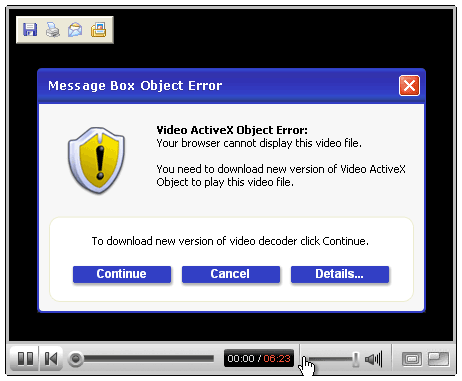

It will serve relentless popups advertising for IEDefender. If you have installed IEDefender, you may have noticed it doesn't easily go away. These instructions should remove that as well. The motive of the infection is to get you to buy IEDefender. Presumably the malware author gets a referral fee for every copy sold. It works like this: Infect your system, display warning popups, install a rogue antispyware application, and then charge you to buy the program that claims to remove the infection they installed.

Removal Instructions:
ShadowPuterDude has authored an automated tool for removal of Trojan.Win32.Obfuscated.gx. You can find the download and instructions here.
    NOTE: You will need to temporarily disable any programs you have running that will block attempts to edit the registry. As FixIEDef calls REGEDIT to delete registry keys added by Zlob, Trojan.Downloader.Delf, AntiSpyPro, and IE Defender.
  1. Download FixIEDef.exe by ShadowPuterDude to the Desktop.
    Note: FixIEDef now supports Non-English Language Systems

  2. Double-click FixIEDef.exe:


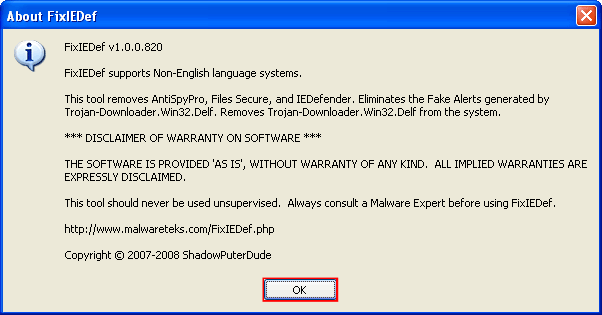
  3. That will open the About FixIEDef screen. Click OK to continue:

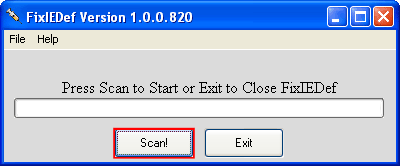
  4. Next, press the Scan! button:


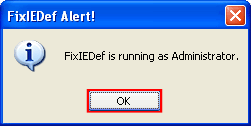
  5. FixIEDef needs to run as Administrator to perform correctly. This message simply confirms it was able to run with admin privileges. Click OK to continue:

  6. Wait for the scan to finish. It shouldn't take very long:
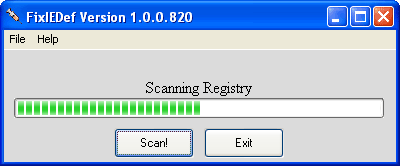

  7. After the !!! All Finished !!! message is displayed, click Exit:
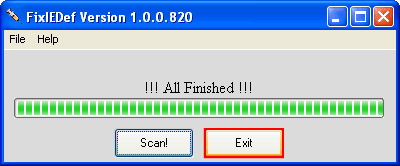

  8. That's it! You're done, and the infection should be removed.

    Note: process.exe is detected by some antivirus programs (AntiVir, Dr.Web, Kaspersky) as a "RiskTool". It is not a virus, but a program used to stop system processes. Antivirus programs cannot distinguish between "good" and "malicious" use of such programs, therefore they may alert the user. See: http://www.beyondlogic.org/consulting/proc...processutil.htm
If after running this tool the Trojan.Win32.Obfuscated.gx infection is still present, post a HiJackThis log in the Malware Removal Forum.

Mirrors: Alternate official download locations for FixIEDef.exe

http://it-mate.co.uk/downloads/fixiedef/fixiedef.exe
http://hosts-file.net/download/fixiedef/fixiedef.exe
http://avant.it-mate.co.uk/?c=Download&f=Tools/FixIEDef
http://archives.mysteryfcm.co.uk/?f=Securi...pyware/FixIEDef

=====================================================================
This is a self-help guide. Use at your own risk.

Important Note: If you need assistance, please start a new topic in our Malware Removal Forum. This topic is also open for comments, but not all will receive a reply.

This post has been edited by admin: Jan 12 2008, 11:35 AM
Reason for edit: support for non-English
Go to the top of the page
 
+Quote Post
idontcare
post Dec 11 2007, 01:54 AM
Post #2


New Member
*
Posts: 3
OS: xp


wow! 5 minutes is all it took to get a reply. thanks it seems to have worked. will definitely save this info. one more thing. where do i go to get the latest version of java that i need? so many different ones out there i have no clue which one (version 5 j2se or plain jane version 6 or whatever) that i need. thanks again for the quick help. so much faster than the tomcoyote forums.
Go to the top of the page
 
+Quote Post
admin
post Dec 11 2007, 08:26 AM
Post #3


Site Administrator
Group Icon
Posts: 16,620
From: 127.0.0.1
OS: Windows Vista Ultimate


Glad we could help!

http://www.java.com/en/download/manual.jsp
Go to the top of the page
 
+Quote Post
imwithavril2000
post Dec 12 2007, 07:22 AM
Post #4


New Member
*
Posts: 1
OS: Windows XP


Thank you so much you guys. I just registered to your website so I could say thank you. I don't even know how I got this annoying virus. I think It got on my computer while I was looking for a video my friend told me was "so cool". It was the 2 girls 1 cup video. I'm still looking for a way to kill my friend for making me watch that video. Anyway thanks again for your help. It was so simple and safe. Now I know where to go If something similar happens again.
Go to the top of the page
 
+Quote Post
don77
post Dec 12 2007, 04:24 PM
Post #5


Malware Expert
Group Icon
Posts: 18,644
From: Boston Ma.
OS: XP Pro,ME, 98


Hello and welcome imwithavril2000

Glad to hear the problem is sorted out and thanks for taking the time to register and let us know

Go easy on your friend smile.gif
Go to the top of the page
 
+Quote Post
smoothdude11
post Dec 13 2007, 04:55 AM
Post #6


New Member
*
Posts: 1
OS: vista


I just wanted to say thanks for the info. I got this virus when a friend told me to watch the BMG pain olympics. I hated it because everytime I opened a folder with internet explorer it would come up with that stupid screen, but I don't have that problem anymore. So thanks your instructions were very easy to follow.
Go to the top of the page
 
+Quote Post
Volgirl21
post Dec 13 2007, 11:36 AM
Post #7


New Member
*
Posts: 1
OS: Windows XP


OMG thank you so much! A friend of mine infected my computer also by looking for the 2 girls 1 cup video. I have since used the above program to disinfect my computer AND promptly created a guest account lol
Go to the top of the page
 
+Quote Post
Speedyspeedb
post Dec 13 2007, 06:29 PM
Post #8


New Member
*
Posts: 1
OS: Vista


Just registered to thank you guys so much for the removal program, been trying for days to remove the thing, downloading numerous fixes recommended and nothing helped, all of them took hours to scan and couldnt find anything. But this one fixed it in 30 secs....so just wanted to say thanks!
Go to the top of the page
 
+Quote Post
OMGTHANKS
post Dec 14 2007, 03:05 AM
Post #9


New Member
*
Posts: 1
OS: Vista


Thanks so much! I registered just to thank you for this. I went to dozens of other sites doing their manual removals and their programs.. nothing worked! This took care of my issue in under five seconds! You saved me wub.gif

This post has been edited by OMGTHANKS: Dec 14 2007, 03:06 AM
Go to the top of the page
 
+Quote Post
emtecbri
post Dec 14 2007, 07:33 AM
Post #10


New Member
*
Posts: 1
OS: Windows XP


smile.gif Thank you so much!!! I've been trying for days to get obfuscated off my computer and that got it off in about 5 seconds. I got the trojan when my friend sent me that BME pain olympics video as well wacko.gif . Oh well, it's all gone now, and I love you! wub.gif Thank you!!! smile.gifsmile.gifsmile.gif
Go to the top of the page
 
+Quote Post
tom 8
post Dec 15 2007, 01:28 AM
Post #11


New Member
*
Posts: 2
OS: windows xp


Hi there! I'm having a bit of a problem. I followed all the steps in the guide, but the virus does not seem to have gone away. I turned off all the other programs I had running, and then executed fixIEDef.bat. It did its thing, it actually got done within seconds which I thought was pretty fast. After I'd exited it and turned on Internet Explorer again, I got the same spam message as before.
I would have filed a HiJackThis log, but I got 404'd when I clicked the link. I don't know what's wrong. I really hope that I'm not totally screwed.

This post has been edited by tom 8: Dec 15 2007, 01:29 AM
Go to the top of the page
 
+Quote Post
Matt T
post Dec 15 2007, 03:46 AM
Post #12


GeekU Senior
Group Icon
Posts: 494
From: New Zealand
OS: Microsoft Windows XP Home Edition


Hey tom 8 and welcome to Geeks To Go! smile.gif

Please read and follow the instructions [Here] and then post a log in the [Malware Forum].

A helper will be with you ASAP, but if it's been over 3 days without help, post a topic in the [Waiting Room]

Good luck
~Matt smile.gif
Go to the top of the page
 
+Quote Post
dickblakemore
post Dec 15 2007, 10:39 AM
Post #13


New Member
*
Posts: 4
From: UK
OS: XP


Thank you for your advice as a result of which I have removed the 'obfuscated' trojan. I obviously collected it when I was looking at the Youtube website and was invited to download an ActiveX codec to enable me to see a video of a young guitar player. (I have included this information in case it is useful for other sufferers) I am very grateful for the effort that you and your colleagues have made.
Go to the top of the page
 
+Quote Post
Davidoyo
post Dec 15 2007, 11:58 AM
Post #14


New Member
*
Posts: 2
OS: windows xp


I am having a problem removing Trojan.Win32.Obfuscated.gx even after following your instructions. I don't know what to do. This is a very annoying problem if you could help me get rid of i that would be greatly appreciated
Go to the top of the page
 
+Quote Post
admin
post Dec 15 2007, 12:40 PM
Post #15


Site Administrator
Group Icon
Posts: 16,620
From: 127.0.0.1
OS: Windows Vista Ultimate


If the FixIEDef tool doesn't remove your infection it's important that you post a HijackThis log in the malware removal forum. These infections are constantly changing and identifying new variants will help yourself and others. thumbsup.gif
Go to the top of the page
 
+Quote Post

4 Pages V   1 2 3 > » 
Reply to this topicStart new topic
1 User(s) are reading this topic (1 Guests and 0 Anonymous Users)
0 Members:


RSS Time is now: 25th July 2008 - 01:18 PM
Advertisements do not imply our endorsement of that product or service. The forum is run by volunteers who donate their time and expertise. We make every attempt to ensure that the help and advice posted is accurate and will not cause harm to your computer. However, we do not guarantee that they are accurate and they are to be used at your own risk.