Welcome Guest ( Log In | Register )

Discover the best free computer help!
Learn more about Geeks to Go by taking the tour. Spyware, virus, trojan, fake security or privacy alerts? Read the malware cleaning guide.
      
 
Reply to this topicStart new topic
How to remove trojan.win32.agent.akk, Critical System Error!
admin
post Dec 7 2007, 10:17 AM
Post #1


Site Administrator
Group Icon
Posts: 17,437
From: 127.0.0.1
OS: Windows Vista Ultimate


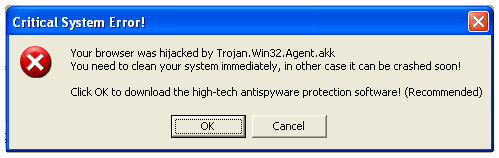
How to remove trojan.win32.agent.akk, and "Critical System Error!" warnings.

"Your browser was hijacked by Trojan.Win32.Agent.akk..." Critical System Error popup:

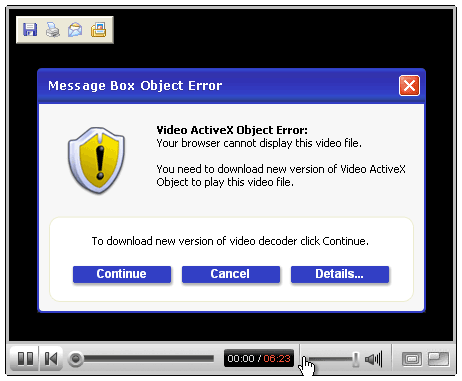
This infection is usually installed by installing a fake codec:

It will serve relentless popups advertising for IEDefender. If you have installed IEDefender, you may have noticed it doesn't easily go away. These instructions should remove that as well. The motive of the infection is to get you to buy IEDefender. Presumably the malware author gets a referral fee for every copy sold. It works like this: Infect your system, display warning popups, install a rogue antispyware application, and then charge you to buy the program that claims to remove the infection they installed.

Trojan.Win32.Agent.akk Removal Instructions:
ShadowPuterDude has authored an automated tool for removal of Trojan.Win32.Agent.akk. You can find the download and instructions here.
    NOTE: You will need to temporarily disable any programs you have running that will block attempts to edit the registry. As FixIEDef calls REGEDIT to delete registry keys added by Zlob, Trojan.Downloader.Delf, AntiSpyPro, and IE Defender.
  1. Download FixIEDef.exe by ShadowPuterDude to the Desktop.
    Note: FixIEDef now supports Non-English Language Systems

  2. Double-click FixIEDef.exe:


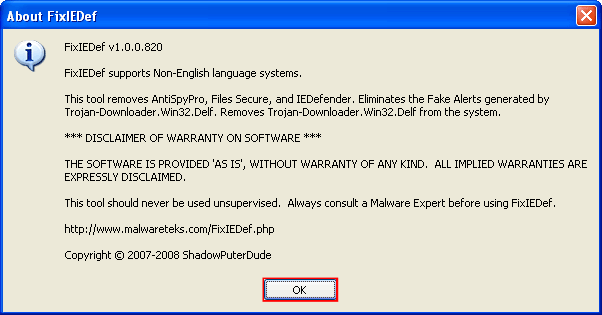
  3. That will open the About FixIEDef screen. Click OK to continue:

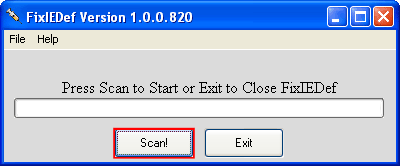
  4. Next, press the Scan! button:


  5. FixIEDef needs to run as Administrator to perform correctly. This message simply confirms it was able to run with admin privileges. Click OK to continue:
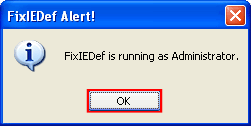

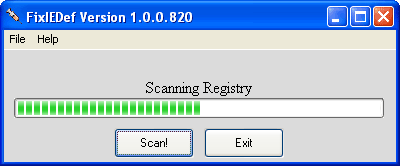
  6. Wait for the scan to finish. It shouldn't take very long:

  7. After the !!! All Finished !!! message is displayed, click Exit:
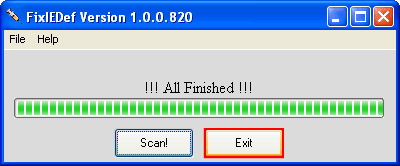

  8. That's it! You're done, and the infection should be removed.

    Note: process.exe is detected by some antivirus programs (AntiVir, Dr.Web, Kaspersky) as a "RiskTool". It is not a virus, but a program used to stop system processes. Antivirus programs cannot distinguish between "good" and "malicious" use of such programs, therefore they may alert the user. See: http://www.beyondlogic.org/consulting/proc...processutil.htm
If after running this tool the Trojan.Win32.Obfuscated.gx infection is still present, post a HiJackThis log in the Malware Removal Forum.

Mirrors: Alternate official download locations for FixIEDef.exe

http://it-mate.co.uk/downloads/fixiedef/fixiedef.exe
http://hosts-file.net/download/fixiedef/fixiedef.exe
http://avant.it-mate.co.uk/?c=Download&f=Tools/FixIEDef
http://archives.mysteryfcm.co.uk/?f=Securi...pyware/FixIEDef

=====================================================================
This is a self-help guide. Use at your own risk.

Important Note: If you need assistance, please start a new topic in our Malware Removal Forum. This topic is also open for comments, but not all will receive a reply.

This post has been edited by ScHwErV: May 1 2008, 06:39 AM
Reason for edit: support for non-English
Go to the top of the page
 
+Quote Post
MongoliaMike
post Feb 25 2008, 10:22 PM
Post #2


New Member
*
Posts: 3
OS: Windows XP


Hi

I am not sure if this is the right place to put this - but I am having some Tojan virus issues. Office Scan did not find any, but an online search found the following problems:

C:\WINDOWS\system\programas\hex.exe is infected with Hacktool.HideWindow
C:\WINDOWS\system\programas\nt.dll is infected with IRC Trojan
C:\WINDOWS\system\programas\svchost.exe is infected with IRC Trojan
C:\WINDOWS\system\programas\svchost2.exe is infected with IRC Trojan

I am in the dark as to best completely get rid of these viruses.

Any advice would be appreciated

M
Go to the top of the page
 
+Quote Post
Essexboy
post Feb 26 2008, 12:57 PM
Post #3


Global Moderator
Group Icon
Posts: 9,241
From: Darkest Cornwall
OS: Vista Ultimate


Please follow all of the steps in this section of the Malware Forum. These self-help tools will help you clean up 70% of problems on your own. If you are still having problems after doing the steps, then please post a HiJackThis Log in the Malware Forum. If you are unable to run and/or post a HJT log, then post that in your initial post in the topic you create in that forum. Should you post in that forum please do not respond to your own topic. Our Malware Staff look for topics to help out in that have no responses. The Malware Forum is very busy with many more requests for help than we have volunteer helpers, so please be patient. If you have not had a response to a topic after 3 days then please go to the Waiting Room and read the pinned topic for instructions.

Go to the top of the page
 
+Quote Post

Reply to this topicStart new topic
1 User(s) are reading this topic (1 Guests and 0 Anonymous Users)
0 Members:


RSS Time is now: 21st November 2008 - 12:01 AM
Advertisements do not imply our endorsement of that product or service. The forum is run by volunteers who donate their time and expertise. We make every attempt to ensure that the help and advice posted is accurate and will not cause harm to your computer. However, we do not guarantee that they are accurate and they are to be used at your own risk.