

 This topic is locked


With our help, over 100,000 people have successfully removed malware from their computer! View our feedback forum to see what others are saying. Don't worry, you don't have to be a geek to remove malware. Our geeks do the technical work, and provide easy step-by-step instructions that require only basic computer skills. Our help is always free. The experts who help you are all volunteers. Some have been at this a long time, others are just reaching the end of their training (we teach malware removal too). Regardless of who helps, we're confident you'll receive some of the highest quality malware removal help available anywhere, at any price.
Step 1. Create a free Geeks to Go account
Click here to join GeekstoGo and create a free account. Before you can create a new malware removal topic, you must join. It's an easy process that involves creating a unique username, password, and submitting your email address. Your email address is only used to notify you when your topic receives replies, or if you forget your password. Alternatively, you can join by using your existing Facebook or Twitter account.

Step 2. Check the System Architecture
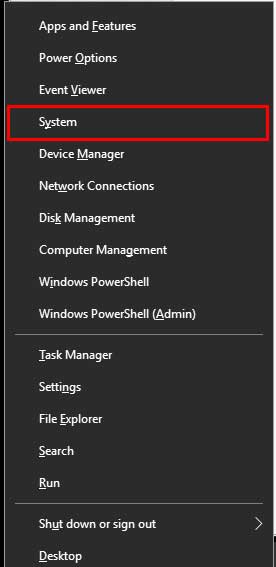
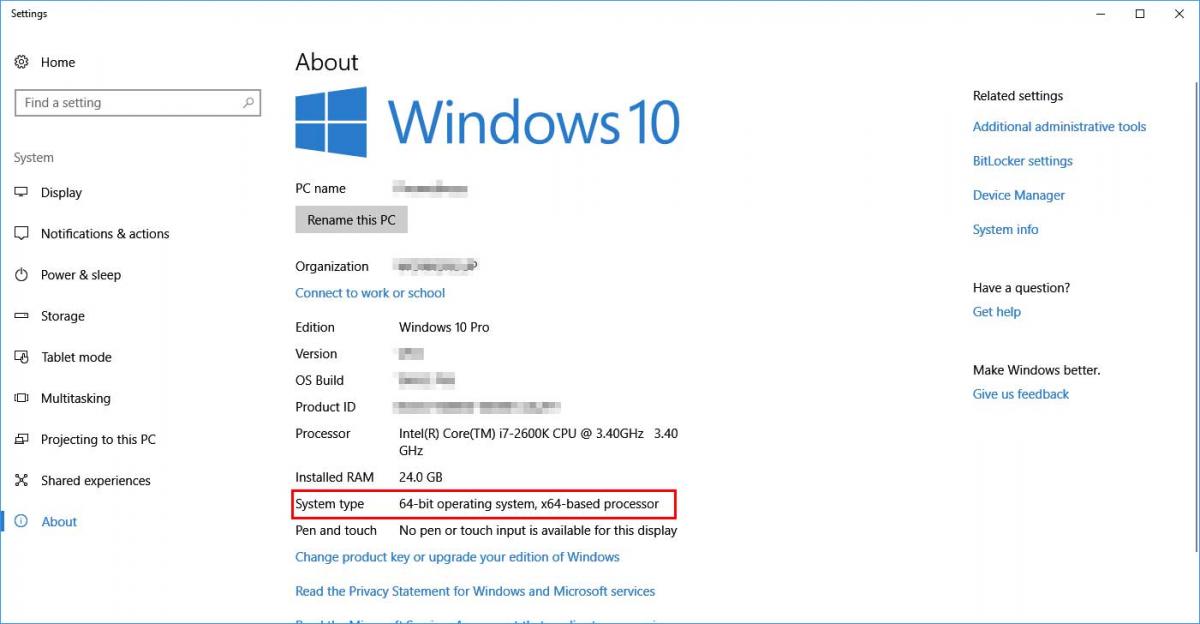
The tool we need to run has been developed in two versions, matching two different architectures. Before we ask you to run it, we need to check which one is yours: 32-bit or 64-bit. You will find detailed instructions how to do that below. Depending on that you'll have to choose the correct version of the tool!
For Windows XP


For Windows Vista & 7


For Windows 8 & 8.1


For Windows 10
Step 3. Download and Run FRST
Farbar Recovery Scan Tool has been developed by Farbar and is updated to work with all the current Windows versions (unlike tools like HiJackThis).
Depending on your system architecture (Identified above) download the matching version from the link below:Please note that the 32-bit version will be named FRST.exe, while the 64-bit will be named FRST64.exe.
The Anti-Virus products may give false detections stating that the tool is harmful - please ignore them and in those cases allow the download to complete.
Save the tool to your Desktop (this is very important!)
If you don't know how to do it, please consult the Spoiler below.

Run the tool by right-clicking on its icon and select Run as administrator as presented below.

If you're running Windows XP - ignore that and instead just double-click on its icon.
Windows 8 & 8.1 users may face another warning from the Windows SmartScreen Protection - please click More information and Run.
You will be presented with a window like below:

First make sure that the Addition box is checked. If it's not, check it.
Then please press Scan button. You will see that the progress bar is moving.
Upon completion a window will pop-up:

Please press OK, right after that a second window will appear:

Again please press OK.
After that two notepad windows will be opened (one under another). Leave these open for now, you will need them both shortly.
Step 4. Create a new topic, describe your issue(s)
Click here to start a new topic in the Virus Spyware, and Malware removal forum.
- Be descriptive.
- Ask clearly.
- Be precise and informative about your problem.
- Describe any symptoms fully.

Step 5. Copy and paste the FRST logs from step 3
Please only copy and paste your logs as described below, unless asked to attach it.
How to copy and paste:
- Go to the notepad window containing FRST.txt.
- Right-click with your mouse or touchpad.
- Choose Select All from the shortcut menu.
- Right-click again, then choose Copy from the shortcut menu.
- Go the window where you are typing your new topic. Select an area after the text.
- Right-click and select Paste from the shortcut menu.
- The FRST.txt log will be pasted after your text.

Step 6. Review and submit your topic
If you're satisfied with your new topic, click the Post New Topic button. Or, to preview what your topic will look like before posting it, click the Preview Post button. You will still have an opportunity to edit your topic after posting it.
After submitting your topic please make sure that you're following it. This will keep you notified to your e-mail whenever your thread will be replied by an approved helper.
In the upper-right corner you will see a button marked red (as below):

If you see there
 that means you are already following this topic and there's nothing more you should do, except awaiting the reply
Otherwise, press the
 button and in the shown window select your notification options (Receive Instantly is recommended).
Tips for a better experience
1. Please remember, everyone here volunteers their time. Be patient, kind, and don't forget to say thanks. We understand it's stressful to have an infected computer and wish we could help everyone immediately. However, depending on the complexity of your infection, when it was posted, and other factors, it may take a couple of days for your topic to receive an initial reply.
2. Please follow your thread to a conclusion. When finished, we will post instructions and advice on preventing future infections. If you fail to follow your topic to conclusion, your system may not be completely clean, and it will be more vulnerable to future infections.
3. If known, the "Topic Title" should contain the name of the infection. Your first, and best opportunity to attract a qualified expert is a quality title.
4. Please stay with your original topic when posting follow ups. Only post your topic once.
5. Do not create topics at multiple forums. It will confuse you, and create extra work for us. If you do this your topic will be closed.
6. If you enjoyed your experience, and would like to learn more about removing malware and spyware, join GeekU our malware removal training program (free).
Last Updated: March 7, 2015
Edited by DonnaB, 04 March 2018 - 03:20 PM.
FRST Update








 Sign In
 Create Account


