
Network Connections Link or Icon on desktop cannot be removed. - Geeks to Go Forums

Jump to content

Log in Register Register Malware removal guide How it works

Network Connections Link or Icon on desktop cannot be removed.

#1 nevets68

  • Group: Member
  • Posts: 25
  • Joined: 17-June 05

  Posted 14 July 2008 - 10:06 PM

As per the Topic Tile...this was placed there by a friend of mine who was using my Vista *business edition* pc.

When I right click on the "icon" I see the following :

Open
Explore
Create Shortcut

I've tried rebooting in safe mode and still the same 3 options.
I've went to the desktop folder and it's not showing there.

I've tried moving it to the recycle bin to no avail as well as highlighting it and trying to delete it.
Again, to no avail.


Attached you'll see the icon in question and what happens when I try to move it to the recycle bin.

Any suggestions are greatly appreciated.
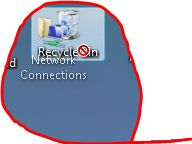
Attached thumbnail(s)

  • Attached Image: Capture.jpg


#2 makinu1der2

  • Group: Member
  • Posts: 182
  • Joined: 08-June 08

Posted 15 July 2008 - 03:23 AM

right click the desktop -> choose personalize -> select desktop icons. You should be able to uncheck Network.

#3 nevets68

  • Group: Member
  • Posts: 25
  • Joined: 17-June 05

Posted 16 July 2008 - 02:16 AM

The issue has been resolved.
I went into the registry and deleted a key.
Clicked refresh and the icon was removed.

Share this topic: