Acer Aspire 5050 laptop crashes and freezes [RESOLVED] - Geeks to Go Forums

Jump to content

Log in Register Register Malware removal guide How it works

Acer Aspire 5050 laptop crashes and freezes [RESOLVED] laptop crashes frequently and occasionally freezes

#1 lobrano

  • Group: Member
  • Posts: 28
  • Joined: 13-November 08

Posted 04 December 2008 - 06:30 AM

This topic is being commenced on the advice of a member of the malware staff who has made a prodigious effort to assist me. He has concluded, however, that the problem should be presented in this forum.

As the topic in the malware forum contains a veritable wealth of information, (including test results, logs, behavioral facts, etc. ) it would be my opinion that the fastest and most efficient method of presenting my problem would be a quick review of that topic by the reader. Accordingly, I submit the following shortcut to it:

http://www.geekstogo.com/forum/Acer-Aspire...es-t217365.html

If this method is unacceptable, please advise.

Thank you for your interest and I shall greatly appreciate any help that I can receive.

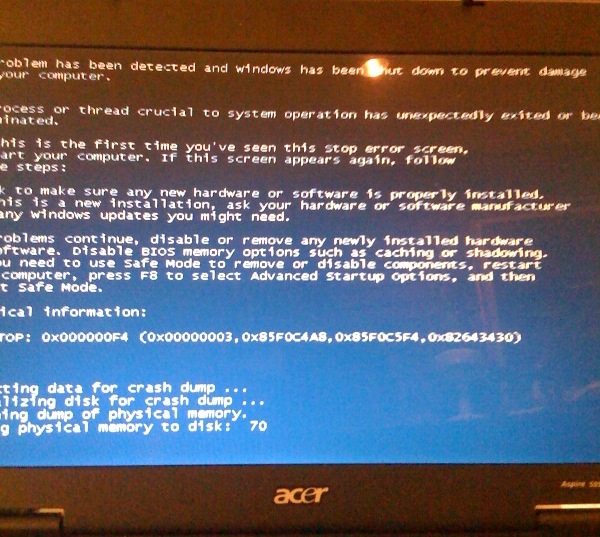
UPDATE TO POST: Subsequent to the original of this post, I managed to capture a (mostly legible) picture of the BSOD (Blue Screen of Death) that very briefly appears after each crash and a copy, in .jpg format, is attached.

SECOND UPDATE-PROBLEM RESOLVED: I downloaded and installed a recently-offered update to Iolo's "System Mechanic" and the crashing to a BSOD immediately ceased.

Attached thumbnail(s)

  • Attached Image: BSOD.jpg


#2 admin

  • Group: Administrator
  • Posts: 23,524
  • Joined: 21-May 03

Posted 08 December 2008 - 11:38 PM

Thank you lobrano for sharing your solution! :)

#3 lobrano

  • Group: Member
  • Posts: 28
  • Joined: 13-November 08

Posted 09 December 2008 - 04:18 AM

You are quite welcome! I hope it will help others who are having a similar problem.

#4 ekurtz

  • Group: Member
  • Posts: 2
  • Joined: 04-April 10

Posted 04 April 2010 - 09:22 AM

I am encountering an almost identical problem. My own situation has advanced to the point where Windows never loads (I sometimes get as far as the black screen that says "Starting Windows," but not even the windows quad-color graphic shows up), and trying to start in safe mode (or any of the other startup options including "Launch Startup Repair") only results in another restart before anything happens.

I'm unable to upload a picture of the BSOD, but if it helps, my BSOD differs from lobrano's like so:

The line "a process or thread crucial..." is missing.
My "Technical Information" line reads:

Quote

*** STOP: 0x000007E (0xFFFFFFFFC0000005, 0xFFFFF80002DFE90D, 0xFFFFF880009A8E88, 0xFFFFF880009A86EO)


I'm not terribly familiar with mid-to-high level computer maintenance, so while I've gone into BIOS and looked at my options (as well as trying to start in Safe Mode and even "disable Automatic restart on system failure," both to no avail), I have taken very few steps in any direction.

If this is posted incorrectly in any way, I apologize. This is my first post, and I'm not very familiar with the proper post etiquette for this board. :)

By the way, my system information is as follows:
Acer Aspire 5542G-5281
AMD Turion II X2 M500 (2.2 GHz, 1MB L2 Cache)
ATI Mobility Radeon HD 4570 (501 MB memory)
4 GB Memory

EDIT:

I suppose it's also relevant that I run Ad-Aware, Malwarebytes, Microsoft Security Essentials, and Glary Utilities once per week, having just done so a two days ago, after installing Star Wars Knights of the Old Republic II on my system via an internet download. Since KOTOR is an older game, I had to download an update file from Lucasarts to play it on Win 7, and I also installed a No-CD Crack for the game. None of those programs detected any problems, but is there a chance that they have missed something? These problems started withing 24 hours of my last system scan.

It is also worth mentioning that I've had this laptop for about 3 weeks now. Thanks!

#5 ekurtz

  • Group: Member
  • Posts: 2
  • Joined: 04-April 10

Posted 04 April 2010 - 09:45 AM

There is now another message below the original "Technical Information." It reads:

Quote

*** ACPI.sys - Address FFFFF8800114BA73 base at FFFFF88001144000, DateStamp 4a5bc106


Sorry about the constant updating. I'm just worried about my baby. :)

Share this topic: