
Remove the Language Bar - Geeks to Go Forums

Jump to content

Log in Register Register Malware removal guide How it works

Remove the Language Bar

#1 Smokey

  • Group: Retired Staff
  • Posts: 1,411
  • Joined: 07-November 03

Posted 05 August 2004 - 06:21 PM

You know that little thing near the clock, the one with the question mark in the yellow circle? That's called the "Language Bar". Even if you take the toolbar off the taskbar, it will come back everytime you start an Office application, you need to do this to not see that little nag called the "Language Bar" again:

1. Click"Start", then "Control Panel"
2. Hit "Date, Time, Language, and Regional Options", then "Regional and Language Options"
3. Press "Languages" tab, then "Details" button
4. Choose "Langage Bar" button at bottom, and then uncheck "Show the language bar on the desktop"
5. Press "OK" and the Language Bar will be gone :D

Note: You can always just recheck to enable it again

If you really want it gone so you can't ever see it again:

1. Go to "Start", then "Run"
2. Type "Regsvr32.exe /u msutb.dll" and press enter
3. The Language bar will never bother you again! <_<

Note: The "Language Bar" button described above will be grayed-out (unaccessible) for good as well, meaning you can never renable it.

#2 therealcote

  • Group: Member
  • Posts: 2
  • Joined: 20-September 05

Posted 20 September 2005 - 02:16 PM

Hi,
Contrary to the above person, I DON'T want to disable my language bar. I use it a lot everyday, but it disappeared yesterday and the language bar button is grayed out and disabled.

Does someone know how I can enable it again?

thanks a lot

Mathieu Cote

#3 dsenette

  • Group: Administrator
  • Posts: 25,650
  • Joined: 21-April 05

Posted 20 September 2005 - 02:24 PM

you can also right click on the taskbar and go to toolbars and pick the language bar

#4 therealcote

  • Group: Member
  • Posts: 2
  • Joined: 20-September 05

Posted 20 September 2005 - 04:42 PM

No, I know all this.

But my problem is:
the ctfmon.exe file closes itself whenever I click ok it the language bar dialog box in the Config Panel

I found something about it on MIcrosoft's website (http://support.micro...3&Product=winxp)

but they say that SP2 fixes this problem (it doesn't for me...)
and that an hotfix is available... but I would have to pay to contact Microsoft support....

I tried everything that is on the Microsoft page... but it didn't work

any idea?

Mathieu

#5 leonpadi

  • Group: Member
  • Posts: 3
  • Joined: 13-October 05

Posted 13 October 2005 - 02:45 AM

Exactly same problem with me too. The language bar is disappeared, without explanation-reason, although i tried all the known solutions...
Any help?

#6 Retired Tech

  • Group: Retired Staff
  • Posts: 20,563
  • Joined: 08-January 05

Posted 13 October 2005 - 03:32 AM

Have you checked the language is the same in regional options and also the keyboard setting

#7 leonpadi

  • Group: Member
  • Posts: 3
  • Joined: 13-October 05

Posted 13 October 2005 - 03:53 AM

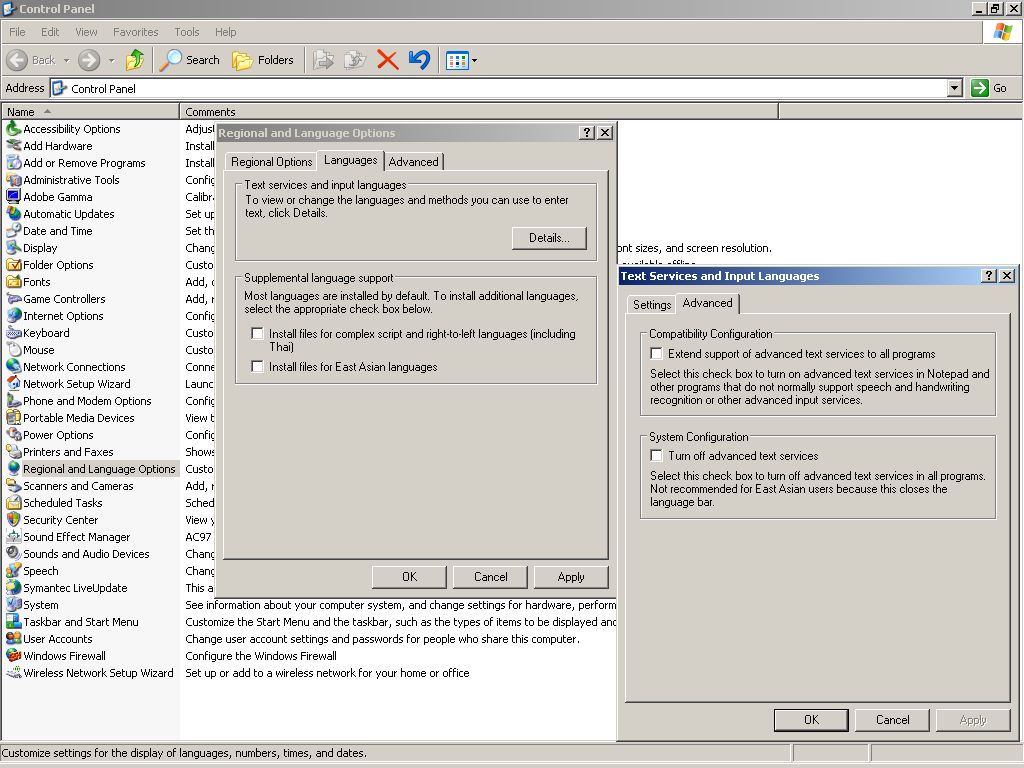
Guys, i think i found a partial solution, please therealcote check this screenshot, yours must be as mine..check it out and tell us...

Attached thumbnail(s)

  • Attached Image: Screenshot.jpg


#8 Retired Tech

  • Group: Retired Staff
  • Posts: 20,563
  • Joined: 08-January 05

Posted 13 October 2005 - 04:00 AM

Put a tick in extend text services to all programmes

#9 leonpadi

  • Group: Member
  • Posts: 3
  • Joined: 13-October 05

Posted 13 October 2005 - 04:01 AM

ok! Thanks for immediate replies!!!

#10 beariebird

  • Group: Member
  • Posts: 1
  • Joined: 10-January 06

Posted 10 January 2006 - 09:22 AM

Also contrary to both above people, I would like totally disable the Language Bar at install. Using the Office Toolkit Resource, is there a way to do this?

Thanks!

#11 jordi nyc

  • Group: Member
  • Posts: 1
  • Joined: 25-March 06

Posted 25 March 2006 - 04:30 AM

Not to blatantly "me too" but I just want to emphasize that simply disabling it by right clicking, Settings, Advanced Tab, and checking Turn Off Adv Text Services ONLY WORKS FOR THE CURRENT USER! Any user that logs on that PC afterwards WILL get the Language Bar. Unless you have 20 users, LAN Admins or Desktop Support dweebs aren't going to go around interrupting end users "SCUSE ME *BUMP*" to disable a stupid little microphone.

There has GOT to be a way to uninstall (not disable) the feature.

#12 Clarencel

  • Group: Member
  • Posts: 1
  • Joined: 04-April 06

Posted 04 April 2006 - 04:47 AM

Hi,

I have used "Regsvr32.exe /u msutb.dll" as mention above without knowing that I can't turn the language bar back on anymore. Someone here seems to have solve this problem by turning it back on but I don't quite understand how this is done. Can someone please guide me urgently? Thanks.

#13 Brd24gor

  • Group: Member
  • Posts: 1
  • Joined: 03-May 06

Posted 03 May 2006 - 01:09 PM

If you want to re-register the .dll, just use the following:

regsvr32 msutb.dll

The /u flag unregisters the stated dll in the previous suggestion.

#14 Leonard Lee

  • Group: Member
  • Posts: 5
  • Joined: 20-July 06

Posted 20 July 2006 - 07:41 PM

View PostBrd24gor, on May 4 2006, 03:09 AM, said:

If you want to re-register the .dll, just use the following:

regsvr32 msutb.dll

The /u flag unregisters the stated dll in the previous suggestion.


After I re-register, the "Language Bar" button described above still grayed-out (unaccessible) after I restart the PC.

Can anyone teach me how to re-activate it?

Thanks.

#15 Retired Tech

  • Group: Retired Staff
  • Posts: 20,563
  • Joined: 08-January 05

Posted 20 July 2006 - 08:47 PM

See if this helps

To turn on the Language bar, follow these steps:

1. Click Start, and then click Control Panel.

2. Click Date, Time, Language, and Regional Options.

3. Click Regional and Language Options.

4. Click the Languages tab, and then click Details.

5. On the Settings tab, click Language Bar.

6. Click to select the Show the Language bar on the desktop check box, and then click OK.

7. Click OK to close the Text Services and Input Languages dialog box.

Share this topic:


  • 2 Pages +
  • 1
  • 2