Windows Defender error 8007007E - Geeks to Go Forums

Jump to content

Log in Register Register Malware removal guide How it works

Windows Defender error 8007007E

#1 Orkkongen

  • Group: Member
  • Posts: 15
  • Joined: 11-May 12

Posted 11 May 2012 - 09:37 AM

Hi...

I had some "fun" with a "Alureon-K" virus a while ago, but got a lot of good help at the Avast-forum, so I should be clean now, but the Windows update will keeps trying to update Windows Defender, and every time I get the error-code 8007007E. There's no help at the MS homepage. I asked in the same topic in Avast-forum, but the nice guy (Jeffce) has now send me to you.
You can se and follow our topic there, to se what is tried and get more info. The issue with errorcode 8007007E is mentioned on 3rd page of the topic.
What shall I do?

Regards
Ulrik Thomsen

#2 happyrock

  • Group: Moderator
  • Posts: 9,285
  • Joined: 16-May 06

Posted 11 May 2012 - 10:37 AM

rather than us going to another site and reading 3 pages worth of posts...
why don't you summarize what you tried and the results for us and post it here for us...

#3 Orkkongen

  • Group: Member
  • Posts: 15
  • Joined: 11-May 12

Posted 11 May 2012 - 01:47 PM

Fair enough...

Well... First I had this Alureon-K virus, and with doing a lot of stuff (I didn't quite understand) I got rid of it, and everythin seemed fine. Then I noticed, that the computer tried to install an update everytime I closed the computer. So I tried updating using Windows Update so I could see the results, and it said that Windows Defender failed to update everytime.
I was not aware that I had Windows Defender and can't find anythin about it on my com. (but could be integrated or something like that).
So I went back to Avast-forum. From that point I ran a "Farbar Service Scanner", tried to run "Windows Repair (all in one)" but it never worked (couldn't get the program running), so we tried to fix the update from this page: My link http://support.microsoft.com/kb/918355. This program tried to fix something, but nothing came out of it. I ran the "sfc /scannow" from command prompt (runned as admin), nothing wrong here, so we tried the fix thing from here: http://support.microsoft.com/kb/836941.
Finally I downloaded this: http://www.microsoft...ang=en&id=20858.

Pfew... and the Jeffce gave up and told about you guys! The most anyoing thing is, that nobody knows what the error-code means (or at least they keep it away from me)... :(

#4 happyrock

  • Group: Moderator
  • Posts: 9,285
  • Joined: 16-May 06

Posted 11 May 2012 - 04:08 PM

quickest way to remove windows defender is to download Microsoft Security Essentials from here...
once you have it downloaded uninstall your current anti virus depending on what you have, there may be a uninstaller tool you may need to run to uninstall the current AV...
then install MSE...it will remove windows defender during the install...
I suggest you leave MSE on your computer as its as effective as any other AV
if after a week or so if you would rather have your other AV just download it and reverse the process but defender will be gone

#5 Orkkongen

  • Group: Member
  • Posts: 15
  • Joined: 11-May 12

Posted 12 May 2012 - 06:52 AM

I've uninstalled my Avast Antivirus and installed MSE as instructed, but the Windows update still tries to install an update for Windows defender, and still giving me the error-code 8007007E.

#6 happyrock

  • Group: Moderator
  • Posts: 9,285
  • Joined: 16-May 06

Posted 12 May 2012 - 10:23 AM

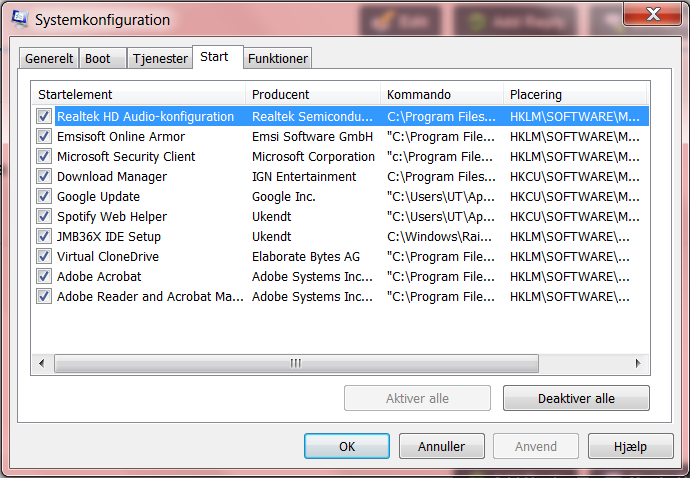
type msconfig in the search box...select it in the results above...click on startup tab
get screenshots of it and post them back here for us

#7 Orkkongen

  • Group: Member
  • Posts: 15
  • Joined: 11-May 12

Posted 12 May 2012 - 10:48 AM

Hope this is good enough... couldn't make the window bigger, so some of it I had to let out...

Attached thumbnail(s)

  • Attached Image: msconfig_start.png


#8 happyrock

  • Group: Moderator
  • Posts: 9,285
  • Joined: 16-May 06

Posted 12 May 2012 - 11:38 AM

thats fine...uncheck everything except microsoft security client and
emsisoft armor if its only a firewall...if its both a AV and firewall you will have to uncheck it also...

#9 Orkkongen

  • Group: Member
  • Posts: 15
  • Joined: 11-May 12

Posted 12 May 2012 - 02:20 PM

Jeps, it's done...
And I still get the errorcode 8007007E, and still tries to update Windows Defender...
I first tried leaving the security client and emisoft on, and got the usual respons, to I removed emisoft as well just to try it. Still the same... Now emisoft and security client are the only ones active...

#10 happyrock

  • Group: Moderator
  • Posts: 9,285
  • Joined: 16-May 06

Posted 12 May 2012 - 03:10 PM

type services.msc into the Start Menu search box... select if in the results above...Find Windows Defender in the list and double-click on it…change Startup type to Disabled...(if the service is started stop it first)
then click ok and reboot

#11 Orkkongen

  • Group: Member
  • Posts: 15
  • Joined: 11-May 12

Posted 13 May 2012 - 04:28 AM

Fantastic... It still wanted to update Windows Defender, but this time it seemed like a succes... :)
So now what?

#12 Orkkongen

  • Group: Member
  • Posts: 15
  • Joined: 11-May 12

Posted 13 May 2012 - 01:31 PM

I can see from the log, that it did not update Defender, but it doesn't bother the update program longer... Thats a good start...

#13 rockmilk

  • Group: Member
  • Posts: 1,813
  • Joined: 09-September 10

Posted 13 May 2012 - 02:50 PM

Please do the following we will see if the registry key exsist for Windows defender and if it is gone we will get it replaced for you. :)


Please download FarbarServiceScanner and run it on the computer with the issue.


Make sure the following options are checked:
Internet Services
Windows Firewall
System Restore
Security Center/Action Center
Windows Update

Press "Scan".
It will create a log (FSS.txt) in the same directory the tool is run.
Please copy and paste the log to your reply.

#14 happyrock

  • Group: Moderator
  • Posts: 9,285
  • Joined: 16-May 06

Posted 13 May 2012 - 03:34 PM

Quote

Fantastic... It still wanted to update Windows Defender, but this time it seemed like a succes.

I'm confused...are you still getting a popup error about windows defener

#15 Orkkongen

  • Group: Member
  • Posts: 15
  • Joined: 11-May 12

Posted 14 May 2012 - 09:19 AM

No, I think it was another update it made... It's not asking about Windows defender anymore...
Now I'll try the FSS (again) as instructed by rockmilk...

Share this topic:


  • 2 Pages +
  • 1
  • 2