

No audio
Started by
dseays
, May 14 2012 02:17 PM
#1

 Posted 14 May 2012 - 02:17 PM
dseays
-
- Member
-

- 9 posts
New Member

#2
Posted 14 May 2012 - 02:51 PM
rshaffer61
-

- Moderator
-

- 34,114 posts
Moderator
The smbus is the main motherboard chipset driver. I suggest going to the manufacturer website as you have for the audio driver and look for the motherboard chipset driver. Yes this driver is the main driver for the motherboard that allows the other chipsets to function and be identified correctly. Most likely the cause of your audio not working.
#3
Posted 14 May 2012 - 05:06 PM
dseays
- Topic Starter
-
- Member
-
- 9 posts
New Member
ok so i managed to download and install the chipset driver. i tried to go back to the site to download the realtek ac'97 sound driver, i installed it, restarted my computer, and when it turns back on...BOOM still no sound! did i do something wrong?
#4
Posted 14 May 2012 - 05:10 PM
rshaffer61
-
- Moderator
-
- 34,114 posts
Moderator
Nope just have to run the issue down now.
Please Go to
1: START and the click on RUN
2: Type in devmgmt.msc
3: Click Enter
To do a screenshot please have click on your Print Screen on your keyboard. It is normally the key above your number pad between the F12 key and the Scroll Lock key
Now go to Start and then to All Programs
Scroll to Accessories and then click on Paint
In the Empty White Area click and hold the CTRL key and then click the V
Go to the File option at the top and click on Save as
Save as file type JPEG and save it to your Desktop
Attach it to your next reply
Please Go to
1: START and the click on RUN
2: Type in devmgmt.msc
3: Click Enter
To do a screenshot please have click on your Print Screen on your keyboard. It is normally the key above your number pad between the F12 key and the Scroll Lock key
Now go to Start and then to All Programs
Scroll to Accessories and then click on Paint
In the Empty White Area click and hold the CTRL key and then click the V
Go to the File option at the top and click on Save as
Save as file type JPEG and save it to your Desktop
Attach it to your next reply

#6
Posted 14 May 2012 - 06:25 PM
rshaffer61
-
- Moderator
-
- 34,114 posts
Moderator
Can you click the + next to the audio entry and expand it out please. You will either have to post a new screenshot or list the entries in that field for me please.

#8
Posted 14 May 2012 - 07:13 PM
rshaffer61
-
- Moderator
-
- 34,114 posts
Moderator
OK lets see if everything is set right.
OK then I need to see what the Audio Properties show as your default audio device.
Go to Start and then to Control Panel
Right click on the Sound or Audio Devices and then click on Properties
At the top of the window click on Audio and what does it say for Default Audio Device?
Click on Playback and same information?
Check speaker connection to back of system
Check volume control in windows by doing the following:
Go to Start and The Run
Type in sndvol32.exe and press Enter
Make sure Master Volume is not muted and turned up
Check Cd Player volume is not muted and turned up
Hopefulyl one of the above will get audio back.
OK then I need to see what the Audio Properties show as your default audio device.
Go to Start and then to Control Panel
Right click on the Sound or Audio Devices and then click on Properties
At the top of the window click on Audio and what does it say for Default Audio Device?
Click on Playback and same information?
Check speaker connection to back of system
Check volume control in windows by doing the following:
Go to Start and The Run
Type in sndvol32.exe and press Enter
Make sure Master Volume is not muted and turned up
Check Cd Player volume is not muted and turned up
Hopefulyl one of the above will get audio back.
#9
Posted 14 May 2012 - 07:43 PM
dseays
- Topic Starter
-
- Member
-
- 9 posts
New Member
the default audio device is the ATI HD but that comes from my video card. I tried clicking on the dropdown menu but ATI is the only choice with no option for the realtek driver
#10
Posted 14 May 2012 - 07:45 PM
rshaffer61
-
- Moderator
-
- 34,114 posts
Moderator
OK then lets make sure the audio is enabled in the bios.
Reboot the system and at the first post screen tap the Del key normally and it should get you into the BIOS
In there find either the Advanced, Onboard or Integrated Peripherals areas.
Using the keyboard arrow keys scroll down to the Audio entry and make sure it is Enabled and if not then look at the bottom of the screen it will tell you how to adjust or modify the values to Enable it.
When done make sure to click F10 to Save and Exit with the setting.
You will then be asked to click Y to Verify the Save and Exit
The system will now reboot with the new settings saved.
Let me know if this helps.
Reboot the system and at the first post screen tap the Del key normally and it should get you into the BIOS
In there find either the Advanced, Onboard or Integrated Peripherals areas.
Using the keyboard arrow keys scroll down to the Audio entry and make sure it is Enabled and if not then look at the bottom of the screen it will tell you how to adjust or modify the values to Enable it.
When done make sure to click F10 to Save and Exit with the setting.
You will then be asked to click Y to Verify the Save and Exit
The system will now reboot with the new settings saved.
Let me know if this helps.
#11
Posted 14 May 2012 - 08:08 PM
dseays
- Topic Starter
-
- Member
-
- 9 posts
New Member
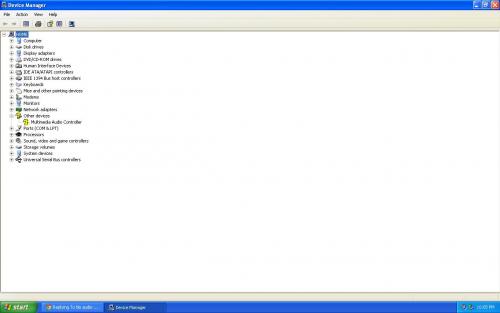
The onboard audio was set to auto after changing it to enable it shows that its missing multimedia audio controller

#13
Posted 14 May 2012 - 08:22 PM
dseays
- Topic Starter
-
- Member
-
- 9 posts
New Member
should i remove my current version of realtek?
#15
Posted 14 May 2012 - 08:57 PM
dseays
- Topic Starter
-
- Member
-
- 9 posts
New Member
ive been trying to uninstall the previous realtek but it doesnt delete off my add/remove programs list (ive restarted the computer several times already). should i just download and install your realtek driver anyways?


Similar Topics
0 user(s) are reading this topic
0 members, 0 guests, 0 anonymous users
As Featured On:






 Sign In
 Create Account


