

Possible hard drive failure
Started by
chief74
, Jul 16 2012 04:31 PM
#1

 Posted 16 July 2012 - 04:31 PM
chief74
-
- Member
-

- 35 posts
Member

#2
Posted 16 July 2012 - 05:48 PM
rshaffer61
-

- Moderator
-

- 34,114 posts
Moderator
Hello chief74.... Welcome to
GeeksToGo,


I'm sorry to hear about your issue. We will try to help you resolve this as soon as possible.
Before we can help you need to provide the following so I can start you in the right direction.
Laptop or Desktop?
First thing is lets try to get your data and pictures backed up.
Use Puppy Linux Live CD to Recover Your Data:
===================
***Required Hardware***
CD Burner (CDRW) Drive,
Blank CD,
Extra Storage Device (USB Flash Drive, External Hard Drive)
===================
1. Save these files to your Desktop/Burn Your Live CD:
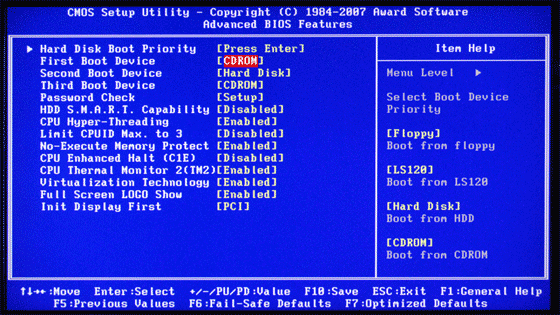
2. Set your boot priority in the BIOS to CD-ROM first, Hard Drive Second
3. Recover Your Data
Remember to only click once! No double clicking! Once you drag and drop your first folder, you will notice a small menu will appear giving you the option to move or copy. Choose COPY each time you drag and drop.
YOU ARE DONE!!! Simply click Menu >> Mouse Over Shutdown >> Reboot/Turn Off Computer. Be sure to plug your USB Drive into another working windows machine to verify all data is there and transferred without corruption. Congratulations!
If you're doing this to recover from a virus or malware infection, (or even if you're not), DO NOT copy executable files (.exe, .scr. etc...) if any of these files are infected you could be copying the corruption over to any new device/computer. just copy documents, pictures, music, or videos.
GeeksToGo,
I'm sorry to hear about your issue. We will try to help you resolve this as soon as possible.
- Please understand we are all volunteers and we are not here all the time.
- Sometimes it may be a extended amount of time to get back to you. If it has been
more then 3 days please shoot me a PM and I will try to get back to you quickly
then. - Please do the following and supply the requested information as needed. If you
don't understand my instructions please ask and I will try to explain them
clearer for you. - Do not attempt any steps unless instructed or ask before to
make sure they will not cause any further issues. - If you are receiving assistance in any other forum site please let us know as there may be conflicting advice given.
Before we can help you need to provide the following so I can start you in the right direction.
Laptop or Desktop?
- If a name brand system then what brand, make and model is the system?
- If custom built then what brand, make and model is the motherboard
- Total memory installed
- Total hard drive capacity and free space
- What steps have you taken so far to resolve the issue
First thing is lets try to get your data and pictures backed up.
Use Puppy Linux Live CD to Recover Your Data:
===================
***Required Hardware***
CD Burner (CDRW) Drive,
Blank CD,
Extra Storage Device (USB Flash Drive, External Hard Drive)
===================
1. Save these files to your Desktop/Burn Your Live CD:
- Download Latest Puppy Linux ISO (i.e.: lupu-528.iso)
Download BurnCDCC ISO Burning Software
There are instructions on how to boot from flash drive with puppy here; http://www.pendrivel...e-from-windows/
- Open BurnCDCC with Windows Explorer
- Extract All files to a location you can remember
- Double Click
 BurnCDCC
 - Click Browse
 and navigate to the Puppy Linux ISO file you just downloaded
 - Open/Double Click that file
IMPORTANT: Adjust the speed bar to CD: 4x DVD: 1x - Click Start

- Your CD Burner Tray will open automatically
- Insert a blank CD and close the tray
- Click OK
2. Set your boot priority in the BIOS to CD-ROM first, Hard Drive Second
- Start the computer/press the power button
- Immediately start tapping the appropriate key to enter the BIOS, aka "Setup"
(Usually shown during the "Dell" screen, or "Gateway" Screen) - Once in the BIOS, under Advanced BIOS Options change boot priority to:
CD-ROM 1st, Hard Drive 2nd - Open your ROM drive and insert the disk
- Press F10 to save and exit
- Agree with "Y" to continue
- Your computer will restart and boot from the Puppy Linux Live CD
3. Recover Your Data
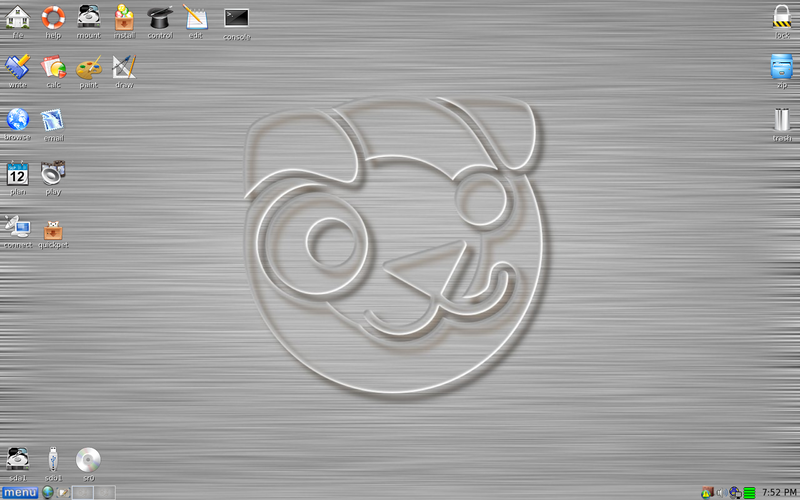
- Once Puppy Linux has loaded, it is actually running in your computer's Memory (RAM). You will see a fully functioning Graphical User Interface similar to what you normally call "your computer". Internet access may or may not be available depending on your machine, so it is recommended you print these instructions before beginning. Also, double clicking is not needed in Puppy. To expand, or open folders/icons, just click once. Puppy is very light on resources, so you will quickly notice it is much speedier than you are used to. This is normal. Ready? Let's get started.
3a. Mount Drives - Click the Mount Icon located at the top left of your desktop.

- A Window will open. By default, the "drive" tab will be forward/highlighted. Click on Mount for your hard drive.
- Assuming you only have one hard drive and/or partition, there may be only one selection to mount.
- USB Flash Drives usually automatically mount upon boot, but click the "usbdrv" tab and make sure it is mounted.
- If using an external hard drive for the data recovery, do this under the "drive" tab. Mount it now.
- At the bottom left of your desktop a list of all hard drives/partitions, USB Drives, and Optical Drives are listed with a familiar looking hard drive icon.
- Open your old hard drive i.e. sda1
- Next, open your USB Flash Drive or External Drive. i.e. sdc or sdb1
- If you open the wrong drive, simply X out at the top right corner of the window that opens. (Just like in Windows)
- From your old hard drive, drag and drop whatever files/folders you wish to transfer to your USB Drive's Window.
Remember to only click once! No double clicking! Once you drag and drop your first folder, you will notice a small menu will appear giving you the option to move or copy. Choose COPY each time you drag and drop.
YOU ARE DONE!!! Simply click Menu >> Mouse Over Shutdown >> Reboot/Turn Off Computer. Be sure to plug your USB Drive into another working windows machine to verify all data is there and transferred without corruption. Congratulations!
If you're doing this to recover from a virus or malware infection, (or even if you're not), DO NOT copy executable files (.exe, .scr. etc...) if any of these files are infected you could be copying the corruption over to any new device/computer. just copy documents, pictures, music, or videos.
#3
Posted 16 July 2012 - 05:49 PM
rshaffer61
-
- Moderator
-
- 34,114 posts
Moderator
Once you have everything backed up then please do the following.
Run hard drive diagnostics: http://www.tacktech....ay.cfm?ttid=287
Make sure, you select tool, which is appropriate for the brand of your hard drive.
Depending on the program, it'll create bootable floppy, or bootable CD.
If downloaded file is of .iso type, use ImgBurn: http://www.imgburn.com/ to burn .iso file to a CD (select "Write image file to disc" option), and make the CD bootable.
NOTE. If your hard drive is made by Toshiba, try the Hitachi DFT CD Image version of the software
Thanks to Broni for the instructions
Run hard drive diagnostics: http://www.tacktech....ay.cfm?ttid=287
Make sure, you select tool, which is appropriate for the brand of your hard drive.
Depending on the program, it'll create bootable floppy, or bootable CD.
If downloaded file is of .iso type, use ImgBurn: http://www.imgburn.com/ to burn .iso file to a CD (select "Write image file to disc" option), and make the CD bootable.
NOTE. If your hard drive is made by Toshiba, try the Hitachi DFT CD Image version of the software
Thanks to Broni for the instructions
#4
Posted 16 July 2012 - 07:15 PM
chief74
- Topic Starter
-
- Member
-
- 35 posts
Member
I appreciate your reply. Question: with the screen freezing up/not advancing any further in the chkdsk verifying files, I finally just shut computer down for the last time. To try the things you mentioned, how do I get the computer up to download the item you mentioned. (sorry can't get back to your reply while typing this ). I figured the computer wouldn't allow me to do anything with it. I know next to nothing about computers.
Computer is an Emachine desktop. I will give you the info on front of computer: 340 intel celeron processor. 100gb hard drive. 512 mb DDR sdram.
I called a computer repair place and they wanted $50 to diagnoise problem. I don't mind paying that but they could give me no idea of final price. Being that the computer is probably 6 years old or so didn't know if it would be worth fixing. I am more concerned about all my pictures and videos that haven't been backed up.
Thank you again for your help.
Computer is an Emachine desktop. I will give you the info on front of computer: 340 intel celeron processor. 100gb hard drive. 512 mb DDR sdram.
I called a computer repair place and they wanted $50 to diagnoise problem. I don't mind paying that but they could give me no idea of final price. Being that the computer is probably 6 years old or so didn't know if it would be worth fixing. I am more concerned about all my pictures and videos that haven't been backed up.
Thank you again for your help.
#5
Posted 16 July 2012 - 07:21 PM
rshaffer61
-
- Moderator
-
- 34,114 posts
Moderator
Problem one as this is the bare minimum you want to run without any other programs running.512 mb DDR sdram
As far as downloading anything are you using that computer to type your replies here?
#6
Posted 16 July 2012 - 07:50 PM
chief74
- Topic Starter
-
- Member
-
- 35 posts
Member
Sorry. Don't know if last reply went or not as I didn't see it when I came back to forum.
I am replying to you via my iPhone.
I am replying to you via my iPhone.
#7
Posted 16 July 2012 - 08:34 PM
rshaffer61
-
- Moderator
-
- 34,114 posts
Moderator
Yes it did and I responded.
Most important is do you have access to another computer that you could download the program and make the cd? Then just bring it back to your system.
Most important is do you have access to another computer that you could download the program and make the cd? Then just bring it back to your system.
#8
Posted 16 July 2012 - 09:18 PM
chief74
- Topic Starter
-
- Member
-
- 35 posts
Member
My daughter has one in her room. Tomorrow I'll try to make a cd on her's. Once I do I'll let you know. I really appreciate your help
Thanks you
Thanks you
#9
Posted 17 July 2012 - 04:34 AM
rshaffer61
-
- Moderator
-
- 34,114 posts
Moderator
No problem and I am happy to be of assistance.
#10
Posted 17 July 2012 - 12:12 PM
chief74
- Topic Starter
-
- Member
-
- 35 posts
Member
On my daughters computer. There are 2 versions. One for
Ibiblio.org or nluugf.nl
Which one should I download?
Says it takes about 29 minutes to download.
Am I in the right place.
I have been wondering. If I mess something up once I put the cd in my computer to try and retrieve my pictures, could I mess it up to where no one (computer repair person) could try and retrieve them?
Thanks
Ibiblio.org or nluugf.nl
Which one should I download?
Says it takes about 29 minutes to download.
Am I in the right place.
I have been wondering. If I mess something up once I put the cd in my computer to try and retrieve my pictures, could I mess it up to where no one (computer repair person) could try and retrieve them?
Thanks
#11
Posted 17 July 2012 - 12:22 PM
rshaffer61
-
- Moderator
-
- 34,114 posts
Moderator
If you are doing the hard drive diagnostics you can get the Seatools DOS cd ISO. It will work for most hard drives. This will tell us if the hard drive is mechanically working.
It does nothing to the drive except test for bad sectors and heads.
If you are talking about the puppy Linux it only accesses your hard drive to get to the data.
You are not actually using the OS because Puppy loads into memory.
It does nothing to the drive except test for bad sectors and heads.
If you are talking about the puppy Linux it only accesses your hard drive to get to the data.
You are not actually using the OS because Puppy loads into memory.
#12
Posted 17 July 2012 - 12:25 PM
chief74
- Topic Starter
-
- Member
-
- 35 posts
Member
Haven't got that far yet but when I start my computer instructions say start tapping appropriate key to enter bios.
Sorry , but what key is appropriate key? Maybe once I get there it would be self explanatory.
Just trying to understand what to expect so I won't run into problems in case you aren't available at that moment.
Thanks
Sorry , but what key is appropriate key? Maybe once I get there it would be self explanatory.
Just trying to understand what to expect so I won't run into problems in case you aren't available at that moment.
Thanks
#13
Posted 17 July 2012 - 12:30 PM
chief74
- Topic Starter
-
- Member
-
- 35 posts
Member
Ok now I'm lost.
First I'm just trying to download the lupu-528.iso to my daughters computer so I can make the disk to put on my computer. Wondering which one to download (see previous text) and if I was in the right place.
First I'm just trying to download the lupu-528.iso to my daughters computer so I can make the disk to put on my computer. Wondering which one to download (see previous text) and if I was in the right place.
#14
Posted 17 July 2012 - 12:37 PM
rshaffer61
-
- Moderator
-
- 34,114 posts
Moderator
To enter the bios it is usually the DEL key but yours may be a F key to enter BIOS or Setup.
The file you want is the lupu-528.iso
Then you will need the BurnCdcc program to burn the ISO correctly so that it is a bootable disk.
The file you want is the lupu-528.iso
Then you will need the BurnCdcc program to burn the ISO correctly so that it is a bootable disk.
#15
Posted 17 July 2012 - 01:01 PM
chief74
- Topic Starter
-
- Member
-
- 35 posts
Member
Just an update. Went back to check the download of lupu 528.iso and still had only downloaded 7% after 25 minutes. Maybe daughters computer is super slow. So just cancelled download. I looked on Internet and saw where I can buy the puppy Linux on cd or flash drive. If I go this way which would you buy if you were doing this?
Thanks
Thanks


Similar Topics
0 user(s) are reading this topic
0 members, 0 guests, 0 anonymous users
As Featured On:






 Sign In
 Create Account


