Angry Birds Crash - Geeks to Go Forums

Jump to content

Log in Register Register Malware removal guide How it works

Angry Birds Crash

#1 topperking99

  • Group: Member
  • Posts: 58
  • Joined: 24-October 08

Posted 18 July 2012 - 06:25 PM

Hello,
I play both Angry Birds PC & Angry Birds Chrome (the online version).
I've been playing the PC version for a while now and after about 15 to 20 minutes of play my computer crashes.
I get a drrrnt sound and beeps coming from my desktop, screen goes blank and everything stops - the computer seems to be trying to do something but it just flashes its light.
I press the reset button to correct the issue everytime.
This only happens when I play AB.
I though it was the PC version; but when I played the Chrome version today it did the same - what is up?
Please help.

Thanks

#2 Troy

  • Group: Technician
  • Posts: 8,658
  • Joined: 23-October 06

Posted 18 July 2012 - 07:43 PM

That sounds like an interesting issue... however first I want to thank you - I have angry birds on my iPhone but didn't know I could get it on PC! I'm downloading it now... hehe :lol:

I'm wondering if perhaps there is a graphics card driver update that may help the issue? Also could you give me some specs of your computer and how old it is etc...

Does this happen with any other games that you play? Are there any other problems with the computer that happen - even if you think they may be completely unrelated?

Cheers

Troy

#3 rshaffer61

  • Group: Moderator
  • Posts: 32,402
  • Joined: 28-February 09

Posted 18 July 2012 - 08:21 PM

Doesn't work on Win8 I can tell you. Maybe something with Win8 codecs.

#4 topperking99

  • Group: Member
  • Posts: 58
  • Joined: 24-October 08

Posted 19 July 2012 - 05:03 AM

View PostTroy, on 18 July 2012 - 07:43 PM, said:

That sounds like an interesting issue... however first I want to thank you - I have angry birds on my iPhone but didn't know I could get it on PC! I'm downloading it now... hehe :lol:

I'm wondering if perhaps there is a graphics card driver update that may help the issue? Also could you give me some specs of your computer and how old it is etc...

Does this happen with any other games that you play? Are there any other problems with the computer that happen - even if you think they may be completely unrelated?

Cheers

Troy


Hi,
Thanks for the reply -
I have Windows 7 - 32 Bit -
And no it never happened before.
My graphics card driver is NVIDIA GE Force GT 220.

Thanks

#5 Troy

  • Group: Technician
  • Posts: 8,658
  • Joined: 23-October 06

Posted 19 July 2012 - 07:46 PM

Interesting, try downloading and installing the updated driver here:

http://www.nvidia.co...hql-driver.html

#6 topperking99

  • Group: Member
  • Posts: 58
  • Joined: 24-October 08

Posted 22 July 2012 - 09:39 AM

View PostTroy, on 19 July 2012 - 07:46 PM, said:

Interesting, try downloading and installing the updated driver here:

http://www.nvidia.co...hql-driver.html


Hello,
I tried the above & it still crashes after about 15 minutes of play ...
What can be the problem?

#7 Troy

  • Group: Technician
  • Posts: 8,658
  • Joined: 23-October 06

Posted 23 July 2012 - 05:02 PM

Do you play any other games at all? I wonder if perhaps the graphics card might be running too hot?

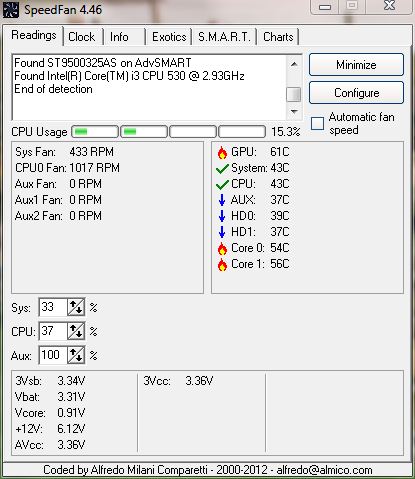
Can you please download Speedfan and post up a screenshot of the temperatures and voltages: http://www.almico.com/sfdownload.php Please make sure to install as Administrator, and also everytime you open the program, right-click and choose to Run as Administrator. This will allow it the access to the temperature sensors.

I've been playing it only a little bit on my computer here, and it hasn't given me any problems, although I've only played it for about 5-10 minutes max. I play it quite a bit more on my phone haha! :lol:

#8 topperking99

  • Group: Member
  • Posts: 58
  • Joined: 24-October 08

Posted 23 July 2012 - 10:17 PM

Hi,
Thank you - I have installed speed-fan -


THanks

Attached thumbnail(s)

  • Attached Image: SpeedFan SSHOT.jpg


#9 Troy

  • Group: Technician
  • Posts: 8,658
  • Joined: 23-October 06

Posted 24 July 2012 - 12:16 AM

Hhmmm that is very interesting - the fans are quite low (i.e. 30-something percent) and temperatures a bit warmer than I'd like to see. Also the +12V rail is reporting only half of what it should be, this could be an issue with the software and/or sensor, or if it's right then the voltage is definitely a problem. Can you take a look at the BIOS settings, usually there is a page where you can view hardware information, including temperatures and voltages - do they match up with these Speedfan settings?

#10 topperking99

  • Group: Member
  • Posts: 58
  • Joined: 24-October 08

Posted 24 July 2012 - 11:31 AM

View PostTroy, on 24 July 2012 - 12:16 AM, said:

Hhmmm that is very interesting - the fans are quite low (i.e. 30-something percent) and temperatures a bit warmer than I'd like to see. Also the +12V rail is reporting only half of what it should be, this could be an issue with the software and/or sensor, or if it's right then the voltage is definitely a problem. Can you take a look at the BIOS settings, usually there is a page where you can view hardware information, including temperatures and voltages - do they match up with these Speedfan settings?


Hello, I got the following from Angry Birds.com

"Download the latest "Free demo" installer from http://download.angrybirds.com, run the installer and select "Repair". If that doesn't help, you could try removing the settings.lua file, or moving it to another location, and then launching the game again. The file can be found here:
WIN 7/ Vista: C:\Users\[user name]\AppData\Roaming\Rovio\Angry Birds
WIN XP: C:\Documents and Settings\[user name]\Application Data\Rovio\Angry Birds
You need to have "Show hidden files and folders" enabled in "Folder and search options" to be able to find the correct folder. Alternatively you can type the path manually to access the folder. Once you've located the settings.lua file, just move it somewhere else and try launching the game again.
If this did not help, we'd like to know more about you problem, so we could help you solve the issue and get your game working! Could you please provide us as much of the following information as you can. If you don't know the answers to everything its OK, but the more we know the better.
- Your PC's model
- Your PC's operating system (OS) and its version number
- What OpenGL version do you have? The game requires OpenGL 1.3. or later to run. You can use Realtechvr GLview (http://www.realtech-...w/download.html) to see if your system supports OpenGL 1.3.
- Have you managed to install the game? If so, have you been able to unlock it?
- In what situation do the games freeze? Does it always happen in the same situation?
- Could you please describe the problem more thoroughly. A screenshot would be great.
- Do you receive an error message? What does it say?
- Have you tried downloading the demo version from http://download.angrybirds.com/ and unlocking them with your keys? If not, please try that.
- Do any other applications cause the same issue?
- When your game freezes, does anything at all work on your PC? Have you tried opening Task Manager and seeing what the status of the game is?
When you provide the above info, we'll be much closer to solving your problem.
"

I tried all what they asked - and it still froze - basically it just freezes and beeps and I have to reset everytime - only after 15 - 20 mins of play.
ALSO - how do I check the BIOS?
And when I played Angrybirds I had Speedfan on & the GPU temp reached 81 - 85.

Thanks

#11 Troy

  • Group: Technician
  • Posts: 8,658
  • Joined: 23-October 06

Posted 24 July 2012 - 09:45 PM

What is the make and model of your computer?

#12 topperking99

  • Group: Member
  • Posts: 58
  • Joined: 24-October 08

Posted 24 July 2012 - 10:43 PM

Hi,
I built it myself - If you can tell me how to get the specs I can tell you about them -

#13 Troy

  • Group: Technician
  • Posts: 8,658
  • Joined: 23-October 06

Posted 25 July 2012 - 09:09 PM

Ok custom builds usually will allow you to enter the BIOS by tapping the Delete (DEL) key as soon as you turn the power on.

As for hardware specs you can fire up System Info for that.

#14 topperking99

  • Group: Member
  • Posts: 58
  • Joined: 24-October 08

Posted 26 July 2012 - 12:17 AM

View PostTroy, on 25 July 2012 - 09:09 PM, said:

Ok custom builds usually will allow you to enter the BIOS by tapping the Delete (DEL) key as soon as you turn the power on.

As for hardware specs you can fire up System Info for that.


Okay, thanks -
Here is the SYSTEM INFO -

OS Name Microsoft Windows 7 Professional
Version 6.1.7601 Service Pack 1 Build 7601
Other OS Description Not Available
OS Manufacturer Microsoft Corporation
System Name SAIDDESKTOP
System Manufacturer To Be Filled By O.E.M.
System Model To Be Filled By O.E.M.
System Type X86-based PC
Processor Intel® Core™ i3 CPU 530 @ 2.93GHz, 2926 Mhz, 2 Core(s), 4 Logical Processor(s)
BIOS Version/Date American Megatrends Inc. 0402, 3/25/2010
SMBIOS Version 2.6
Windows Directory C:\Windows
System Directory C:\Windows\system32
Boot Device \Device\HarddiskVolume1
Locale Canada
Hardware Abstraction Layer Version = "6.1.7601.17514"
User Name SAIDDESKTOP\IHab
Time Zone Eastern Daylight Time
Installed Physical Memory (RAM) 4.00 GB
Total Physical Memory 2.99 GB
Available Physical Memory 2.01 GB
Total Virtual Memory 5.98 GB
Available Virtual Memory 4.29 GB
Page File Space 2.99 GB
Page File C:\pagefile.sys

If you need more specifics let me know.

Also, I have attached the BIOS info:

Thanks

Attached thumbnail(s)

  • Attached Image: BIOS Information.JPG


#15 Troy

  • Group: Technician
  • Posts: 8,658
  • Joined: 23-October 06

Posted 28 July 2012 - 04:07 AM

OK just to confirm - is this your motherboard:

http://www.evga.com/...120-LF-E650.pdf

Overall the system looks reasonable and should be plenty powerful enough to play the game without trouble.

I'm still waiting on the voltages and temperatures as reported by the BIOS, not just what the registry reports BIOS information as. One thing that concerns me is the GT220 is not a very powerful graphics card at all and yet it seems to be running so hot...

Also make and model of PSU please? And what sort of case, and how many case fans are running please?

Share this topic:


  • 2 Pages +
  • 1
  • 2