Dell XPS 410 went haywire after malware infection. - Geeks to Go Forums

Jump to content

Log in Register Register Malware removal guide How it works

Dell XPS 410 went haywire after malware infection.

#1 hd1983

  • Group: Member
  • Posts: 14
  • Joined: 23-July 12

Posted 23 July 2012 - 05:21 AM

On Friday the 13th my Dell XPS 410 (running Windows XP SP2) became infected with nasty malware that hid most of the files on my hard drive, it installed a nice little icon on my desktop that looked like a big and small gear, the virus kept telling me that my hard drive was suffering from "critical errors" in a multitude of little pop ups.

I was able to restart the computer twice before I received the lovely unountable boot volume error, and now I can only get into BIOS, I cannot access safe mode.
I tried the Kaspersky and AVG rescue software that I made into a bootable USB flash drive, the Kaspersky removed one rootkit and three trojans, after removing the malware I tried to reinstall Windows again with no luck, the disc won't give me the any key prompt.
Yes, I am changing the boot order in Windows to boot from my CD/DVD rom drive.

I have even tried making my XP into a bootable flash drive with online instructions, and the pc still won't boot, not from CD or flash drive.
I even reset my BIOS to the factory default settings and still no luck.
I've been told that my hard drive is bad, but everything was fine before the virus, the hard drive made no noise at all and showed no signs of failure before the malware installed itself, but I could be terribly wrong.

I have followed every instruction carefully and yet my Dell refuses to install Windows XP, I feel like I've exhausted every single option, I am desperate for a solution.

#2 Amlak

  • Group: Member
  • Posts: 1,470
  • Joined: 13-April 10

Posted 23 July 2012 - 04:36 PM

Hi, hd1983. Let's help you out with your malware issue. Just keep in mind there may be some delays with some of my responses as all my fixes must first be approved by an expert before they are submitted.

First, a question. Ignoring the issue with the Windows CD, are you able to boot from CD/DVD at all with any other CD/DVD?

#3 hd1983

  • Group: Member
  • Posts: 14
  • Joined: 23-July 12

Posted 23 July 2012 - 05:30 PM

Thank you for the response, I play The Sims 2 and The Sims 3 on that system, I can barely get any Sims 3 game disc to work at all, and The Sims 2 disc takes a few tries before it will work.

I have never played music cds or DVDs in the drive, only pc games.

#4 Amlak

  • Group: Member
  • Posts: 1,470
  • Joined: 13-April 10

Posted 23 July 2012 - 08:29 PM

IMPORTANT:
You will need a flash drive with a size of 512 Mb or bigger. Make sure that you do not leave anything important on the flash drive, as all data on it will be deleted during the following steps.

    • Download OTLPEStd.exe from the following link and save it to your Desktop: mirror1.

    • Download eeepcfr.zip from the following link and save it to your Desktop: the mirror

    • Finally, if you do not have a file archiver like 7-zip or Winrar installed, please download 7-zip from the following link and install it: the mirror


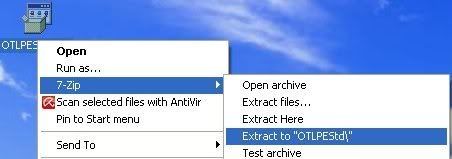
  • Once you have 7-zip install, decompress OTLPEStd.exe by rightclicking on the folder and choosing the options shown in the picture below. Please use a dedicated folder, for example OTLPE, on your Desktop

    Posted Image

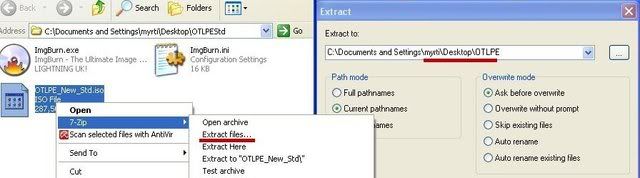
  • Open the folder OTLPEStd which will be created in the same location as OTLPEStd.exe and right-click OTLPE_New_Std.iso. Select 7-Zip and from the submenu select Extract files... and extract the content onto your Desktop in a OTLPE folder:

    Posted Image

  • Please also decompress eeepcfr to your systemroot (usually C:\).
  • Empty the flash drive you want to install OTLPE on.
  • Go to C:\eeecpfr and double-click usb_prep8.cmd to launch it.
  • Press any key when asked to in the black window that opens.

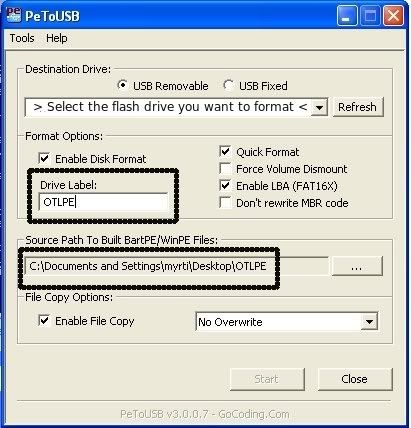
  • As indicated in the image, make sure you have selected the correct flash drive, before proceeding.
    For Drive Label: type in OTLPE.
    Under Source Path to built BartPE/WinPE Files click ... and select the folder OTLPE that you created on your Desktop.
    Finally check Enable File Copy.

    Posted Image

  • Click on Start, accept the disclaimers and wait for the program to finish.
  • Download Farbar Recovery Scan Tool and save it to the flash drive also.
    Your bootable flash drive with Reatogo and FRST should now be ready!

  • Set the infected computer to boot from USB then let it boot into Reatogo.
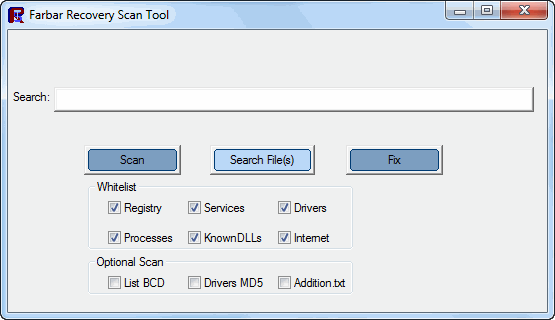
  • Locate the flash drive with FRST and double click it.
  • The tool will start to run.
    Posted Image
  • When the tool opens click Yes to disclaimer.
  • Press Scan button.
  • It will make a log (FRST.txt) on the flash drive. Please copy and paste it in your reply.


#5 hd1983

  • Group: Member
  • Posts: 14
  • Joined: 23-July 12

Posted 24 July 2012 - 05:36 AM

Thanks, I'll try this and report back this afternoon or evening.

Okay, I tried to use the rescue USB this morning and I still had no luck, this time it attempted to boot from Reatogo (black screen, white words at the bottom, and then the Windows logo would briefly appear) after that I received a blue screen that wasn't the unmountable boot volume error, this time I was told that I should check for a virus or hard drive corruption, and run chkdsk.

The error numbers that I received were 0x000007B, 0xF7c3c528, 0xc0000034, 0x0000000, 0x0000000
Does this error have to do with the fact that I reset the BIOS back to factory settings?

#6 Amlak

  • Group: Member
  • Posts: 1,470
  • Joined: 13-April 10

Posted 27 July 2012 - 06:38 PM

Hi, hd1983. I only spotted your modified post just now, and only because I wanted to post to see how things were going. Please, for next time, post a new reply instead of editing your last post because it makes it so easy for me to miss what you have to say by simply editing.

In answer to your question, possibly. This blue screen can usually be eliminated by changing one certain setting in the BIOS screen. Will post more soon.

#7 Amlak

  • Group: Member
  • Posts: 1,470
  • Joined: 13-April 10

Posted 28 July 2012 - 08:32 AM

Hi, hd1983.

The blue screen is often resolved by changing the SATA mode in BIOS to IDE mode. Disabling some of the advanced features of SATA drives in BIOS could stop the STOP 0x0000007B error from showing up.

If you need help changing the needed setting in BIOS, do let me know.

#8 hd1983

  • Group: Member
  • Posts: 14
  • Joined: 23-July 12

Posted 28 July 2012 - 11:59 AM

Sure,I would like to know how to do this,I was told on another forum that the XPS 410 didn't have or support an IDE mode.

#9 Amlak

  • Group: Member
  • Posts: 1,470
  • Joined: 13-April 10

Posted 28 July 2012 - 08:34 PM

The wording may differ, but it should still be possible.

In BIOS, under System Setup Options, set the SATA controller to RAID Autodetect/ATA and save the change upon quitting.

Refer here for documentation. The tidbit about SATA Operation is what you should locate in the BIOS in order to change the needed setting.

#10 hd1983

  • Group: Member
  • Posts: 14
  • Joined: 23-July 12

Posted 29 July 2012 - 06:24 PM

Thanks again, I'll try this tonight.

#11 hd1983

  • Group: Member
  • Posts: 14
  • Joined: 23-July 12

Posted 29 July 2012 - 08:04 PM

Okay, I tried changing the SATA settings in BIOS and I still received the same blue screen error when I tried to boot using the USB, I'm going to purchase a portable USB CD/DVD drive and try to install the Windows disc from that on Wednesday.

#12 Amlak

  • Group: Member
  • Posts: 1,470
  • Joined: 13-April 10

Posted 29 July 2012 - 08:48 PM

Just to make sure, did you save upon exit?

#13 hd1983

  • Group: Member
  • Posts: 14
  • Joined: 23-July 12

Posted 29 July 2012 - 10:02 PM

Yes, I did.

#14 Amlak

  • Group: Member
  • Posts: 1,470
  • Joined: 13-April 10

Posted 30 July 2012 - 05:21 PM

Ok, we'll see if the Windows disc will work with the external CD/DVD drive. Do let me know if you have issues with that, too.

By the way, it seems you're not concerned with the personal data. Do you just want to install Windows without backing up?

#15 hd1983

  • Group: Member
  • Posts: 14
  • Joined: 23-July 12

Posted 30 July 2012 - 06:10 PM

No, I'm not worried about data loss because I never stored anything of major importance on the Dell, I only had The Sims 2 and The Sims 3 installed on that machine (along with some music).

Share this topic:


  • 2 Pages +
  • 1
  • 2