I cant change my desktop background - Geeks to Go Forums

Jump to content

Log in Register Register Malware removal guide How it works

I cant change my desktop background I can only select a bg color. No images

#1 Allsortgroup

  • Group: Banned
  • Posts: 905
  • Joined: 23-June 05

  Posted 23 June 2005 - 09:28 AM

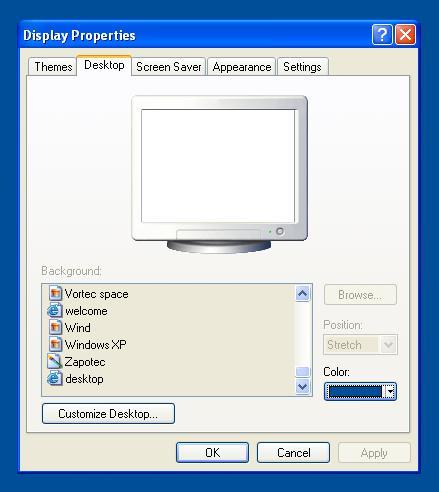
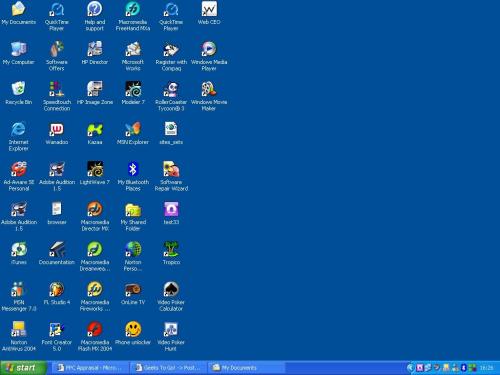
Attached Image: properties.JPGAttached Image: desktop.JPGHi there,

I am running windows xp home edition. When i swich on my pc it loads the icons, then for about 1 second my desktop background flashes and then turnes blue. When i right click, and click on properties, i then click on desktop and you can only select a color as your background? The browse button is like frozen, the thing where you scroll up and down to select a background image is frozen aswell. They are like grey in the background. Can someone please help me change my background back to an image? There is an image below of the properties window and my desktop...
Attached Image: properties.JPG
Attached Image: desktop.JPG

#2 gerryf

  • Group: Retired Staff
  • Posts: 11,365
  • Joined: 18-March 05

Posted 23 June 2005 - 09:32 AM

what preceded this happening? Malware infection?

#3 Allsortgroup

  • Group: Banned
  • Posts: 905
  • Joined: 23-June 05

Posted 23 June 2005 - 11:00 AM

I dont really know? I just swiched on my pc a few days ago and this happend. I can only change the background color. Although i have downloaded ad-aware to scan for viruses. So how can i get my background back?

#4 mm_akash

  • Group: Member
  • Posts: 94
  • Joined: 20-February 05

Posted 23 June 2005 - 12:45 PM

Dear allsortshop

I think...you should change your operationg system.
I mean just do re-install your os.

Thanks

#5 gerryf

  • Group: Retired Staff
  • Posts: 11,365
  • Joined: 18-March 05

Posted 23 June 2005 - 12:48 PM

that would be unwise and unneeded :tazz:

download the attached file, extract it...run fixreg1.reg, then fixreg2.reg

say yes when windows asks you to merge into registry

Attached File(s)

  • Attached File  fixreg.zip (881bytes)
    Number of downloads: 34253


#6 Allsortgroup

  • Group: Banned
  • Posts: 905
  • Joined: 23-June 05

Posted 23 June 2005 - 01:10 PM

Thanks!!! I have fixed the problem now and my desktop is fine!

#7 gerryf

  • Group: Retired Staff
  • Posts: 11,365
  • Joined: 18-March 05

Posted 23 June 2005 - 01:11 PM

chalk one up for the good guys!

You're very welcome

#8 mm_akash

  • Group: Member
  • Posts: 94
  • Joined: 20-February 05

Posted 23 June 2005 - 09:46 PM

allsortshop

Anyway you got your solution.It is our satisfaction.That to this geeks to go.Thank to all afirends.

Akash

#9 lee_scott_88

  • Group: Member
  • Posts: 1
  • Joined: 04-July 05

  Posted 04 July 2005 - 08:08 AM

THANKS !!!! I had the same problem and your FIxreg file fixed it straight away. :tazz: I have just had a problem with a virus which installed a fake anti-spyware program and when i removed it the option to change my background image was greyed-out in the same way as the screen-shots at the top.

#10 Yami

  • Group: Member
  • Posts: 1
  • Joined: 09-July 05

Posted 09 July 2005 - 06:20 PM

hey, thanks a alot. helped me much. :tazz:

#11 schott0102

  • Group: Member
  • Posts: 1
  • Joined: 17-July 05

Posted 17 July 2005 - 05:09 PM

lee_scott_88, on Jul 4 2005, 08:08 AM, said:

THANKS !!!! I had the same problem and your FIxreg file fixed it straight away.  :tazz: I have just had a problem with a virus which installed a fake anti-spyware program and when i removed it the option to change my background image was greyed-out in the same way as the screen-shots at the top.
View Post


Yes. I had the very same problem. A fake anti-spy did this to me. Some how I got infected with it and a small icon appeared right beside the clock saying my Comp was infected. After I removed my desktop changed to a black screen with "Your Computer is infected" writen in red in the middle. My task bar was blocked but that was really easy to solve and i couldnt change the wallpaper but the attached file did the job!
The name of the fake anti-spy was sheriff something but im not really sure.

Anyway, thanks for the fix file. Great job.

#12 LCARS Central Net

  • Group: Member
  • Posts: 1
  • Joined: 23-July 05

Posted 23 July 2005 - 10:06 PM

I had the exact same issue. This fix worked for me as well. Thanks!! :tazz:

#13 pandora233

  • Group: Member
  • Posts: 1
  • Joined: 24-July 05

Posted 24 July 2005 - 10:10 PM

Gerryf:
I don't know if you've noticed, buy you've saved a lot of people a lot of grief.
I'm glad you use your powers for good. *laugh*
I ;) you.

:tazz:

#14 poc_hr

  • Group: Member
  • Posts: 3
  • Joined: 02-August 05

Posted 02 August 2005 - 12:36 AM

thanks this realy helped me a lot gerryf :tazz:

#15 ReyT

  • Group: Member
  • Posts: 1
  • Joined: 02-August 05

Posted 02 August 2005 - 09:55 AM

A million thanks!

I had the same problem with a spyware called "Spysheriff". My desktop is normal now.

Again Thank you. :tazz:

Share this topic:


  • 2 Pages +
  • 1
  • 2