
Welcome Guest ( Log In | Join )

Discover the best free computer help!
Learn more about Geeks to Go by taking the tour. Want to ask a question, reply to a topic, or remove all advertising? It's easy, fast and free. Join today!
Spyware, virus, trojan, fake security or privacy alerts? Please start with our malware cleaning guide.
     
 
Reply to this topicStart new topic
Windows Vista run command prompt as administrator
admin
post Jan 27 2007, 12:52 PM
Post #1


Site Administrator
Group Icon
Posts: 17,671
From: 127.0.0.1
OS: Windows Vista Ultimate


User Account Control in Vista extends to the Command Prompt. If you get a "you do not have permission..." error, it's probably because you need administrator permissions to run the command. Here's how to run from the command prompt as administrator:

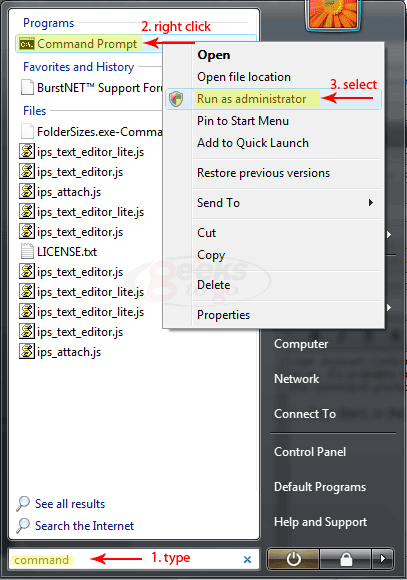
Click Start, in the Start Search box, type command. A list of of matches will appear above. Right-click Command Prompt in Programs list, and then click Run as administrator. You will likely be prompted for an administrator confirmation, or a password. Type your password or click Continue.
IPB Image
Go to the top of the page
 
+Quote Post
jonam
post Jul 23 2007, 02:01 AM
Post #2


New Member
*
Posts: 3
OS: Vista


What do I do when the the box pops up when I run Command Prompt as Administrator? Also can u tell me why I cannot uninstall programs, even when I am the only administrator user and I have turned off UAC? Please reply. Thank you.
Go to the top of the page
 
+Quote Post
luan4
post Sep 24 2007, 01:27 PM
Post #3


New Member
*
Posts: 2
OS: Windows Vista


ive tried this method to find the command prompt many times, and it does not seem to be coming up in the search. i have followed each step carefully, and the command prompt does not come up in the search. any thoughts?
Go to the top of the page
 
+Quote Post
Neil Jones
post Sep 24 2007, 04:33 PM
Post #4


Member 5k
********
Posts: 5,648
From: UK
OS: Windows XP Home Edition Service Pack 3


A simple solution if you want to run the command prompt as administrator in Vista is to open the Start Menu, type in "cmd" in the bar along the bottom, then instead of just pressing enter, press CTRL+SHIFT+ENTER instead. It will then show up as "Administrator: Command Prompt" in the window title.
Go to the top of the page
 
+Quote Post
luan4
post Sep 24 2007, 04:37 PM
Post #5


New Member
*
Posts: 2
OS: Windows Vista


i figured it out. i had the classic start menu. not the vista one. seriously, vista can die
Go to the top of the page
 
+Quote Post
xxcrisxx
post Jun 27 2008, 05:37 AM
Post #6


New Member
*
Posts: 1
OS: vista


after adding in the command prompt messenger worked GREAT. Thank you all so so much!
Go to the top of the page
 
+Quote Post

Reply to this topicStart new topic
1 User(s) are reading this topic (1 Guests and 0 Anonymous Users)
0 Members:


Collapse

> Similar Topics

    Topic Title Replies / Views Topic Information
No New Posts 4 / 2,570 29th December 2007 - 05:25 AM
chicleboricua started - last by hendaz
No New Posts   2 / 1,072 27th May 2007 - 03:35 PM
smmalis started - last by smmalis
No New Posts   1 / 1,001 21st December 2007 - 01:35 AM
rajensama started - last by pip22
No New Posts   1 / 93 10th December 2008 - 11:05 AM
shanmarine started - last by shanmarine

RSS Time is now: 8th January 2009 - 04:44 PM
Advertisements do not imply our endorsement of that product or service. The forum is run by volunteers who donate their time and expertise. We make every attempt to ensure that the help and advice posted is accurate and will not cause harm to your computer. However, we do not guarantee that they are accurate and they are to be used at your own risk.




