geek ('gēk), noun.
1. Obsessive Computer User: somebody who enjoys or takes pride in using computers or other technology, often to what others consider an excessive degree
2. Someone with greater than normal computer skills.

Geeks To Go - Free Computer Help
Welcome Guest ( Log In | Register ) to Geeks to Go Computer Help Forum! Here you'll find free, friendly help and support for all your computing questions. Once registered - you'll have the ability to post your question in the appropriate category below. Additionally, if you can assist another member by sharing your computing knowledge, please feel free to post a reply! Best of all - Registration and all assistance, is FREE! Once you've completed registration, simply click the appropriate category below, click on the "new topic" button, and post your question! What are you waiting for? (registering removes advertising)
Recommended: Click Here for a Free Registry Scan [Sponsored Link]
      
3 Pages V   1 2 3 >  
Reply to this topicStart new topic
> How to use SmitFraudFix
admin
post Apr 21 2006, 12:31 PM
Post #1


Site Administrator
Group Icon

Group: Admin
Posts: 16,277
Joined: 21-May 03
Member No.: 1
Operating System:
Windows Vista Ultimate


Instructions for SmitFraudFix (by S!Ri)

SmitFraudFix only works with Windows XP or 2000

SmitFraudFix removes Desktop Hijack malware: AdwarePunisher, AdwareSheriff, AlphaCleaner, Antispyware Soldier, AntiVermeans, AntiVermins, AntiVerminser, AntivirusGolden, AVGold, BraveSentry, MalwareWipe, MalwareWiped, MalwareWipePro, MalwareWiper, PestCapture, PestTrap, PSGuard, quicknavigate.com, Registry Cleaner, Security iGuard, Smitfraud, SpyAxe, SpyCrush, SpyDown, SpyFalcon, SpyGuard, SpyHeal, SpyLocked, SpyMarshal, SpySheriff, SpySoldier, Spyware Vanisher, Spyware Soft Stop, SpywareQuake, SpywareKnight, SpywareSheriff, SpywareStrike, Startsearches.net, TitanShield Antispyware, Trust Cleaner, UpdateSearches.com, Virtual Maid, VirusBlast, VirusBurst, Win32.puper, WinHound, Brain Codec, DirectVideo, EliteCodec, eMedia Codec, FreeVideo, Gold Codec, HQ Codec, iCodecPack, iMediaCodec, Image ActiveX Object, IntCodec, iVideoCodec, JPEG Encoder, Key Generator, Media-Codec, MediaCodec, MMediaCodec, MovieCommander, MPCODEC, My Pass Generator, PCODEC, Perfect Codec, PowerCodec, PornPass Manager, PornMag Pass, PrivateVideo, QualityCodec, Silver Codec, SiteEntry, SiteTicket, SoftCodec, strCodec, Super Codec, TrueCodec, VideoAccess, VideoBox, VidCodecs, Video Access ActiveX Object, Video ActiveX Object, VideoCompressionCodec, VideoKeyCodec, VideosCodec, WinAntiSpyPro, WinMediaCodec, X Password Generator, X Password Manager, ZipCodec...

Download:
Use this URL to download the latest version (the file contains both English and French versions):
http://siri.geekstogo.com/SmitfraudFix.exe

Mirrors: Alternate official download locations for Smitfraudfix.exe
http://siri.urz.free.fr/Fix/SmitfraudFix.exe
http://telechargement.zebulon.fr/259-smitfraudfix.html

Use:
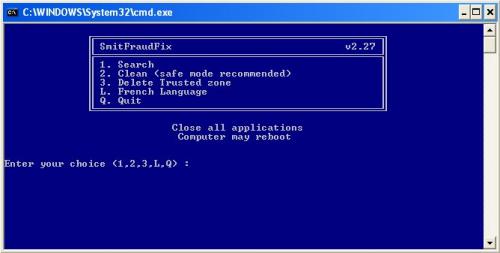
  • Search:
    • Double-click smitfraudfix.exe
    • Select 1 and hit Enter to create a report of the infected files. The report can be found at the root of the system drive, usually at C:\rapport.txt
    Attached Image


  • Clean:
    • Reboot your computer in Safe Mode (before the Windows icon appears, tap the F8 key continually)
    • Double-click smitfraudfix.exe
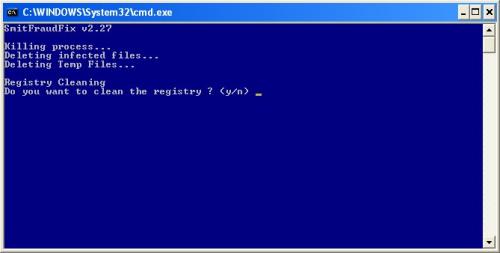
    • Select 2 and hit Enter to delete infect files.
    • You will be prompted: Do you want to clean the registry ? answer Y (yes) and hit Enter in order to remove the Desktop background and clean registry keys associated with the infection.
    • The tool will now check if wininet.dll is infected. You may be prompted to replace the infected file (if found): Replace infected file ? answer Y (yes) and hit Enter to restore a clean file.
    • A reboot may be needed to finish the cleaning process. The report can be found at the root of the system drive, usually at C:\rapport.txt
    Attached Image


  • Optional:
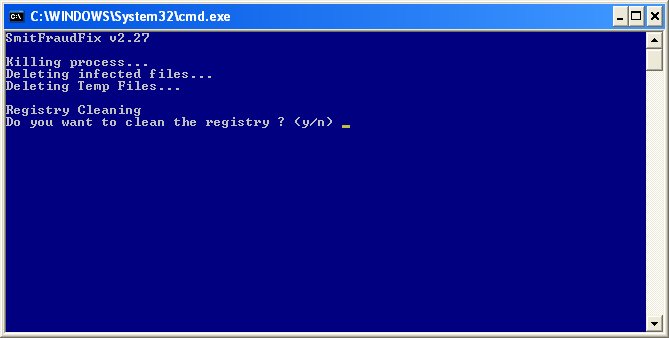
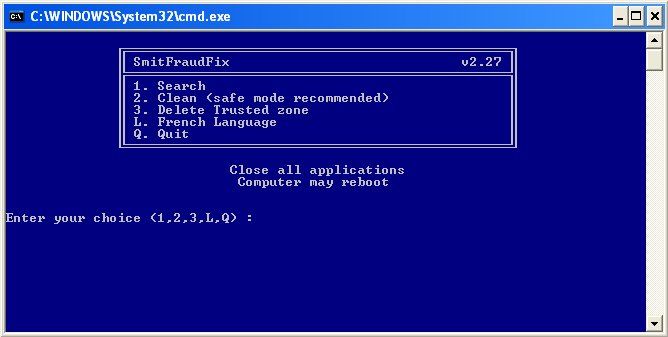
    • To restore Trusted and Restricted site zone, select 3 and hit Enter.
    • You will be prompted: Restore Trusted Zone ? answer Y (yes) and hit Enter to delete trusted zone.
Note:
process.exe is detected by some antivirus programs (AntiVir, Dr.Web, Kaspersky) as a "RiskTool". It is not a virus, but a program used to stop system processes. Antivirus programs cannot distinguish between "good" and "malicious" use of such programs, therefore they may alert the user.
http://www.beyondlogic.org/consulting/proc...processutil.htm

=====================================================================
This is a self-help guide. Use at your own risk.

Important Note: If you need assistance with SmitFraudFix, please start a new topic in our Malware Removal Forum.


--------------------
Please do not PM me asking for support. Post on the forums instead :)
Please be courteous, polite, and say thank you.
Please post the final results, good or bad. We like to know!
HijackThis Guide | Free Antivirus Tools | Link to Us

Search the Forums | Terms of Use | Forum Help
Go to the top of the page
 
+Quote Post
admin
post Jul 12 2007, 04:18 PM
Post #2


Site Administrator
Group Icon

Group: Admin
Posts: 16,277
Joined: 21-May 03
Member No.: 1
Operating System:
Windows Vista Ultimate


This topic has been left open to allow specific questions and comments related ONLY to this guide. It's NOT for posting HJT logs, links to your logs, or any other general malware help. Replies not following these rules will be deleted. Thanks for your cooperation.


--------------------
Please do not PM me asking for support. Post on the forums instead :)
Please be courteous, polite, and say thank you.
Please post the final results, good or bad. We like to know!
HijackThis Guide | Free Antivirus Tools | Link to Us

Search the Forums | Terms of Use | Forum Help
Go to the top of the page
 
+Quote Post
xMasa
post Oct 28 2007, 02:58 AM
Post #3


New Member
*

Group: Member
Posts: 3
Joined: 27-October 07
Member No.: 227,661
Operating System:
XP


sometimes when i click it, nothing happens. whats up?
Go to the top of the page
 
+Quote Post
harrythook
post Oct 28 2007, 04:08 AM
Post #4


Trusted Helper
Group Icon

Group: Malware Staff
Posts: 2,559
Joined: 29-May 06
Member No.: 177,521
Operating System:
winXP sp2, win 98


Hi xMasa,
Please be more specific, and explain the problem you are having with this tool.


--------------------
If I have helped you, help us continue the fight against malware


Veni Vidi Vici
THE FIGHT AGAINST MALWARE

Go to the top of the page
 
+Quote Post
don77
post Oct 28 2007, 07:15 AM
Post #5


Malware Expert
Group Icon

Group: Geek U Moderator
Posts: 18,588
Joined: 5-July 04
From: Boston Ma.
Member No.: 2,804
Operating System:
XP Pro,ME, 98


QUOTE(harrythook @ Oct 28 2007, 06:08 AM) *
Hi xMasa,
Please be more specific, and explain the problem you are having with this tool.


Actually it would be best to start a new topic ion the malware forum

Edit: I see you already posted a topic in the maleware forum thumbsup.gif


--------------------
Please do not PM me asking for support. Post on the forums


Don77 Malware Page <--Have I helped you? Please consider donating to help me continue the fight against malware, Thank you

Go to the top of the page
 
+Quote Post
Suzy25
post Dec 29 2007, 07:52 PM
Post #6


New Member
*

Group: Member
Posts: 2
Joined: 29-December 07
Member No.: 233,640
Operating System:
XP


[font="Arial"][/font][size="5"][/size]Hello,
I am brand ne to this Geeks to Go and have had numerous problems with spyware etc. My question here is I downloaded the SmitfraudFix but when I did I was not in safe mode and I did not put it on my desktop. Now if I try and install it again, it comes up as the original and I do not know how to get rid of it or where it is. I need it on my desktop so I can use it in safe mode. I am a mature woman who knows more than my peers which is not much. So if someone could help me I would be ever so grateful.
Thanks Suzy helpsmilie.gif helpsmilie.gif
Go to the top of the page
 
+Quote Post
harrythook
post Dec 30 2007, 04:11 PM
Post #7


Trusted Helper
Group Icon

Group: Malware Staff
Posts: 2,559
Joined: 29-May 06
Member No.: 177,521
Operating System:
winXP sp2, win 98


Hi Suzy25,
Please refrain from PM's to staff members here, the forums are the place to ask for help.
Go HERE and read the instructions please. If you cannot make progress following the instructions there, then start a topic in the malware section and detail your problems.

Harry


--------------------
If I have helped you, help us continue the fight against malware


Veni Vidi Vici
THE FIGHT AGAINST MALWARE

Go to the top of the page
 
+Quote Post
mmkkmm
post Dec 30 2007, 09:52 PM
Post #8


Member
**

Group: Member
Posts: 16
Joined: 30-December 07
Member No.: 233,786
Operating System:
XP


I've used SmitFraudFix successfully.
But, how do I know the malware is gone?
Also, what scans should I run before I know I'm safe?

(I've done 'Must-Read-Before-Posting-Hijackthis-Log')
Go to the top of the page
 
+Quote Post
don77
post Dec 31 2007, 06:52 AM
Post #9


Malware Expert
Group Icon

Group: Geek U Moderator
Posts: 18,588
Joined: 5-July 04
From: Boston Ma.
Member No.: 2,804
Operating System:
XP Pro,ME, 98


Hello and welcomemmkkmm

QUOTE
I've done 'Must-Read-Before-Posting-Hijackthis-Log'


If the various scanners recommended are coming back clean you should be all set if you want to confirm then go ahead and post a HJT log in the malware forum


--------------------
Please do not PM me asking for support. Post on the forums


Don77 Malware Page <--Have I helped you? Please consider donating to help me continue the fight against malware, Thank you

Go to the top of the page
 
+Quote Post
Welopez
post Jan 5 2008, 02:01 PM
Post #10


New Member
*

Group: Member
Posts: 3
Joined: 5-January 08
From: Riverside, CA
Member No.: 234,488
Operating System:
Win XP Pro


%#$%&! Trojan Zlob! I purchased AdwareAlert for $20 and ran it several times. I continue to receive the popups and browser hijacks. I've downloaded two Zlob removal tools (Including Sari's) and ran each of them several times, following all instructions. Restore Off, Boot in Safe Mode, run the tool, reboot. Each time I think I'm successful, but a few hours later the popups return! This is the most persistent piece of %$#&^! I have ever run into. angry.gif

Any suggestions?

This post has been edited by Welopez: Jan 5 2008, 02:03 PM
Go to the top of the page
 
+Quote Post
Welopez
post Jan 6 2008, 09:00 AM
Post #11


New Member
*

Group: Member
Posts: 3
Joined: 5-January 08
From: Riverside, CA
Member No.: 234,488
Operating System:
Win XP Pro


I downloaded SmitfraudFix.exe again, and ran it in SAFE mode with RESTORE off. I think it cleaned the malware this time. After four days, I've been free of annoying fraud popups for a whole hour!

Thanks gang! smile.gif
Go to the top of the page
 
+Quote Post
Welopez
post Jan 6 2008, 01:35 PM
Post #12


New Member
*

Group: Member
Posts: 3
Joined: 5-January 08
From: Riverside, CA
Member No.: 234,488
Operating System:
Win XP Pro


wacko.gif Well, I thought I was done with that Trojan. It hadn't popped up in two hours, so I ran DEFRAG and then Check Disk. Then I rebooted. Oops! It's back! This is the most obnoxious pest I have ever run into.

My default browser is SlimBrowser, but every time the Trojan runs, it open Internet Explorer. With SlimBrowser I have the option to block domains.... but that doesn't appear to be an option for Internet Explorer. Blocking it, however, does not remove it from my computer. sad.gif

I remain at a loss to deal with this malware. Any help would be appreciated.

Go to the top of the page
 
+Quote Post
Suzy25
post Jan 6 2008, 04:19 PM
Post #13


New Member
*

Group: Member
Posts: 2
Joined: 29-December 07
Member No.: 233,640
Operating System:
XP


Thanks Welopez anyway.I had someone come over but it was totally frozen and gone. I appreciate the response. We will be reloading windows. Thanks Again, Suzy
Go to the top of the page
 
+Quote Post
don77
post Jan 6 2008, 04:24 PM
Post #14


Malware Expert
Group Icon

Group: Geek U Moderator
Posts: 18,588
Joined: 5-July 04
From: Boston Ma.
Member No.: 2,804
Operating System:
XP Pro,ME, 98


I would suggest both of you

run through the steps outlined in this Topic
Post back a fresh log in the Malware forum please


--------------------
Please do not PM me asking for support. Post on the forums


Don77 Malware Page <--Have I helped you? Please consider donating to help me continue the fight against malware, Thank you

Go to the top of the page
 
+Quote Post
TarHeelMike
post Jan 29 2008, 07:09 AM
Post #15


New Member
*

Group: Member
Posts: 1
Joined: 29-January 08
Member No.: 237,289
Operating System:
XP


I just wanted to say thank you for this board and how much help this appication was. I was able to get some of the "Security Toolbar 7.1" malware off myself but still had several files I simply could not find. I have a corporate computer and work remotely. So had I sent my laptop to corp to be cleaned I would have been very far behind in my work. The Smitfraudfix worked very well and quickly. Thanks again. TarHeelMike.
Go to the top of the page
 
+Quote Post

3 Pages V   1 2 3 >
Reply to this topicStart new topic
4 User(s) are reading this topic (4 Guests and 0 Anonymous Users)
0 Members:


Collapse

> Similar Topics

    Topic Title Replies Topic Starter Views Last Action
No New Posts  
9 FCCAGut 1,251 28th January 2008 - 03:16 PM
Last post by: Rusty Bushes
No New Posts  
5 klutzrick 436 2nd March 2008 - 07:48 PM
Last post by: klutzrick
No new  
22 Plutox 1,936 14th April 2008 - 09:34 PM
Last post by: bdlt
No New Posts  
1 Safrul 392 6th March 2008 - 08:07 AM
Last post by: RatHat
No New Posts  
3 fortuitous 128 5th May 2008 - 11:51 AM
Last post by: hary

RSS Time is now: 16th May 2008 - 07:05 AM
The forum is run by volunteers who donate their time and expertise. We make every attempt to ensure that the help and advice posted is accurate and will not cause harm to your computer. However, we do not guarantee that they are accurate and they are to be used at your own risk.

© Geeks To Go, Inc. | All Rights Reserved | Link to Us!